Videos
Background music for video
Music here is one track laid across the whole video, looping to fill it and automatically dropping out of the way whenever anybody speaks. That is a deliberately simple model, and knowing where its edges are saves you fighting it.
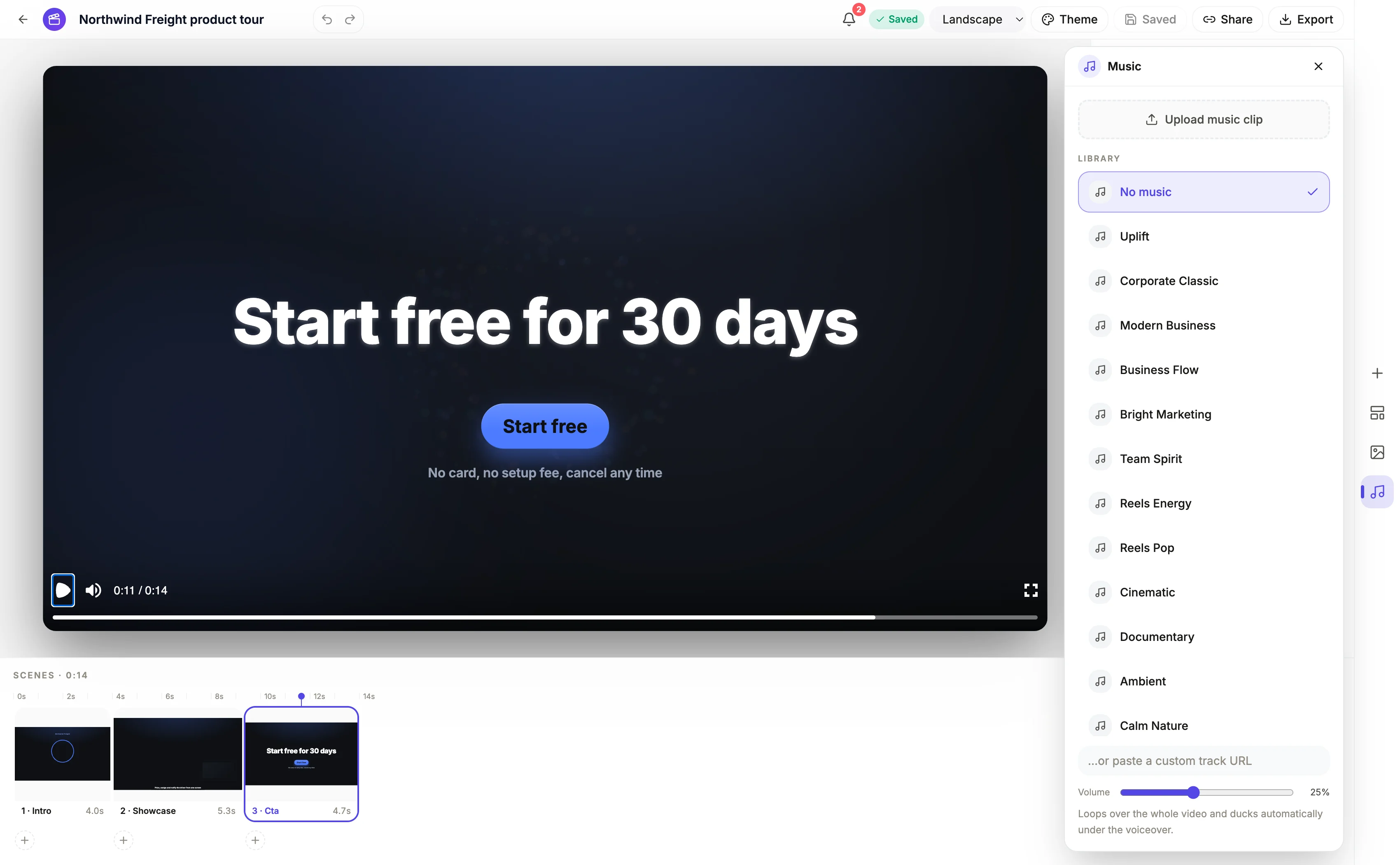
Thirteen tracks, grouped by what they are for
Uplift, Corporate Classic, Modern Business, Business Flow, Bright Marketing and Team Spirit cover the corporate and marketing register. Reels Energy and Reels Pop are the fast social cuts. Cinematic and Documentary are the slower, more serious options. Ambient, Calm Nature and Soft Breeze are the beds for something quiet, which is usually what a tutorial wants if it wants music at all. There is also a No music option, and you can upload your own file or paste a track URL.
The ducking, precisely
Music volume starts at 25 percent and the slider caps at 60, which is deliberately low because the voice has to sit on top. Wherever narration plays, the music drops to 22 percent of its set level, ramping down over twelve frames before the line starts and back up over twelve frames after it ends. The whole track also fades in over the first thirty frames and out over the last forty five, so a video never starts or ends on a hard music cut.
It ducks under every kind of narration
Both the scene level voice track and per beat narration in a sequenced scene create ducking windows, so a photo montage where each picture has its own spoken line ducks correctly picture by picture rather than only at the scene boundary. What it does not duck under is audio from an uploaded video clip: a clip's keep and duck setting exists but clip driven ducking is not wired, so music only responds to narration.
One track, not a cue sheet
There is no way to change music partway through, to cut it to the picture, or to hit a beat drop on a specific scene. It loops for the whole duration at a constant level apart from the ducking and the fades. If a video genuinely needs a musical change of gear, the practical approach is to build it as two videos and join them outside, or to pick a track that is even enough not to want one.
How it works, in three steps
Step 1
Choose the track after the narration exists
Ducking is calculated from the voice track, so a video with no narration yet will not tell you how the music actually sits.
Step 2
Leave the volume near its default
25 percent under a synthesised voice is about right. Pushing it toward 60 makes the ducking audible as pumping rather than as balance.
Step 3
Upload your own if you have a licence
The panel takes an audio file up to 25 MB, or a URL to a track hosted elsewhere, and treats it exactly like a library one.
The full walkthrough with screenshots is in the guide Add voiceover, captions and music to a video.
Limits worth knowing
- One track for the whole video. There is no way to change music by scene or to sync a cut to a beat.
- The volume slider stops at 60 percent, so music can never be the dominant sound.
- Uploaded audio is capped at 25 MB, and only audio files are accepted for this slot.
- Music does not duck under an uploaded clip's own audio. That control exists on the clip but is not implemented.
Questions people ask
Do I need to clear the music for commercial use?
The thirteen library tracks are provided for use in videos you build here. If you upload your own, the licence is yours to hold, and a venue performance licence such as an ASCAP or BMI one never covers synchronisation to video.
Can I use a trending sound from TikTok or Reels?
Not by baking it in. Both platforms restrict business accounts to their own commercial libraries and forbid reusing those tracks off platform, so the safe route is a silent or library scored export, with the trending sound added inside the app after upload.
Should a tutorial have music at all?
Quietly or not at all. A walkthrough is listened to for instructions, and a bed under a calm instructional voice adds warmth without helping comprehension. Ambient, Calm Nature or Soft Breeze at the default volume is the safe choice.
Why does the music dip before the voice starts?
The ramp begins twelve frames ahead of the line and finishes twelve frames after it, which is under half a second at either end. Dipping at the exact moment the voice arrives sounds abrupt, so the ramp leads slightly.
Make your own video
The button opens the generator with this use case already described. Change the wording to match yours, generate, then edit anything you like.
Create a video with OneCraftRelated pages
Slideshow video with narration
The reason most photo slideshows are unwatchable is that every picture gets the same three seconds and one voiceover runs across the lot. The interesting shot flies past, the filler lingers, and the narration is talking about image two while image five is on screen.
AI voice options
There are two different voice pickers here and they work at different scales. When a video is generated, the director chooses from eight characters, four styles across two genders. In the builder afterwards, every voice Google offers is searchable per scene. Most people only need the first.
AI video script generator
A video script that reads well on a page usually plays badly. The reason is that the page has no timing. Here the script is produced scene by scene, and every line arrives attached to a duration, an on-screen headline and a layout that has already been chosen.
More finished work of this kind is on the video examples hub.
Written and checked by the OneCraft team. Last checked .