E-signatures
Access code to sign
An email address is a weak claim about who somebody is. Inboxes get forwarded, shared and left open on desks. An access code adds a second thing the signer has to know, and you decide how they came to know it.
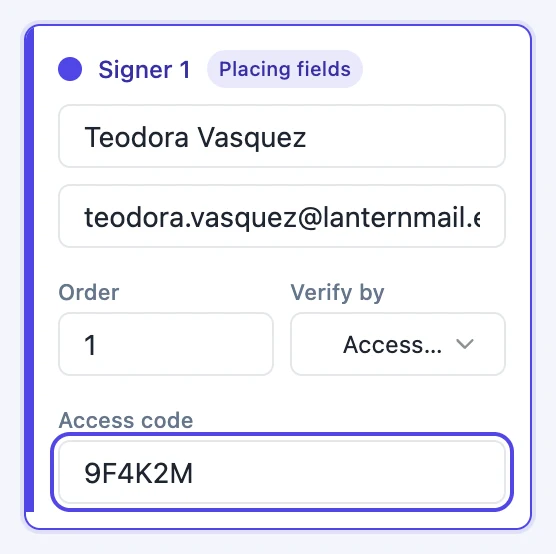
You set it, and you deliver it
Choose Access code on a recipient card and a box appears for the code itself, with the placeholder saying to share it with the signer yourself. That is the entire security model and it is worth being explicit about: the product never sends the code. If you email it in the same thread as the invitation you have gained nothing. It works when the channel is genuinely different, a phone call, a text, a reference number the person already holds from an earlier letter.
Nothing stores the code you typed
It is hashed with scrypt against a sixteen byte random salt before it touches the database, and comparison uses a constant time function so the time a wrong guess takes reveals nothing about how much of it was right. There is no route that returns the code, to you or to anyone. If you forget it, you cannot look it up, and the only fix is to change it and tell the signer the new one.
Editing later without retyping it
If you come back to a draft and save the recipients again, leaving the code box blank keeps the stored hash rather than clearing it. The card shows Saved, type to replace as its placeholder, so it is obvious the code is still in force. Typing a new value replaces it. That means you can fix a spelling in somebody's name without accidentally removing their code.
Five attempts, then fifteen minutes
Each wrong code increments a counter on that recipient. On the fifth failure the counter resets and the recipient is locked for fifteen minutes, during which every attempt is refused with a message to try again later. The counter is written with a compare and set against the value that was read, so a burst of parallel guesses cannot all write the same number and slip past the limit. A correct code clears the counter and the lock.
What a wrong code leaves behind
Every failed verification is appended to the audit trail as its own event with the IP address behind it and the method that was attempted. So a document somebody tried and failed to open six times looks different in the record from one nobody touched. Successful verification is recorded too, separately from the moment the document was first viewed.
How it works, in three steps
Step 1
Choose Access code on the recipient
The Verify by dropdown on each card offers email link only, access code, or an emailed one-time code.
Step 2
Type a code of at least four characters
Something the signer already knows or can be told separately. A contract reference or the last four digits of an account number both work.
Step 3
Tell them through another channel
Phone, text or a previous letter. The invitation email warns them a code will be needed but never contains it.
The full walkthrough with screenshots is in the guide Send a PDF for e-signature.
Limits worth knowing
- Minimum four characters. There is no complexity requirement beyond that.
- The code cannot be recovered or displayed once saved, only replaced.
- The product never delivers the code. Sharing it is entirely your job.
- One code per recipient. Two people on the same envelope need two codes, set separately.
Questions people ask
Can I use the same code for everyone on the envelope?
You can type the same value on each card, but each is stored and checked separately. A shared code is only as strong as the least careful person holding it.
The signer is locked out. Can I clear it?
Yes. Resending their invitation resets the failure counter and lifts the lock, as well as issuing a new link.
What does a signer see before they enter the code?
The document title, their own name, and a box asking for the code. Nothing about the pages, the other parties or the contents.
Is this stronger than an emailed one-time code?
It depends entirely on how you shared it. A code given over the phone is a genuinely separate channel. A code emailed alongside the link is not.
Make your own signing flow
The button opens the generator with this use case already described. Change the wording to match yours, generate, then edit anything you like.
Send a document for signingRelated pages
One time code signing
You have nothing to share with this person in advance and no phone number for them, but you would still rather not treat a link in an inbox as proof of identity. A short code sent on demand sits between those two positions.
E signature audit trail
A list of things that happened is only worth something if you can show it has not been edited since. That is what the hash chain under this log is for, and the page tells you whether it still holds.
How secure is e signing
Most of the security in a signing product is invisible, which makes it easy to claim and hard to check. Here is what is actually enforced, in the order a request meets it, and then what it does not cover.
More finished work of this kind is on the e-signature examples hub.
Written and checked by the OneCraft team. Last checked .