E-signatures
One time code signing
You have nothing to share with this person in advance and no phone number for them, but you would still rather not treat a link in an inbox as proof of identity. A short code sent on demand sits between those two positions.
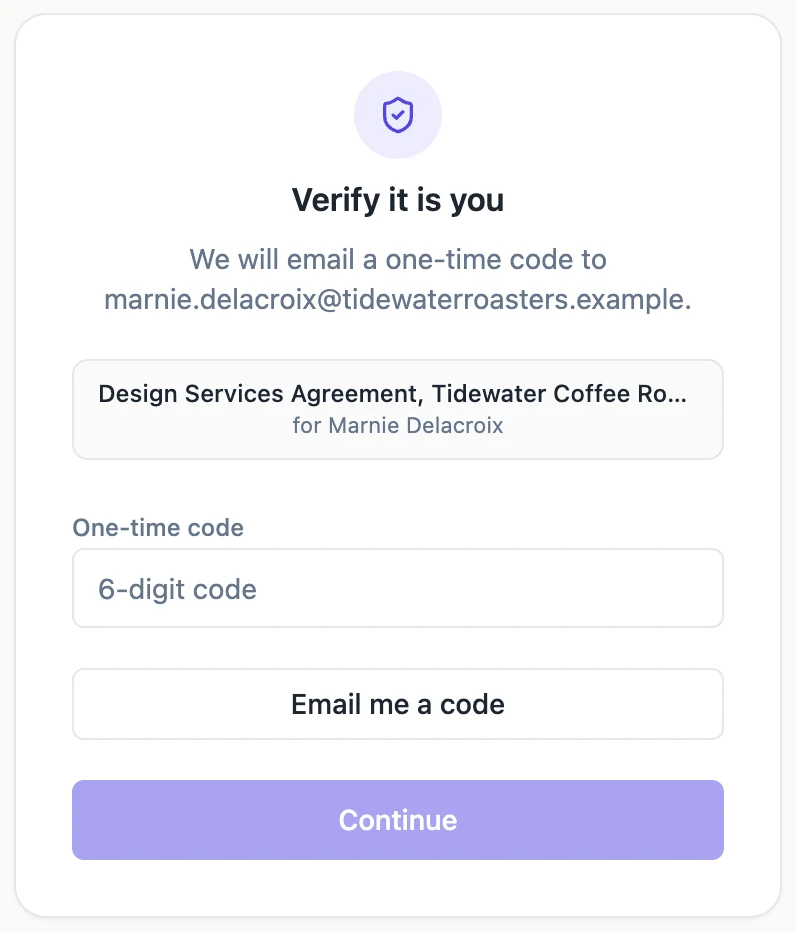
The code is asked for, not pushed
Nothing is sent when the envelope goes out. The invitation simply warns that a code will be emailed to confirm it is them. When the recipient opens their link they get a verification card offering an Email me a code button, and the code is generated at that moment. Sending it only when somebody is actually sitting at the screen is what makes a ten minute life practical.
Six digits, ten minutes
The code is a random number between zero and one million, padded to six digits so leading zeros survive. Its expiry is stamped when it is created and the email states the number of minutes plainly. Ask for a code and wander off, and the one in your inbox is worthless by the time you come back, which is the trade for it having been delivered to an inbox in the first place.
It can only be spent once
Redemption happens as a conditional write against the unused code, so two requests carrying the same digits cannot both succeed. The second is told the code has already been used. That closes the replay window on a code sitting in an inbox that somebody else can also read, at least for the second person to try it.
Two separate ceilings
A recipient may be issued at most five codes in any ten minute window, after which requests are refused until the window rolls forward. Separately, a single code tolerates five wrong entries before it is retired, and five failed verifications of any kind lock that recipient for fifteen minutes. Pressing Send another code repeatedly is therefore a losing strategy, and the button is labelled honestly so people know a new code invalidates nothing but replaces the one they should be using.
It is stored the same way a password is
The digits are hashed with salted scrypt before storage and compared in constant time, so the row holds no readable code. The email is the only place the plain number ever exists, and it is sent inline by the API rather than through the background queue, because the person is waiting on it and a queue hop would add seconds to something that should feel instant.
How it works, in three steps
Step 1
Set the recipient to an emailed code
The Verify by dropdown on the card. Nothing else is needed from you, since the code is generated on demand.
Step 2
The signer requests it
Their verification card carries an Email me a code button. The code lands in the same inbox the invitation did.
Step 3
They type it and continue
Six digits, then Continue. A correct code clears any earlier failures and opens the document.
The full walkthrough with screenshots is in the guide Send a PDF for e-signature.
Limits worth knowing
- A code lasts ten minutes and can be redeemed once.
- Five codes per recipient per ten minute window, then requests are refused for a while.
- The code goes to the same address as the invitation, so it is not a separate channel.
- Codes are always six digits. The length and the expiry are not configurable from the app.
Questions people ask
Is this two factor authentication?
Not really, since the code and the link arrive at the same address. It proves the person can read that inbox now, which is a lower but still useful claim.
The code never arrived. What now?
Press Send another code. If nothing arrives at all, the delivery problem is with that mailbox, and an access code shared by phone is the better route for that person.
What if the code expires while they are reading the document?
It does not matter. The code is only used to open the document. After that the session carries them, and it lasts thirty minutes.
Does a failed code attempt show up anywhere?
Yes, as its own event in the audit trail with the IP address and the method, separate from the successful verification event.
Make your own signing flow
The button opens the generator with this use case already described. Change the wording to match yours, generate, then edit anything you like.
Send a document for signingRelated pages
Access code to sign
An email address is a weak claim about who somebody is. Inboxes get forwarded, shared and left open on desks. An access code adds a second thing the signer has to know, and you decide how they came to know it.
How to verify a signed PDF
Somebody sends you a file and says it is signed. Checking that claim takes about twenty seconds, and it does not involve trusting the sender, the covering email or the marks on the page.
E signature audit trail
A list of things that happened is only worth something if you can show it has not been edited since. That is what the hash chain under this log is for, and the page tells you whether it still holds.
More finished work of this kind is on the e-signature examples hub.
Written and checked by the OneCraft team. Last checked .