E-signatures
How to verify a signed PDF
Somebody sends you a file and says it is signed. Checking that claim takes about twenty seconds, and it does not involve trusting the sender, the covering email or the marks on the page.
Use a reader that checks signatures
A browser preview usually will not do it. Open the file in a desktop PDF reader with signature support, and it will tell you before you have read a word whether the document carries a signature and whether that signature still matches the bytes. This is the whole check. Everything else on this page is detail about what you are looking at.
What the panel says
One signature covering the entire document, applied at the point the envelope completed rather than by any individual signer. Its reason is recorded as all required signatures completed, its location names the platform that issued it, and it carries the time it was applied. Its name field carries the envelope identifier, which is the string to quote if you ever need to ask about a specific document.
Two different verdicts
Readers report two things and people conflate them. The first is integrity: does the file still hash to what the signature says. That is the one that matters, and it is what tells you nothing has been altered since issue. The second is trust: does the reader recognise the issuer of the signing certificate. That depends entirely on which authorities your reader has been configured to trust, so an unfamiliar issuer is a statement about your settings rather than about the document.
Do not try to match the hashes yourself
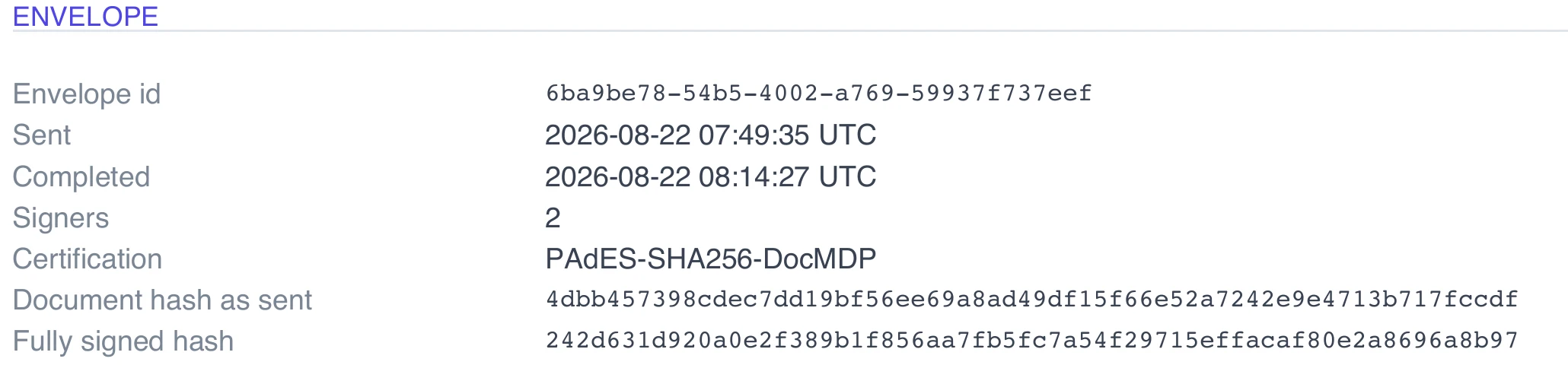
The certificate of completion prints two hashes, and it is tempting to compute the checksum of your download and compare. They will not match, and nothing is wrong. One is the file as it was uploaded, before anyone signed. The other is the file once every signature had been stamped in, taken before the final certification was applied. Both are internal reference points recorded at those two moments, not a checksum of the file you are holding. The reader's integrity check is the correct tool.
The certificate is a separate document
Alongside the signed PDF there is a certificate of completion recording who signed, how each was verified, when, from which address and what they consented to. If the sender ticked the option to include it, its pages sit inside the signed PDF and are covered by the same certification. If not, it is a second file, and it is worth asking for, because the signed document alone says nothing about how it came to be signed.
A rescan is not a signed document
Printing a signed PDF and scanning it back in destroys everything described above. So does re-saving it through a tool that rewrites the file, or merging it into a larger PDF, both of which will make a reader report that the document has changed since it was signed. If somebody sends you a scan of a signed agreement, ask for the original, because the scan carries no more evidence than a photocopy.
How it works, in three steps
Step 1
Open it in a signature aware reader
A desktop PDF reader rather than a browser preview or an email client preview pane.
Step 2
Read the integrity verdict first
Unchanged since signing is the answer you want. A trust warning about the issuing authority is a separate and much less important thing.
Step 3
Ask for the certificate of completion
Either it is already inside the file as extra pages, or it is a separate PDF the sender can download and forward.
The full walkthrough with screenshots is in the guide Send a PDF for e-signature.
Limits worth knowing
- The hashes printed on the certificate are reference values from two internal moments, not checksums of the downloaded file.
- Whether your reader trusts the issuing certificate depends on that reader's configuration, not on the document.
- No timestamp authority is configured at present, so the signing time comes from the signature itself rather than an independent third party.
- Any tool that rewrites or merges the file will invalidate the certification, even if it changes nothing you can see.
Questions people ask
My reader says the certificate is not trusted. Is the document fake?
Not necessarily, and usually not. Trust is about which issuers your reader recognises. Look at the integrity verdict instead, which is the part that says whether the file has been altered.
Can I check it without special software?
Not properly. Some browser previews show nothing at all about signatures, and a preview that shows the pages tells you nothing about whether they changed.
Why is there only one signature when three people signed?
The three parties signed electronically, and their marks are stamped onto the pages. The single cryptographic signature is applied over the whole file at the end, once everybody had finished.
What if the verification fails?
Treat the copy as unreliable and ask the sender for the original download. A failure most often means the file was re-saved, merged or exported by another tool rather than tampered with deliberately.
Make your own signing flow
The button opens the generator with this use case already described. Change the wording to match yours, generate, then edit anything you like.
Send a document for signingRelated pages
E signature consent forms
A consent form is the one document where refusing has to be as easy as agreeing, and where the record of who agreed matters more than the mark on the page. That changes which settings are worth the extra friction.
Access code to sign
An email address is a weak claim about who somebody is. Inboxes get forwarded, shared and left open on desks. An access code adds a second thing the signer has to know, and you decide how they came to know it.
Resend a signing invitation
Somebody says they never got it. The lazy fix is to forward the original email, which leaves two live links to the same document in two inboxes. Resending properly replaces one with the other.
More finished work of this kind is on the e-signature examples hub.
Sources
Written and checked by the OneCraft team. Last checked .