E-signatures
Sign a document on a phone
Most people who are sent something to sign are not at a desk. A contract page shrunk to fit a phone has boxes four millimetres tall, and typing into one of those is a genuinely bad experience, so below a certain width the layout gives up on it.
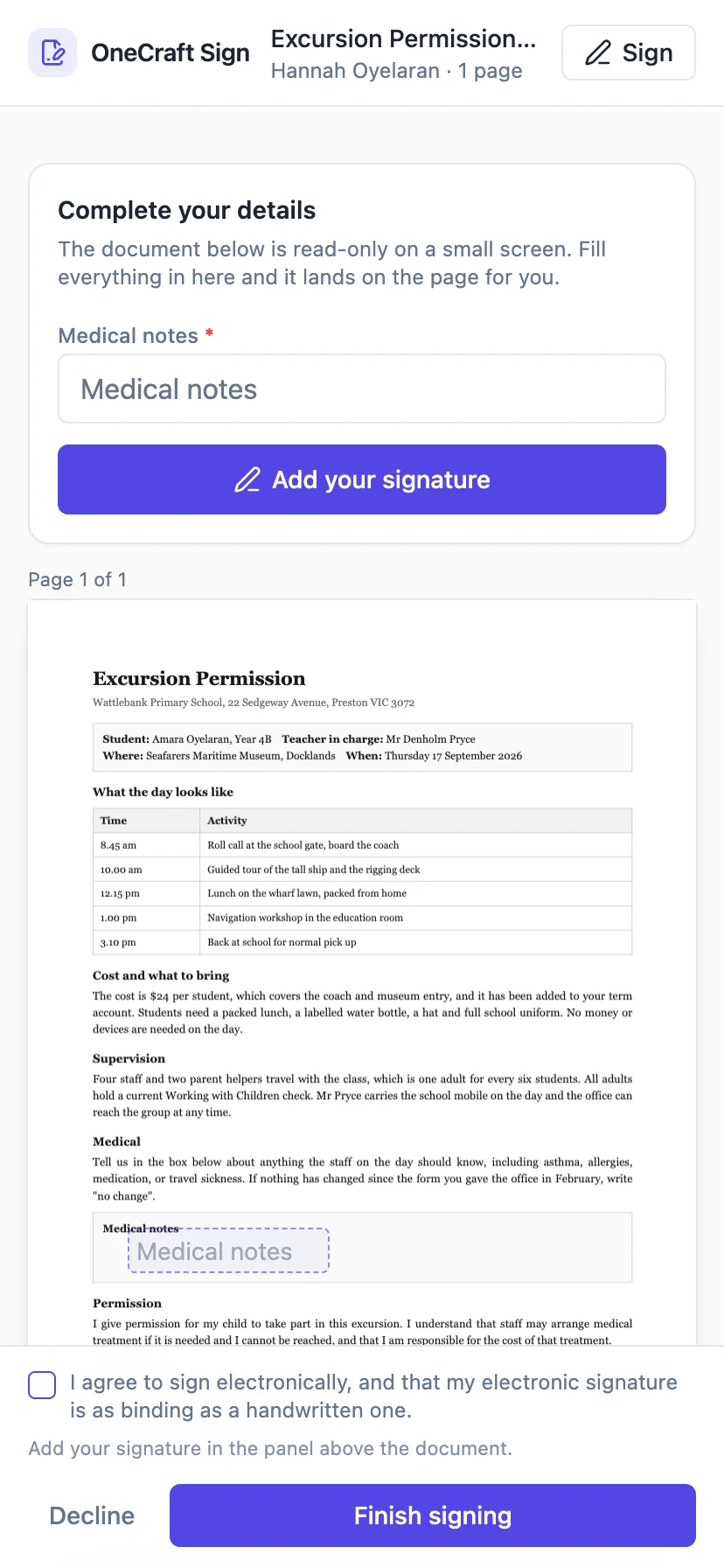
Compact mode swaps the layout
When the page column falls under 560 pixels the view switches. A card appears above the document headed Complete your details, holding a full size labelled input for every value that signer has to type, and the pages below become read only. The inputs on the page are still drawn so you can see where each value will land, but they cannot be typed into, which removes the temptation to try.
Typing at a usable size
The panel flattens everything, including the lines inside a signature block, into one list of ordinary form inputs with their labels above them. A block's Name and Title lines become two separate inputs rather than two tiny slots on a rule. Required ones are marked with an asterisk. Whatever is typed appears on the document as you go, so the connection between the panel and the page stays visible.
Drawing with a finger
The signature pad is a canvas with touch handling, so a finger works the same way a mouse does. It opens as a dialog over the page from a button in the panel, and again from the header, so it is reachable without scrolling to find a box. If drawing on glass produces something you would rather not put on a contract, the type mode renders your name in a script face instead.
The submit bar stays put
The consent line and the Finish signing button are fixed to the bottom of the screen rather than sitting at the end of a twelve page scroll. The bar also carries a running status: add your signature in the panel above, or the name of whichever required value is still missing, or simply ready to submit. On a phone that line is often the only thing telling the signer why the button did not work.
The pages still render properly
The document itself is rendered at whatever width is available, down to 240 pixels, with each page labelled by number so a signer can tell where they are. Signature spots stay tappable even in compact mode, since tapping one is how you open the pad. What is switched off is typing into a four millimetre box, not looking at the document.
How it works, in three steps
Step 1
Open the link from the email
It opens in the phone browser. If a code is needed, the verification card comes first and is sized for a phone keypad.
Step 2
Fill in the panel above the document
Every value you have to type is there at full size, labelled, with the required ones marked.
Step 3
Add your signature and finish
The pad opens over the page. Draw with a finger or type your name, tick the consent line, then press Finish signing in the bottom bar.
The full walkthrough with screenshots is in the guide Send a PDF for e-signature.
Limits worth knowing
- Below 560 pixels the fields on the document cannot be typed into. Use the panel above it.
- The signer's session lasts 30 minutes and is not stored, so a phone that reloads the page asks for the code again.
- There is no app. Signing happens in the mobile browser.
- A large scanned PDF can be slow to render over a mobile connection, since the whole file is fetched.
Questions people ask
Does a signature drawn with a finger look bad?
It looks like a finger signature. If that bothers you, switch the pad to type mode and your name is rendered in a script face instead, which stamps identically.
What if I reload the page halfway through?
The signing session is held in memory only, so a reload takes you back to the verification step. Anything you had typed is not kept.
Can I sign on a tablet?
Yes, and above 560 pixels you get the full layout with typing directly on the page. Tablets in portrait usually clear that threshold.
Can I start on a phone and finish on a laptop?
Yes. The link works on any device until you submit or it expires, though nothing you typed on the first device carries across.
Make your own signing flow
The button opens the generator with this use case already described. Change the wording to match yours, generate, then edit anything you like.
Send a document for signingRelated pages
In person signing
The other party is standing at the counter. Emailing them a link, waiting for them to find their phone, unlock it and search their inbox is theatre. Turn your screen round instead.
Single column form layout
A classic form can be laid out freely on a canvas or forced into one column at full width. The second option looks plainer on a laptop and is almost always better on a phone, which is where most forms are actually filled in.
E signature field types
There are ten e signature field types: signature block, signature, initials, date signed, name, title, company, email, text and checkbox. Knowing which of three groups each one falls into tells you almost everything about how it behaves, because the group decides where the value comes from. The sender places fields and never types a value into any of them.
More finished work of this kind is on the e-signature examples hub.
Written and checked by the OneCraft team. Last checked .