E-signatures
E signature field types
There are ten e signature field types: signature block, signature, initials, date signed, name, title, company, email, text and checkbox. Knowing which of three groups each one falls into tells you almost everything about how it behaves, because the group decides where the value comes from. The sender places fields and never types a value into any of them.
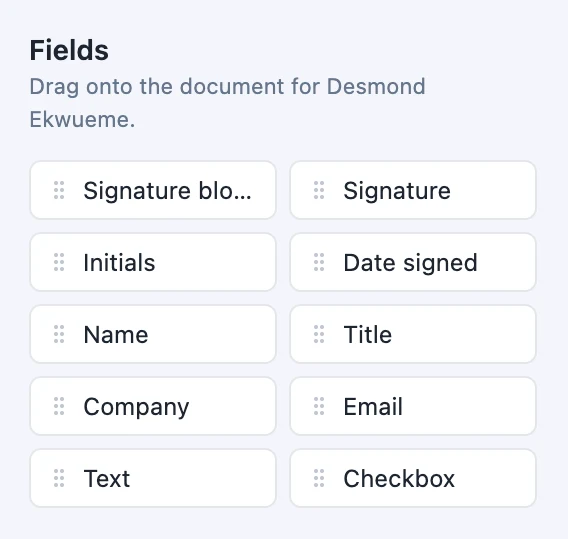
The palette, in its own order
Signature block first, because it is the one that saves the most work, then signature, initials, date signed, name, title, company, email, text and checkbox. That ordering is deliberate: the block sits at the top so you consider it before assembling the same arrangement out of four loose fields. Every one of them is placed against a specific recipient, so the same palette produces different colours depending on which card is selected.
Two carry ink
Signature at 200 by 60 points and initials at 80 by 50. Both take the image the signer produces, scaled to fit while keeping its proportions, drawn left aligned with a thin rule beneath. Neither can be pre-filled and neither can be typed into. One of these, or a signature block, has to exist for every signer before the envelope is allowed to leave, and this is the only group that satisfies that requirement.
Two fill themselves
Date signed, 140 by 24 points, takes the moment that signer submitted and prints it as a short month date. Name, 180 by 24, is filled from the recipient card you already typed when you added them. Neither is offered to the signer as an input, and any value supplied for a date field when the envelope is saved is discarded, which is what makes the printed date evidence rather than a claim.
Five are typed by the signer
Title and company at 180 by 24, email at 200 by 24, text at 180 by 24, and checkbox at 18 points square. The first four arrive labelled except for text, which takes whatever label you give it. Every value in these five comes from the recipient the field is assigned to: the editor has a label box and a Required switch for each field, and no box for a value, so you cannot type an answer in advance. The checkbox is the odd one: the signer types into a small box like any other field, and an X is stamped at that spot whatever they entered.
One is all of them at once
The signature block is a single field that draws a role heading, a signing area with a rule, and up to four labelled lines for name, title, company and date. It starts at 240 by 114 points and its height follows the number of lines you switch on. Where an execution page wants the traditional arrangement, one block is quicker to place and easier to keep straight than five loose fields lined up by eye.
Everything is measured in points
Every size above is in PDF points, the same unit the file itself uses, so a 200 point signature box is a shade over seven centimetres wide on any page. Positions are stored the same way, against the page dimensions read from the file when it was uploaded. All ten can be resized after placement, down to a floor of 12 points, and none of them can be dragged outside the page.
How it works, in three steps
Step 1
Select the recipient first
Fields belong to whoever is selected, and the colour on the box is the only thing that tells you which person a field is for.
Step 2
Reach for the block before the loose fields
If you are about to place a signature, a name, a title and a date in a stack, one signature block does all four and keeps them aligned.
Step 3
Set the label and required flag on typed fields
With a field selected, the panel offers a label shown to the signer and a required switch, which is on by default.
The full walkthrough with screenshots is in the guide Send a PDF for e-signature.
Limits worth knowing
- Ten types, and no way to define your own. There are no dropdowns, radio groups, multi-line boxes or file attachments.
- 500 fields is the ceiling for a single envelope, across every recipient.
- Font size is not adjustable. Values shrink to fit their box, down to a floor of four points.
- Fields cannot be duplicated or copied to another page. Each is placed individually.
Questions people ask
Which fields let me send the envelope?
A signature, an initials or a signature block for each signer. A date signed or a text field alone is not enough, because neither carries a mark from the person. If a signer has none of the three, sending is refused and the error names the person who has nowhere to sign, so you can place a field for them and try again.
Can I type a value into a field before sending?
No. The Selected field panel offers only a label and a Required switch, and there is no value box anywhere in the editor. Every typed value, including title, company, email and text, comes from the recipient the field is assigned to. The two exceptions fill themselves: the name comes from the recipient card and the date from the moment of signing.
Why are the field sizes in points rather than pixels?
Because a PDF is measured in points, 72 to the inch, so a field placed in points lands on the same spot of the page whatever size it is shown at on screen. A 200 point signature box is about seven centimetres wide on paper. Positions are checked against the page sizes read from your file, so a field cannot sit off the page.
Is there a field for uploading an attachment?
No. A signer fills in boxes and produces a signature, and nothing else can be collected in an envelope. If you need a copy of an ID or a supporting document, ask for it separately, or collect it with a form that has a file upload field and send the form's PDF for signing afterwards.
What does a signer see in a checkbox field?
A small box they type into, not a tick control. Whatever they enter, the finished PDF shows the letter X in that spot. Because the default box is 18 points square, give the checkbox a clear label such as I agree to the delivery terms, and remember the label may be cut short in the editor at that size.
Can a field be optional?
Yes, for the typed fields. The Required switch is on by default and can be turned off, so a signer can leave, for example, a second phone number blank. Signature, initials and the signature block are what make an envelope sendable, so at least one of those per signer still has to be there whatever you set elsewhere.
Make your own signing flow
The button opens the generator with this use case already described. Change the wording to match yours, generate, then edit anything you like.
Send a document for signingRelated pages
Place signature fields on a PDF
A box that looks right in the editor and stamps two centimetres off in the finished PDF is the classic failure of this kind of tool. Avoiding it is a question of what the coordinates are measured against.
Types of form fields
There are 41 component types in total, 36 available in the classic builder and 25 in the conversational one. This is the reference: what each group is for, and which fields only exist on one side.
The date signed field
Ask a person to type today's date and a certain number of them will type last Tuesday, or their birthday, or nothing. The date on an executed agreement is a fact about when it happened, so it is not something a signer should be typing at all.
More finished work of this kind is on the e-signature examples hub.
Written and checked by the OneCraft team. Last checked .