E-signatures
Signature block fields
Placing a signature box, then a name box, then a title box, then a date box, and lining all four up by eye is a waste of a morning. The signature block is one field that draws the whole arrangement and keeps it square.
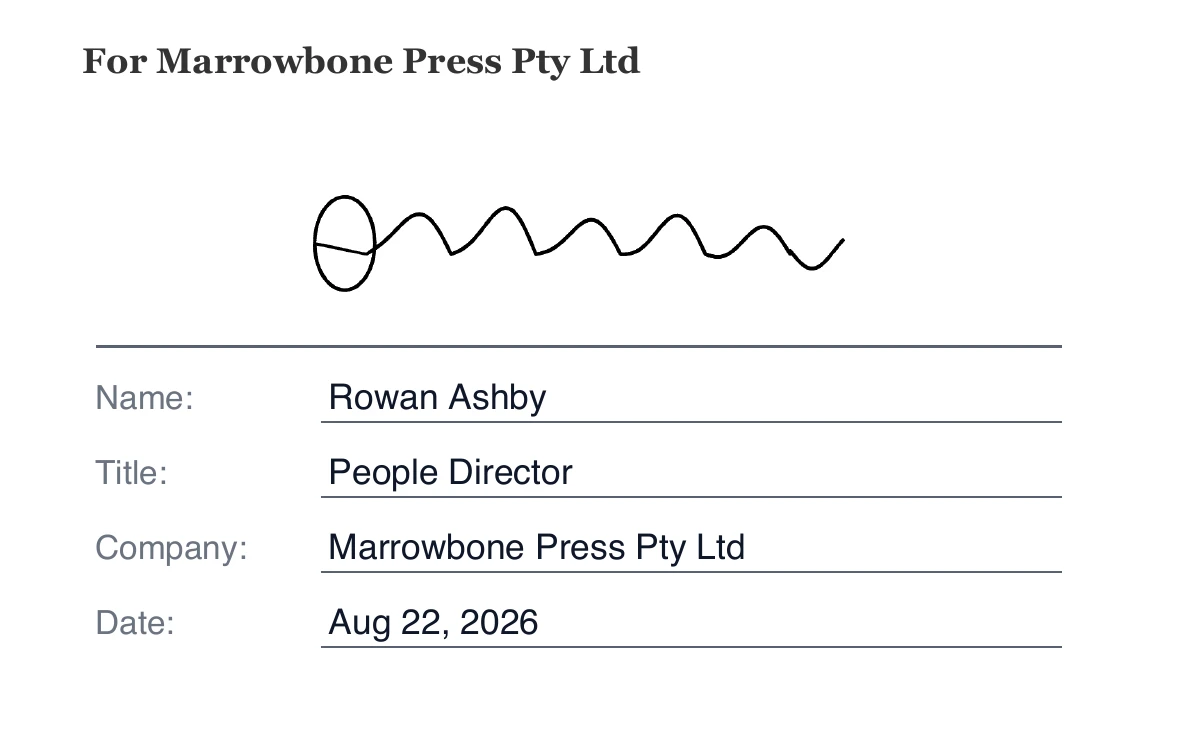
One field, several printed lines
A block starts 240 points wide by 114 tall, about eight and a half centimetres across on a printed page. Inside it are an optional role heading printed in uppercase, a signing area 46 points deep with a rule underneath it, and then a stack of labelled lines each 18 points tall. Every line has a label in the left column and a rule for its value in the right. It is drawn identically in the editor, in the signer's browser and by the stamper, because all three read the same measurements.
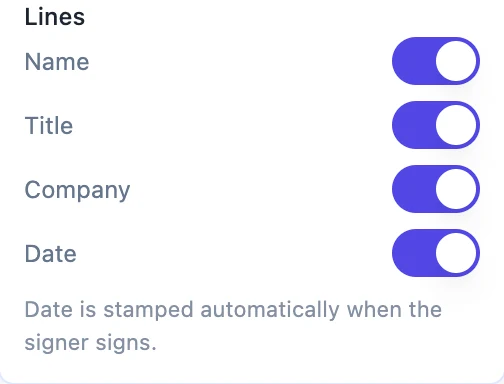
Four lines to choose from
Name, Title, Company and Date, toggled individually. A new block arrives with Name and Date on, which suits most agreements. Turn on Title and Company for anything executed on behalf of an organisation. The box height is recalculated whenever you toggle one, so the printed lines always fit inside the box you placed rather than spilling past its bottom edge.
The role heading is the useful bit
A short line above the signature, printed in uppercase, saying who this block is for. Signed for and on behalf of Halloway Freight, or Witness, or For the Tenant. It is what makes two blocks on the same page readable at a glance rather than a pair of identical rules. It takes up to eighty characters and the block grows a little to make room for it.
What the signer actually types
Three of the four lines, at most. Name, Title and Company each become a small input sitting on their rule when the signer opens the document. The Name line is pre-filled from the recipient row, because you already typed their name when you added them and asking again is rude. The Date line is never typed by anybody: it is stamped from the moment the signature is submitted.
Required means every line
A block marked required will not let the signer finish until each of its typed lines has something in it, and the message names the missing line by its label rather than saying a field is empty. That check runs in the browser and again on the server, so an empty Company line cannot get through by disabling something. If a line is genuinely optional for that signer, take it off the block rather than leaving it blank.
How it works, in three steps
Step 1
Drag a signature block onto the execution page
It is the first item in the field palette, and it lands as a full block rather than a bare signature line.
Step 2
Write the role heading
With the block selected, the panel offers a Role heading box. Say who this block is for, in the language the agreement itself uses.
Step 3
Toggle the lines you need
Name, Title, Company and Date. The box resizes itself as you switch them, so what you see is what will print.
The full walkthrough with screenshots is in the guide Send a PDF for e-signature. If the document was written in OneCraft, read Send a document for signature.
Limits worth knowing
- Only those four line types exist. There is no way to add a custom labelled line, such as a witness address.
- The role heading is capped at 80 characters and each line label at 40.
- A typed line value is capped at 200 characters and shrinks to fit rather than wrapping.
- Required applies to the whole block, not to individual lines within it.
Questions people ask
Can the signer change the name that is pre-filled?
The Name line arrives carrying the name on the recipient card, and where a value is already present the signer is shown it rather than an empty input.
Why is there no line for a witness address?
The block prints four fixed line types. For anything else, place a plain text field with your own label beside the block.
Do I need a separate date field as well?
No. If the Date line is on, the block prints the signing date itself. A separate date field is only for putting a date somewhere the block is not.
What happens to the block when the document was written here?
A document built in OneCraft already prints its own signature block, so the handover fills its blanks instead of drawing a second set of rules on top.
Make your own signing flow
The button opens the generator with this use case already described. Change the wording to match yours, generate, then edit anything you like.
Send a document for signingRelated pages
Fillable fields for signers
Fillable fields for signers are the boxes the other person completes on their way to the signature: a free text field, a confirmation checkbox, and labelled name, email, title and company boxes. A reference number, a job title, a mark against a clause. You decide which are compulsory; the signer supplies every value.
E signature for freelance contracts
You are not running a legal department. There is one client, the scope was agreed on a call yesterday, and the only thing standing between you and starting work is a signature you would rather not spend an afternoon collecting.
Document with a signature block
An execution block is the part of an agreement people get wrong most often, usually by typing underscores. A signature block gives every party the same structure, and it is also what the signing flow reads to place its fields.
More finished work of this kind is on the e-signature examples hub.
Written and checked by the OneCraft team. Last checked .