E-signatures
Signing order
A switch labelled Sign in order sits under the field palette. It looks small. It changes who receives an email tonight, who receives one on Thursday, and what happens when somebody clicks a link before it is their turn.
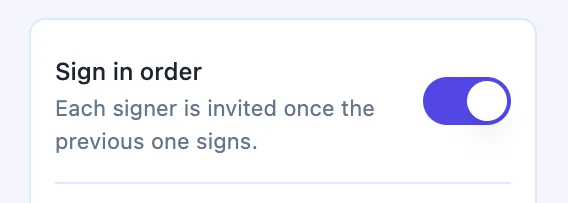
Off means everyone at once
With the switch off, sending emails every signer immediately. Nobody waits, nobody blocks anybody, and the envelope completes whenever the last of them happens to finish. This is right far more often than people assume. Two directors signing the same board resolution have no reason to take turns, and making them do so adds days for no benefit.
On means one wave at a time
With it on, only the lowest order number is invited when you send. As each of those people finishes, the next outstanding number is worked out and invited then. Order numbers are not required to be unique, so two people can share position one and be invited together, then a single signer at position two hears nothing until both of them are done. That is how you model a pair of parties plus a countersigner.
The order is enforced, not just scheduled
Waiting for an invitation is one thing, being unable to jump the queue is another. Every signer route checks the turn before doing anything: opening the challenge, requesting a code, verifying, fetching the document and submitting. If anybody at a lower order has not signed yet, the request is refused with a message saying it is waiting on an earlier signer. So a forwarded link, or one dug out of an old email, cannot be used out of sequence.
Each signer sees the document as it stands
Because signatures are stamped as they arrive, a sequential envelope means the second signer opens a copy that already carries the first signature. That is usually the point of ordering: the countersigner wants to see the other party has committed before they do. With the switch off, both people may open an unsigned copy at the same time, and both signatures are stamped in whatever order they arrive.
Choosing between them
Use the order when one person's decision genuinely depends on another's, or when someone senior should not be bothered until the groundwork is done. Turn it off when the parties are peers. The cost of a wrong choice is asymmetric: an unnecessary order just makes things slow, while a missing one can put a director's signature on a document before the person it commits has agreed to it.
How it works, in three steps
Step 1
Number the recipients
Each card has an Order box. Give the same number to people who should be invited together, and higher numbers to those who come after.
Step 2
Set the switch to match
Sign in order sits under the field palette. Off invites everybody now; on invites the first number now and the rest in turn.
Step 3
Confirm on the send dialog
The confirmation tells you which behaviour you are about to get, so a wrong switch is caught before anything leaves.
The full walkthrough with screenshots is in the guide Send a PDF for e-signature.
Limits worth knowing
- The order is set by numbers on the recipient cards, not by dragging the list around.
- The switch applies to the whole envelope. You cannot make two signers sequential and a third parallel.
- Order numbers start at 1. A value below that is raised to 1 when saved.
- A declined signature stops the envelope, so nobody further down the order is ever invited.
Questions people ask
Can two people share the same position?
Yes. Identical order numbers form one wave, invited together, and the next number waits for all of them to finish.
What does an early signer see if they open their link too soon?
A message that the request is waiting on an earlier signer. They are not shown the document, and their invitation arrives when their turn comes.
Can I change the order after sending?
No. The order is part of the sent envelope. Changing it means withdrawing the request and creating a new one.
Does a document sent from the document editor use an order?
Yes, and it is on by default there. Each signature block party carries its own position, taken from the document itself.
Make your own signing flow
The button opens the generator with this use case already described. Change the wording to match yours, generate, then edit anything you like.
Send a document for signingRelated pages
Multiple signers on one document
Three people signing the same agreement is three sets of boxes on one PDF. The difficulty is never the signing, it is making sure the right box belongs to the right person and that nobody can fill in somebody else's.
Fillable fields for signers
Fillable fields for signers are the boxes the other person completes on their way to the signature: a free text field, a confirmation checkbox, and labelled name, email, title and company boxes. A reference number, a job title, a mark against a clause. You decide which are compulsory; the signer supplies every value.
Form response to signed PDF
A form response becomes a signed PDF when the form carries an e-signature field: on submission, the answers are rendered to a PDF and sent as an envelope to each signer the form names. The submitter, an approver or both then sign in order, and the result is a document rather than a row in a table.
More finished work of this kind is on the e-signature examples hub.
Written and checked by the OneCraft team. Last checked .