E-signatures
Multiple signers on one document
Three people signing the same agreement is three sets of boxes on one PDF. The difficulty is never the signing, it is making sure the right box belongs to the right person and that nobody can fill in somebody else's.
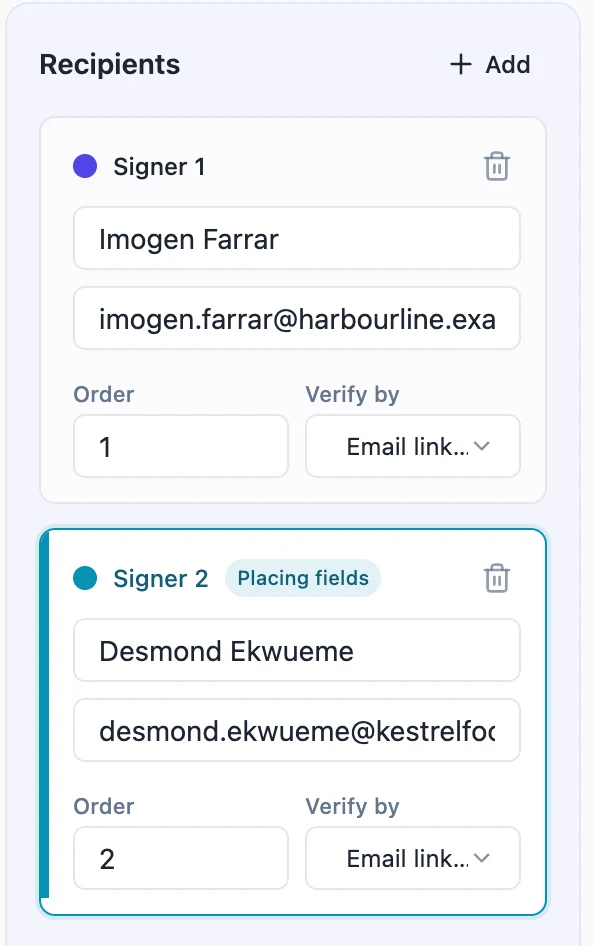
Colour is the whole interface
Each recipient card takes a colour from a palette of five, assigned by its position in the list and cycled beyond that. The card, its bar, its badge and every field placed for that person all use it. There is no dropdown on the field asking who it belongs to. You select a signer, and everything you drop onto the page belongs to them until you select somebody else. Getting into the habit of clicking the card first is the entire trick to placing fields for three people without mixing them up.
Nobody sees anybody else's fields
When a signer opens the document, the API returns only the fields tied to their recipient row. The other parties' boxes are not dimmed or locked, they simply are not there. That is a server-side filter rather than a display choice, so there is no client-side trick that reveals them, and a signer cannot fill in a box that was never sent to their browser.
Everyone needs somewhere to sign
The envelope refuses to send if any signer has no signature, initials or signature block field placed for them. The message names the person, which is the common case in a hurry: three cards created, fields placed for two of them. A date field alone does not satisfy it, because the date is stamped from the moment of signing rather than being an act of signing.
Signatures accumulate one at a time
Each person's fields are drawn into the document as they finish, not all at once at the end. The second signer opens a copy that already carries the first signature, which matters when the parties want to see who has committed before they do. Every stamp is written to a new file rather than overwriting the last one, so the state of the document after each signature stays retrievable.
One person, two blocks
A director who signs both as an individual and on behalf of a company is still one recipient. Give them one card and place two signature blocks with different role headings. Duplicate cards sharing an email address and an order position are collapsed into a single recipient before anything is saved, so you cannot accidentally send the same person two invitations for the same document.
How it works, in three steps
Step 1
Add a card per person
Name and email each. The colour comes from the card's position, so the order you add them in is the order of the palette.
Step 2
Select a card, then place their fields
Everything you drag onto the page belongs to whoever is selected. Check the colour of each box before you move on.
Step 3
Send and watch the badges
Each row moves through Waiting, Viewed and Signed independently, and the envelope only completes when every one of them has signed.
The full walkthrough with screenshots is in the guide Send a PDF for e-signature.
Limits worth knowing
- 25 recipients per envelope, and 500 fields across all of them.
- The colour palette holds five colours. A sixth signer reuses the first colour.
- Every signer needs at least one signature, initials or signature block field before the envelope can go out.
- If one person declines, the envelope stops there. The signatures already collected are not applied to a completed file.
Questions people ask
Can two signers share an email address?
Not at the same position in the order. Two cards with the same email and the same order number are treated as one person, since that is nearly always a duplicate rather than an intention.
Does everyone get invited at the same time?
That depends on the Sign in order switch. Off, everyone is invited at once. On, only the first order is invited and the rest follow as each finishes.
Can a signer see who else is on the document?
Not before they sign. The pre-signing screen shows only the title, their own name and which check they need. Once complete, the certificate lists every signer.
What if one person's email is wrong?
While it is a draft, fix the card. After sending, the only correction is to withdraw the envelope and send a new one, because a sent document is fixed.
Make your own signing flow
The button opens the generator with this use case already described. Change the wording to match yours, generate, then edit anything you like.
Send a document for signingRelated pages
Send a document for signature
To send a document for signature, upload the PDF to a new envelope, add each signer's name and email, place their signature fields on the page and send. Every signer gets a personal link by email, and when the last one signs you get back a certified signed PDF and a certificate of completion.
Signature block fields
Placing a signature box, then a name box, then a title box, then a date box, and lining all four up by eye is a waste of a morning. The signature block is one field that draws the whole arrangement and keeps it square.
Sign a document on a phone
Most people who are sent something to sign are not at a desk. A contract page shrunk to fit a phone has boxes four millimetres tall, and typing into one of those is a genuinely bad experience, so below a certain width the layout gives up on it.
More finished work of this kind is on the e-signature examples hub.
Written and checked by the OneCraft team. Last checked .