E-signatures
Form response to signed PDF
A form response becomes a signed PDF when the form carries an e-signature field: on submission, the answers are rendered to a PDF and sent as an envelope to each signer the form names. The submitter, an approver or both then sign in order, and the result is a document rather than a row in a table.
One submission, one envelope
When a response arrives on a form carrying e-signature fields, a background job renders that response into a PDF and hands it over as an envelope. The response row then records the envelope it produced, which is what makes the whole thing safe to replay: a duplicate message finds the envelope already recorded and does nothing rather than sending a second request to the same people.
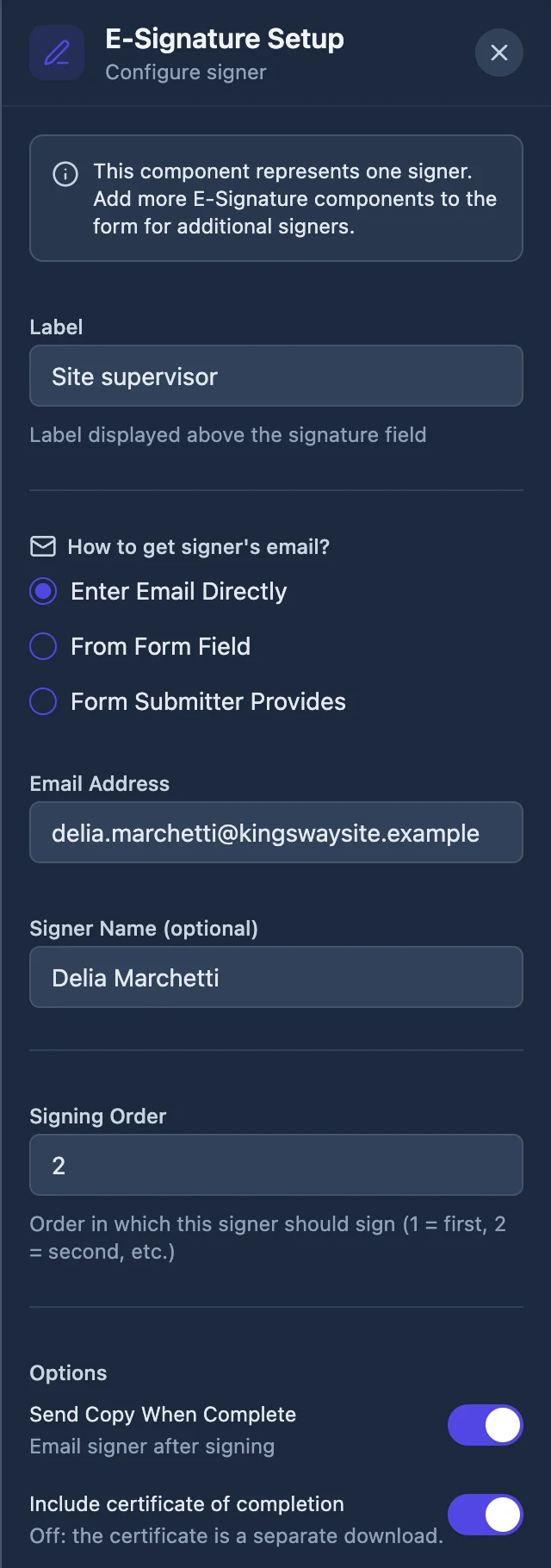
Each e-signature field is one signer
The form decides who they are. A signer's address can be fixed on the field so the same manager signs every submission, pulled from another answer so the person who typed their email in question two is the one asked, or requested at fill time. Their position in the signing order comes from the field as well, so a submitter can be asked first and an approver second.
Boxes measured on the rendered page
The renderer reports the position of each signature area on the page it produced, in browser pixels, and those are converted into PDF points by scaling against the width of an A4 page. Printed lines under the signature, labelled Name, Title, Company or Date, become fields of the matching type, with the Name line required. Anything unrecognised becomes a plain text field carrying its printed label.
The certificate follows the form's setting
Whether the certificate of completion is appended to the finished PDF is decided by the e-signature field on the form rather than in the envelope. That keeps the choice with the person who designed the form, which is the right place for it when the same form runs a hundred times and nobody wants to make the same decision a hundred times.
When the render fails
If a signature area cannot be found on the rendered page, the job stops with a permanent error and the response is marked as failed with the reason recorded against it, rather than producing an envelope with a signer who has nowhere to sign. Failures that might be temporary are retried instead. The distinction matters: a retry loop on a genuinely broken form would email your signers repeatedly.
How it works, in three steps
Step 1
Add an e-signature field to the form
One per signer, each with a source for the signer's email and a position in the order.
Step 2
Somebody submits the form
The answers are rendered into a PDF and handed over as an envelope automatically. There is no manual step.
Step 3
The signers are invited in turn
Each gets a private link. The finished PDF comes back with a certificate recording the events behind each signature.
The full walkthrough with screenshots is in the guide Add e-signatures with multiple signers.
Limits worth knowing
- Signing starts after the form is submitted, not while it is being filled in.
- Every signer on this route is invited with a link only. Access codes and emailed codes are not available here.
- One envelope per response. There is no way to batch several responses into a single document.
- If the form has no e-signature field, nothing is handed over and the submission behaves normally.
Questions people ask
Can the person filling the form sign it themselves instead?
For that, use the inline signature field, which they draw or type on the spot and which prints straight into the response PDF. The e-signature field exists for a signature collected after submission, through an envelope with its own audit trail and a certified PDF. A form can carry both when the submitter signs now and a manager signs later.
What if the same person submits twice?
Each submission is its own response and produces its own envelope, so two submissions mean two signing requests and two finished PDFs. Nothing merges them. A retried message for the same response does not duplicate anything, because the response row records the envelope it produced and a replay finds it already there.
Where do I see the resulting envelopes?
On the envelope list, labelled as coming from a form response, with the same status tracking as any other envelope: sent, partially signed, completed, declined, voided or expired. The list has a title search and status filters but no export, so a count of signed responses has to be read from the list itself.
Can I edit the PDF before it goes out?
No. It is rendered from the response and sent in the same job, so the answers as submitted are what gets signed. Neither the owner nor the respondent can edit a submitted response either. If an answer is wrong, void the envelope from its status page and have the form submitted again.
Does the e-signature field work on a conversational form?
No. The e-signature field is in the classic toolkit only, so a conversational form cannot start an envelope on submit. A conversational form can still collect a drawn signature with the inline signature field, which prints into the response PDF but carries no envelope, audit trail or certificate. For a signing step after submission, build the form as classic.
How long do signers have to sign a form response?
Thirty days from when the envelope is created, which happens at submission. Every envelope gets that expiry, and nothing on the form or in the envelope changes it. A daily sweep then marks any signer who has not signed as expired, and their link answers that the signing request has expired, so a late approver needs a fresh submission.
Make your own signing flow
The button opens the generator with this use case already described. Change the wording to match yours, generate, then edit anything you like.
Send a document for signingRelated pages
Resend a signing invitation
Somebody says they never got it. The lazy fix is to forward the original email, which leaves two live links to the same document in two inboxes. Resending properly replaces one with the other.
Decline to sign
The worst outcome for a signing request is not a refusal. It is silence, where nobody knows whether the other party is thinking about it, missed the email or has decided against the whole thing.
Signing order
A switch labelled Sign in order sits under the field palette. It looks small. It changes who receives an email tonight, who receives one on Thursday, and what happens when somebody clicks a link before it is their turn.
More finished work of this kind is on the e-signature examples hub.
Written and checked by the OneCraft team. Last checked .