E-signatures
Decline to sign
The worst outcome for a signing request is not a refusal. It is silence, where nobody knows whether the other party is thinking about it, missed the email or has decided against the whole thing.
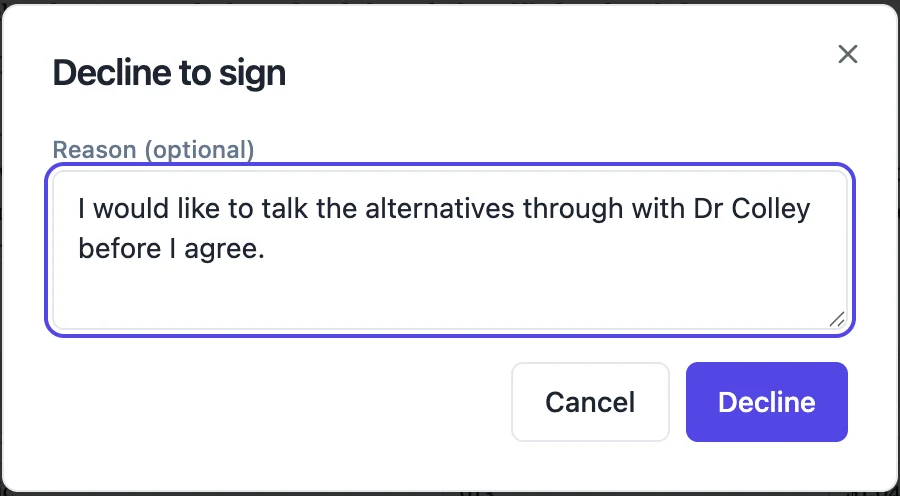
The button is always there
Decline sits in the bottom bar of the signing view, beside Finish signing, styled quietly but never hidden. A signer does not have to have filled anything in to use it, and does not have to explain themselves. Pressing it opens a small dialog with a reason box marked optional, and confirming ends their part of the request.
The reason is theirs to give
Up to five hundred characters, and genuinely optional. Somebody who declines without typing anything is recorded as having declined with no reason given, which is still far more useful than nothing. The text they write is stored on their row and travels with the notification, so you get their words rather than a summary of them.
The whole envelope stops
A decline moves the envelope to declined, not just that person. The remaining signers, if the order had reached them, are not chased further, and the stamping worker explicitly holds the envelope rather than completing it when any signer has declined. Signatures already collected stay in the working copy where they were stamped, but no completed and certified file is produced from them.
What lands in your inbox
An email titled Declined, followed by the document title. It names the person, gives their email address and prints the reason, or says Not given, and closes with a line noting that no signatures were applied to the document. It is sent to the account that owns the envelope. There is no separate in-app alert to hunt for: the email is the notification.
What you see on the status page
The envelope badge turns to Declined and the person's row carries a Declined badge with their reason printed underneath it in red. The audit trail gains a declined event holding the reason in its metadata, the IP address behind it and the timestamp, numbered and hash chained like every other event. From there the sensible move is usually to fix whatever they objected to and send a new envelope.
How it works, in three steps
Step 1
The signer presses Decline
It sits beside Finish signing in the bottom bar of the signing view, and needs no fields to have been filled first.
Step 2
They add a reason, or do not
The dialog offers a reason box marked optional, up to five hundred characters.
Step 3
You get an email and the envelope stops
The notice carries their reason. Nothing further is stamped and no certified copy is produced.
The full walkthrough with screenshots is in the guide Send a PDF for e-signature.
Limits worth knowing
- A decline cannot be undone. Reaching agreement means sending a fresh envelope.
- The reason is capped at 500 characters and is not shown to the other signers.
- Signatures collected before the decline are not published as a completed document.
- A signer must get past their identity check before they can decline, since declining needs the same session as signing.
Questions people ask
Can a signer decline after they have signed?
No. Once their submission is accepted their part is finished, and the decline route refuses with a note that the request was already completed.
Do the other signers hear about it?
The decline notice goes to the sender only. Telling the other parties is your call, since you may want to reissue before you explain.
Can I reuse the envelope after fixing the problem?
No. A declined envelope keeps its history as evidence. Create a new one with the corrected document.
What if somebody just ignores the request instead?
Nothing changes until the thirty day expiry sweeps it, which is exactly why the decline button being obvious is worth something.
Make your own signing flow
The button opens the generator with this use case already described. Change the wording to match yours, generate, then edit anything you like.
Send a document for signingRelated pages
Withdraw a signature request
You spotted the wrong figure on page two an hour after sending. There is no edit button on a sent envelope, on purpose, so the correction starts by taking the old one out of circulation properly.
Form response to signed PDF
A form response becomes a signed PDF when the form carries an e-signature field: on submission, the answers are rendered to a PDF and sent as an envelope to each signer the form names. The submitter, an approver or both then sign in order, and the result is a document rather than a row in a table.
Signing order
A switch labelled Sign in order sits under the field palette. It looks small. It changes who receives an email tonight, who receives one on Thursday, and what happens when somebody clicks a link before it is their turn.
More finished work of this kind is on the e-signature examples hub.
Written and checked by the OneCraft team. Last checked .