E-signatures
Withdraw a signature request
You spotted the wrong figure on page two an hour after sending. There is no edit button on a sent envelope, on purpose, so the correction starts by taking the old one out of circulation properly.
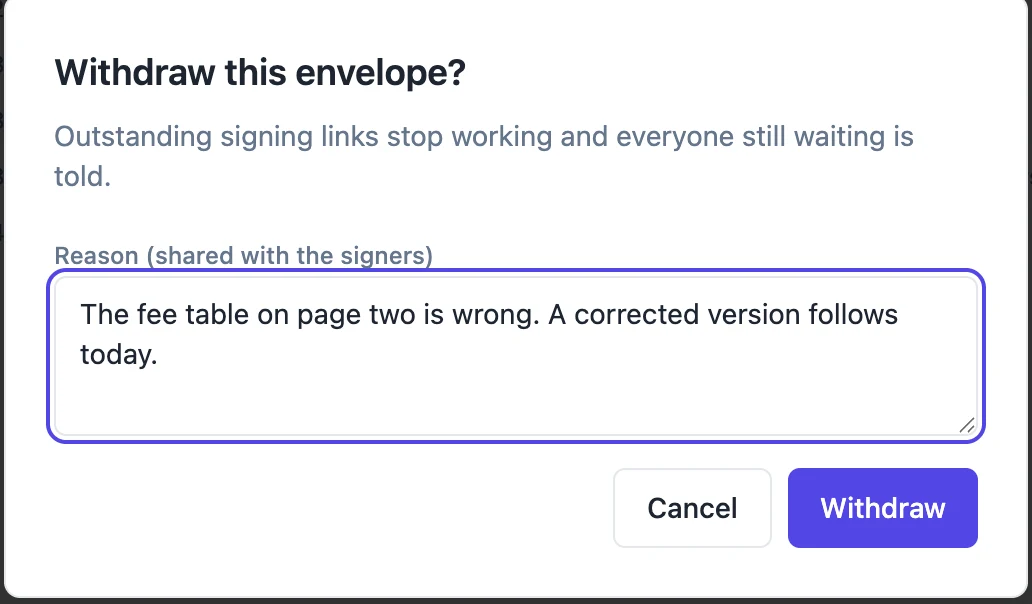
One action, whole envelope
Withdraw sits at the end of the button row on the status page. The dialog warns that outstanding signing links stop working and everyone still waiting is told, and offers a reason box labelled as shared with the signers. Confirming flips the envelope to withdrawn and expires every recipient who had not already finished, in one move. There is no way to withdraw the request from one person and leave it live for another.
Write a reason people can act on
The reason is optional and capped at five hundred characters, and unlike most optional fields it is worth filling in every time, because it is printed in the email the signers receive. Replaced by a corrected version tells somebody to expect a new request. Silence makes them wonder whether the deal is off. The placeholder in the box suggests exactly that sort of sentence.
Who hears about it
Everyone who was actually invited and had neither signed nor declined. Somebody further down a signing order who was never emailed is not sent a withdrawal notice for a request they never received, which avoids confusing them with news about something they never saw. The notice is titled Withdrawn followed by the document title, says the sender cancelled the request and their link no longer works, prints the reason, and tells them no action is needed.
Dead links say so
A withdrawn link does not fail obscurely. Opening it returns a clear message that the document was withdrawn by the sender, shown on the same card the signer would have seen any other outcome on. That matters when the email arrives after the notice, or when somebody clicks an old link out of their history weeks later.
Some things cannot be pulled back
A completed envelope cannot be withdrawn, and neither can one that is already withdrawn. Once the last signature has landed the certified file exists, the copies have been emailed, and there is nothing meaningful left to cancel. That is the practical argument for reading the last page carefully before pressing Send, because the window for a graceful retreat closes when the final signer finishes.
How it works, in three steps
Step 1
Open the envelope and press Withdraw
It sits at the end of the download button row, and is offered on anything not completed, already withdrawn or expired.
Step 2
Say why
The reason goes into the email each waiting signer receives, so write it for them rather than for your own records.
Step 3
Send the corrected version as a new envelope
There is no reopening. Fix the document, create a fresh envelope and send it, ideally referencing the withdrawal in your message.
The full walkthrough with screenshots is in the guide Send a PDF for e-signature.
Limits worth knowing
- Withdrawing applies to the whole envelope. Individual recipients cannot be cancelled.
- A completed envelope cannot be withdrawn at all.
- It cannot be reversed. The withdrawn envelope stays on the list with its history intact.
- Signers who had already finished are not notified, since their part was genuinely done.
Questions people ask
Can I withdraw after one of three people has signed?
Yes. The envelope moves to withdrawn, the remaining links die, and the person who had already signed keeps their record in the audit trail but is not emailed.
Is the reason shown to the signers?
Yes, printed in the withdrawal email. The dialog labels the box as shared with the signers so there is no surprise.
What is the difference between withdrawing and letting it expire?
Withdrawing is immediate and tells people why. Expiry is silent and happens thirty days on, which leaves everyone guessing in the meantime.
Does the withdrawn document stay downloadable?
The document as sent is still available to you from the envelope. What stops working are the signers' links.
Make your own signing flow
The button opens the generator with this use case already described. Change the wording to match yours, generate, then edit anything you like.
Send a document for signingRelated pages
The signed copy, emailed
The moment everybody has signed, the finished file goes out as an attachment to everyone involved. Nobody has to log in, remember a link or ask you to forward it, which removes the most common follow-up email in the whole process.
Automatic invoice reminders, set per invoice
Automatic invoice reminders email the client before and after the due date until the invoice is paid, so chasing money stops depending on you remembering. The schedule should be firm enough to get paid and polite enough to keep the client.
Decline to sign
The worst outcome for a signing request is not a refusal. It is silence, where nobody knows whether the other party is thinking about it, missed the email or has decided against the whole thing.
More finished work of this kind is on the e-signature examples hub.
Written and checked by the OneCraft team. Last checked .