E-signatures
Tamper proof signed PDF
Nothing makes a file impossible to alter. What a certifying signature does is make an alteration impossible to hide, which is the useful property. Any editor can change the number on page two; none can do it without the file announcing it.
A document level signature, not another mark
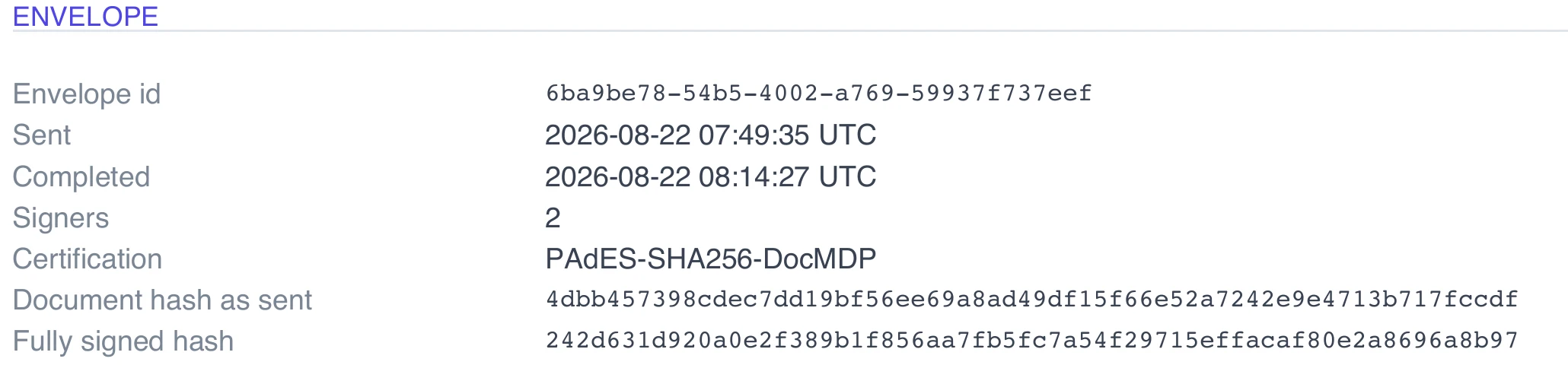
The signatures the parties drew are pictures stamped onto pages. This is something else entirely: a cryptographic signature over the bytes of the whole file, written into the PDF as a detached CMS structure in the standard Adobe form. It is not visible on any page, has no drawn appearance, and belongs to the platform rather than to any signer. It is applied once, at the very end, after every human signature is in place.
Certification at level one
It is added as a certifying signature rather than an ordinary approval one, with a document modification detection permission of one. That is the strictest setting: no change whatsoever is permitted after it, not form filling and not annotation. The permission is written into the document catalogue and the form flags are set to signatures exist and append only, so a reader knows to enforce it before it has finished parsing the file.
Why the certificate goes in first
If you asked for the certificate of completion to be included in the signed PDF, its pages are appended before certification, never after. Adding pages to a document already certified at level one is exactly the change the certification forbids, and a reader would flag the result as altered. The build order is therefore fixed: stamp every signature, hash it, build the certificate, append it if asked, then certify.
What a reader shows
A PDF reader that understands signatures will show a signature panel listing one signature over the whole document, with the reason recorded as all required signatures completed and a signing time. It will report whether the byte range still hashes to what the signature says. If somebody edited a figure, deleted a page or re-saved the file from another tool, that check fails and the reader says the document has been changed since it was signed.
It never degrades quietly
If certification cannot be applied, the envelope does not fall back to publishing an uncertified file. It moves to a failed state, the sender is emailed with the reason, and no completed document is distributed. That is deliberate. An earlier generation of this feature shipped unsigned output when something went wrong and still called it signed, which is worse than a visible failure because nobody finds out until it matters.
How it works, in three steps
Step 1
Send and let everyone sign
Certification is not something you switch on. It happens automatically once the last signature has been stamped in.
Step 2
Download the signed document
The Signed document button on the status page gives you the certified file, named after the envelope title.
Step 3
Open it in a reader that checks signatures
The signature panel reports one document level signature and whether the file still matches it.
The full walkthrough with screenshots is in the guide Send a PDF for e-signature.
Limits worth knowing
- Certification proves the file has not changed since issue. It does not prove anything about who the signers are; that is what the identity checks and the certificate are for.
- Whether your reader trusts the signing certificate depends on that reader's trust settings, not on the product.
- Once certified the file cannot be added to. Merging it into a larger PDF will invalidate the certification.
- Only the completed file is certified. The working copies made after each individual signature are not.
Questions people ask
Can somebody still edit the file?
Yes, in the sense that any editor will let them. The point is that the edited copy fails verification, so the change is provable rather than preventable.
Will my reader say the signature is trusted?
It will report that the document is unchanged since signing. Whether it labels the signer as trusted depends on the certificate authorities that reader is configured to trust.
What if I print it and scan it again?
You lose everything cryptographic. A scan is a picture of a document, and none of this applies to it. Keep the original PDF.
Does the certificate of completion get covered by it?
If you chose to include the certificate inside the signed PDF, yes, because its pages are added before certification is applied.
Make your own signing flow
The button opens the generator with this use case already described. Change the wording to match yours, generate, then edit anything you like.
Send a document for signingRelated pages
Trusted timestamp for a signed PDF
A signing time written into the file is a claim by whoever wrote it. A timestamp token is a claim by a third party who has no stake in the document, and it keeps working after the signing certificate itself has expired.
E signature for HR documents
Three quite different jobs get lumped together as HR paperwork. An offer that needs negotiating and countersigning, a policy that needs acknowledging, and a handbook that needs a record of receipt. Each wants a different set of boxes on the page.
One time code signing
You have nothing to share with this person in advance and no phone number for them, but you would still rather not treat a link in an inbox as proof of identity. A short code sent on demand sits between those two positions.
More finished work of this kind is on the e-signature examples hub.
Sources
Written and checked by the OneCraft team. Last checked .