E-signatures
E signature for HR documents
Three quite different jobs get lumped together as HR paperwork. An offer that needs negotiating and countersigning, a policy that needs acknowledging, and a handbook that needs a record of receipt. Each wants a different set of boxes on the page.
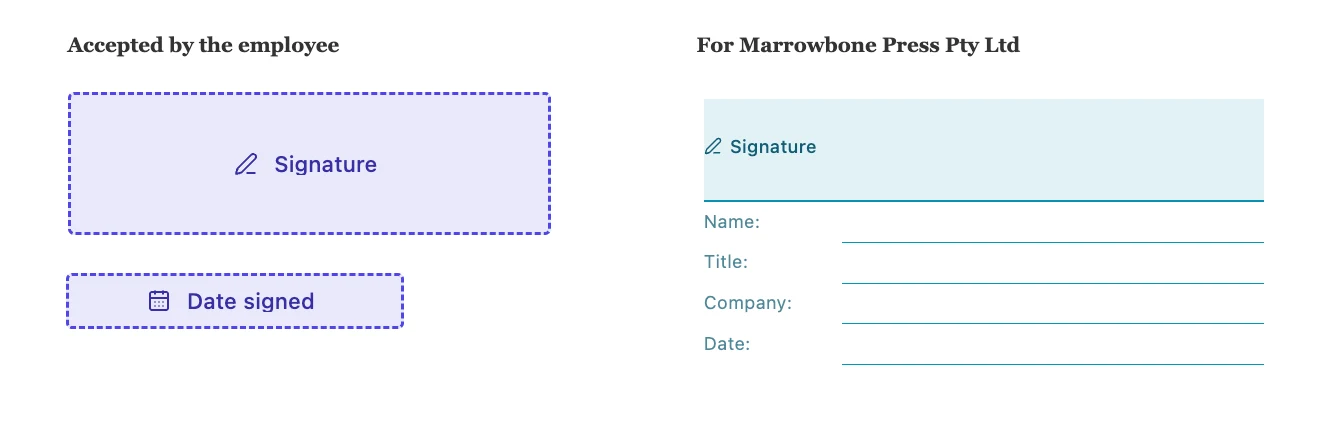
An offer letter is a two party document
The candidate signs, and somebody at the company countersigns. Put both on the envelope with the candidate at position one and the manager at position two, and turn Sign in order on, so the manager is not asked to commit until the candidate has. A signature block for each, with the role heading naming who it is for, gives the execution page the shape a lawyer expects without you drawing anything.
A policy acknowledgement is not a signature
Nobody is agreeing terms with you; they are confirming they read something. The useful combination is a checkbox field sitting against the acknowledgement sentence, a signature, and a date field that fills itself. The checkbox stamps an X at that spot once the signer fills it in, so the finished page shows a mark beside the sentence rather than only a signature at the bottom. Leave it required and the submission is refused while it is empty.
Handbook receipts want the company on the page
When somebody works through an agency or across two entities, whose handbook they received matters. Turn on the Title and Company lines of the signature block, and the signer fills them in as they go. Both are pre-labelled, so the person is not left guessing what belongs in an unlabelled box, and a value that is longer than its rule shrinks to fit rather than running off the end.
A candidate who has not started yet
Somebody in the middle of a notice period usually has no company address with you, only a personal one, and an offer is the most sensitive thing you will ever send to a personal inbox. An access code is worth the extra step here. Set one on the recipient, tell them during the call where the offer was discussed, and the invitation warns them a code will be needed without ever containing it.
Chasing without nagging
The status page tells you whether the candidate opened the document at all, since Viewed is only set once somebody passes their identity check and reaches the pages. A person who has not viewed it has an email problem. A person who viewed it three days ago and has not signed has a different problem, and the answer to that one is a phone call rather than another email.
How it works, in three steps
Step 1
Upload the letter or policy as a PDF
Under 25 MB, pages upright. Anything produced by a word processor is normally well inside both.
Step 2
Match the fields to the job
A signature block per party for an offer, a required checkbox plus signature for an acknowledgement, Title and Company lines for a receipt.
Step 3
Set a code where the inbox is personal
An access code on a candidate's card, shared by phone. Everyone already on your systems can usually sign with the link alone.
The full walkthrough with screenshots is in the guide Send a PDF for e-signature.
Limits worth knowing
- One envelope is one document signed by everybody on it. Sending the same policy to forty staff means forty envelopes.
- There is no template library. Each envelope starts from an uploaded PDF or a document written here.
- Nothing is stored against an employee record. The envelope list is the only place these live.
- Requests expire thirty days after the envelope was created, which is worth knowing when an offer sits over a holiday period.
Questions people ask
Can I send one policy to the whole team at once?
Not as a single envelope, because everybody on an envelope signs the same copy. Each person needs their own envelope so each has their own record.
Should the manager sign before or after the candidate?
After, in almost every case. Order the candidate first so the countersignature confirms an offer that has already been accepted rather than the other way round.
How do I prove somebody acknowledged a policy?
The certificate of completion records when they signed, how they were verified, their IP address and the consent they accepted. The required checkbox on the page records what they were acknowledging.
What if a candidate declines?
The envelope stops and you get an email with whatever reason they gave. Negotiating a change means correcting the letter and sending a fresh envelope.
Make your own signing flow
The button opens the generator with this use case already described. Change the wording to match yours, generate, then edit anything you like.
Send a document for signingRelated pages
Onboarding video maker
The default onboarding video is one twenty to forty minute orientation film fronted by an HR generalist, opening on company history and the org chart. It ages the moment a tool changes, it is watched at a fraction of its length, and it front loads what the new hire does not need over what they are anxious about.
Signature request expiry
A signing link that works forever is a small liability sitting in somebody's inbox. Thirty days after the envelope was created, it stops working, and the sweep that does it runs whether anyone is watching or not.
E signature for leases
Property documents are long, they carry more than two names, and half of them arrive as scans rather than clean exports. All three of those facts change how you prepare the envelope.
More finished work of this kind is on the e-signature examples hub.
Written and checked by the OneCraft team. Last checked .