E-signatures
E signature for leases
Property documents are long, they carry more than two names, and half of them arrive as scans rather than clean exports. All three of those facts change how you prepare the envelope.
Initials down the margin
The convention on a long lease is a set of initials on every page, so no page can be quietly replaced afterwards. The initials field is 80 by 50 points, small enough for a margin, and it is dropped page by page for whichever party you have selected. What makes this bearable is that the signer produces one mark and it fills every spot at once, then steps through them from a counter in the header rather than hunting.
Two tenants and an agent
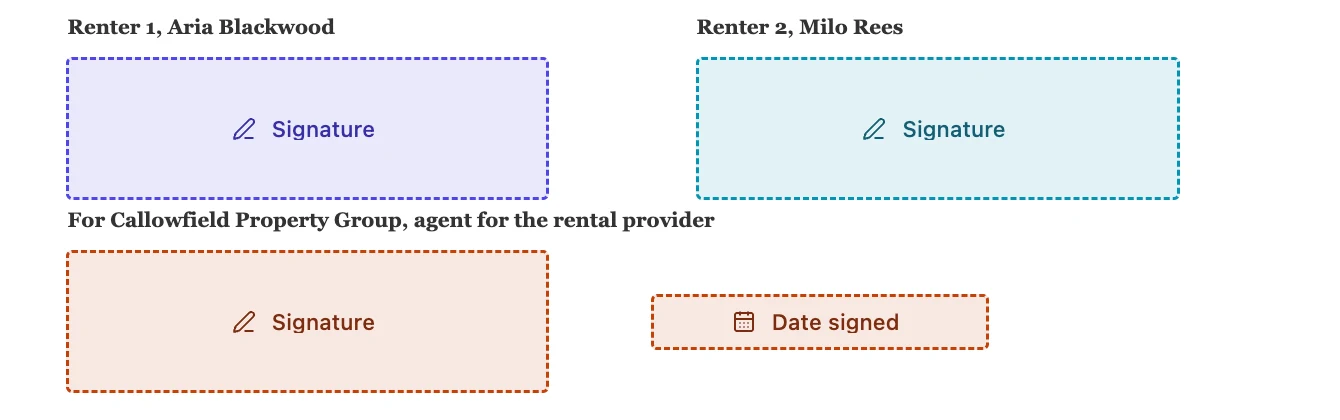
Add a card each. Both tenants at position one so they are invited together, the agent at position two so they countersign once the tenants have committed, and Sign in order switched on to enforce it. Each card takes its own colour from a palette of five, and every field you place carries the colour of whoever was selected, which is the only practical way to keep three sets of initials straight across twelve pages.
Scanned condition reports
A photographed or scanned inspection report is the most likely file to be refused, for two reasons. It may be over the 25 MB ceiling, in which case reducing the image quality before uploading fixes it. Or a page may have been saved rotated, which is refused by page number, because the stored page dimensions ignore rotation and a field placed against them would stamp somewhere no reader agrees with. Straighten the pages and upload again.
The report is its own envelope
An inspection report signed at handover and a lease signed a week earlier are two documents with two different sets of dates on them, so they want two envelopes rather than one merged PDF. Doing it that way also means the report can be signed on the spot with the Sign here button on a tablet at the property, while the lease was signed by email days before.
What you can show a tribunal
For each party, the certificate of completion records how they were verified, the exact moment they signed, the address the request came from, and the hash of the document as it stood at that moment. That last figure is the one that answers a claim of a swapped page, and it is more useful than the initials the practice was invented for. It is not legal advice, and what any particular tribunal accepts is beyond what a product can promise.
How it works, in three steps
Step 1
Get the PDF clean before uploading
Pages upright, under 25 MB, no password. Scans are where this matters, and the error names the page it objected to.
Step 2
Add every party and set the order
Tenants together at position one, the agent or landlord at position two, with Sign in order switched on.
Step 3
Initials per page, blocks at the end
One initials box per page per party, then a signature block each on the execution page with the role heading naming the party.
The full walkthrough with screenshots is in the guide Send a PDF for e-signature.
Limits worth knowing
- There is no place-on-every-page shortcut. Twelve pages and three parties means thirty six initials boxes placed by hand.
- PDFs over 25 MB, password protected, or with any rotated page are refused at upload.
- 500 fields is the ceiling for one envelope, which a very long lease with several parties can approach.
- Signing requests expire thirty days after the envelope was created, which is short for a chain of related documents.
Questions people ask
Can the landlord sign last?
Yes. Give them a higher order number than the tenants and switch Sign in order on. They are not invited until every tenant at the earlier position has finished.
My scanned report was rejected. Why?
Almost always a rotated page or the 25 MB ceiling. The message names the page in the first case, which tells you exactly what to straighten.
Can two tenants sign from the same email address?
Not at the same position in the order. Two cards sharing an address and a position are treated as one person, so each tenant needs their own address.
Does the finished lease prove nothing changed afterwards?
The completed PDF carries a document level certification, so a reader can tell whether a byte changed after it was issued. Keep the original PDF; a printed and rescanned copy carries none of that.
Make your own signing flow
The button opens the generator with this use case already described. Change the wording to match yours, generate, then edit anything you like.
Send a document for signingRelated pages
Initials on every page
A twelve page lease traditionally wants a set of initials in the corner of each page, so nobody can quietly swap page seven later. Producing twelve marks by hand is tedious. Producing one and having it land twelve times is not.
E signature for freelance contracts
You are not running a legal department. There is one client, the scope was agreed on a call yesterday, and the only thing standing between you and starting work is a signature you would rather not spend an afternoon collecting.
Track who has signed
Half the work of getting a document signed is knowing who to chase and when. A row per person, with a badge and a timestamp, replaces the reply-all thread asking whether anybody has looked at it yet.
More finished work of this kind is on the e-signature examples hub.
Written and checked by the OneCraft team. Last checked .