Websites
Add Google Analytics to your website: paste the G- ID and publish
Adding Google Analytics to a website means loading Google's tag on every page with your property's measurement ID, which starts with G-. On a site built here there is no code to paste, only the ID, and it runs beside the built in visit counter.
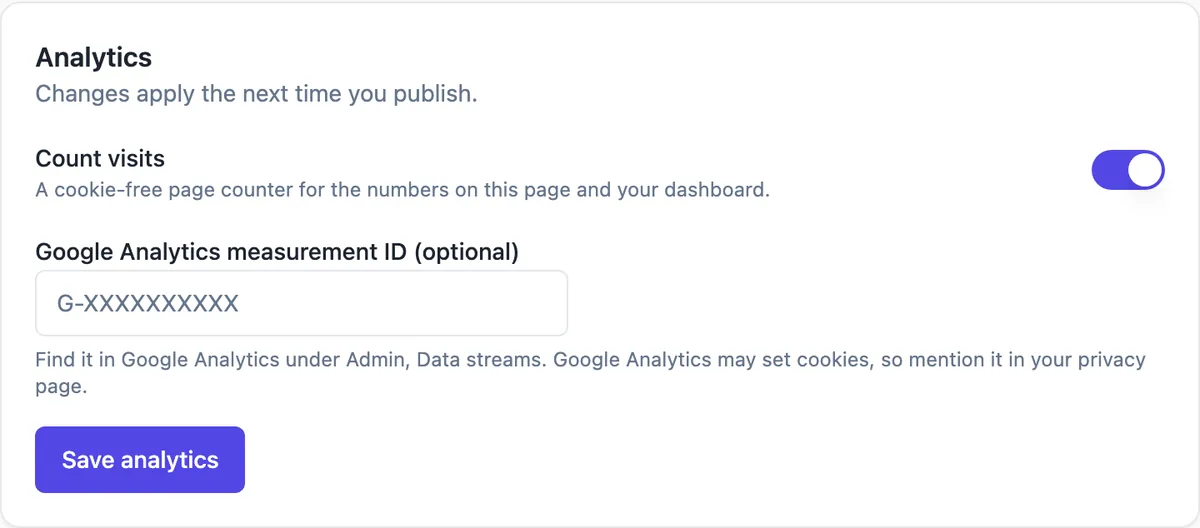
Where the ID goes
In site settings, the Analytics card has a field for the Google Analytics measurement ID. Paste the ID that starts with G-, press Save analytics, then publish. Every published page then loads Google's gtag script with that ID. The field accepts only a valid measurement ID, so a pasted script snippet or an old UA number is refused.
Finding the measurement ID
In Google Analytics, open Admin, then Data streams, choose or create a web stream for your site address, and copy the Measurement ID shown at the top. Use your custom domain as the stream address if you have one, otherwise your onecraft.live address. One property can hold streams for several sites if you want them reported together.
Two counters side by side
The built in counter stays on unless you switch Count visits off, and it feeds the Visits card and the chart on your sites home without cookies. Google Analytics adds sessions, events, engagement time, campaign tags and conversions, at the cost of cookies and a larger script. Many owners keep both: the built in counter for a quick look, Analytics for campaigns.
Say it in your privacy page
The card notes that Google Analytics may set cookies and that you should mention it in your privacy page. Do that in plain words: what is collected, by whom and why. Depending on where your visitors are, you may also need a consent mechanism before loading it, which the builder does not provide, so check the rules that apply to you.
Pages it does not run on
The thank you page that buyers land on after a store payment carries no analytics, because its address contains a private return token that should not reach any analytics service. The builder preview never loads the tag either. Everything else on the published site, including product and collection pages, does.
How it works, in three steps
Step 1
Copy the ID
In Google Analytics go to Admin, Data streams, your web stream, and copy the Measurement ID that starts with G-.
Step 2
Paste and save
In site settings, Analytics card, paste it into Google Analytics measurement ID and press Save analytics.
Step 3
Publish
The tag goes live with the next publish; check Realtime in Google Analytics while you open the site.
Limits worth knowing
- Only a GA4 measurement ID starting with G- is accepted; there is no field for other scripts.
- There is no built in cookie consent banner.
- The store thank you page and the builder preview never load analytics.
- Changes apply on the next publish.
Questions people ask
Can I add Google Tag Manager or the Meta pixel?
Not in the section builder. The only third party measurement it loads is the Google Analytics measurement ID, and arbitrary scripts cannot be pasted into pages. Code mode projects follow strict rules about outside hosts too, so tracking pixels are not a supported addition there either.
Why do I see no data in Google Analytics?
Check that the site was published after saving the ID, that the ID matches the web stream, and that you are looking at Realtime while visiting the live site, not the builder preview. Ad blockers in your own browser can hide your visit, so test from a phone on mobile data.
Do I still need the built in counter?
No, it is optional. Switch Count visits off if you only want Google Analytics, and the Visits card and the site card chart will stop updating. Keeping it costs nothing and gives a cookie free number that ad blockers rarely affect, which is a useful second opinion.
Can I track form submissions as conversions?
Form submissions do not send events to Google Analytics automatically. Count them in the messages inbox instead, by day and by page, and compare with visits. If conversions in Analytics matter for advertising, a dedicated landing page tool or Code mode work may suit better.
Does Google Analytics slow the site?
It adds Google's script to each page, which is far heavier than the built in beacon, though it loads without blocking the page from showing. On a fast static site the effect is small. If speed matters more to you than campaign data, leave the field empty.
Can several sites share one Google Analytics property?
Yes. Paste the same measurement ID into each site, or create a separate web stream per site inside one property and use each stream ID. Separate streams make it easier to filter reports by site later, while one shared ID gives a single combined view with less setup.
Make your own website
The button opens the generator with this use case already described. Change the wording to match yours, generate, then edit anything you like.
Create a website with OneCraftRelated pages
Website visit stats: views, visitors and referrers, no cookies
Website visit stats answer three plain questions: how many people came, which pages they read and where they came from. For a small business site that is usually all you need to know whether a post, a flyer or a profile link is working.
Website SEO settings: what you set and what is done for you
Website SEO settings decide how your site appears in search results and when a link is shared: the title, the description, the small icon and the share image. The rest of technical SEO, such as a sitemap and canonical tags, should simply be right without you touching it.
Free website address: yourname.onecraft.live, and when to move on
A free website address is a subdomain on someone else's domain: your name in front, their name behind. It costs nothing and works straight away, and it is a sensible start as long as you know you can rename it and later add your own domain without breaking links.
More finished work of this kind is on the website examples hub.
Written and checked by the OneCraft team. Last checked .