Websites
Website visit stats: views, visitors and referrers, no cookies
Website visit stats answer three plain questions: how many people came, which pages they read and where they came from. For a small business site that is usually all you need to know whether a post, a flyer or a profile link is working.
What is counted
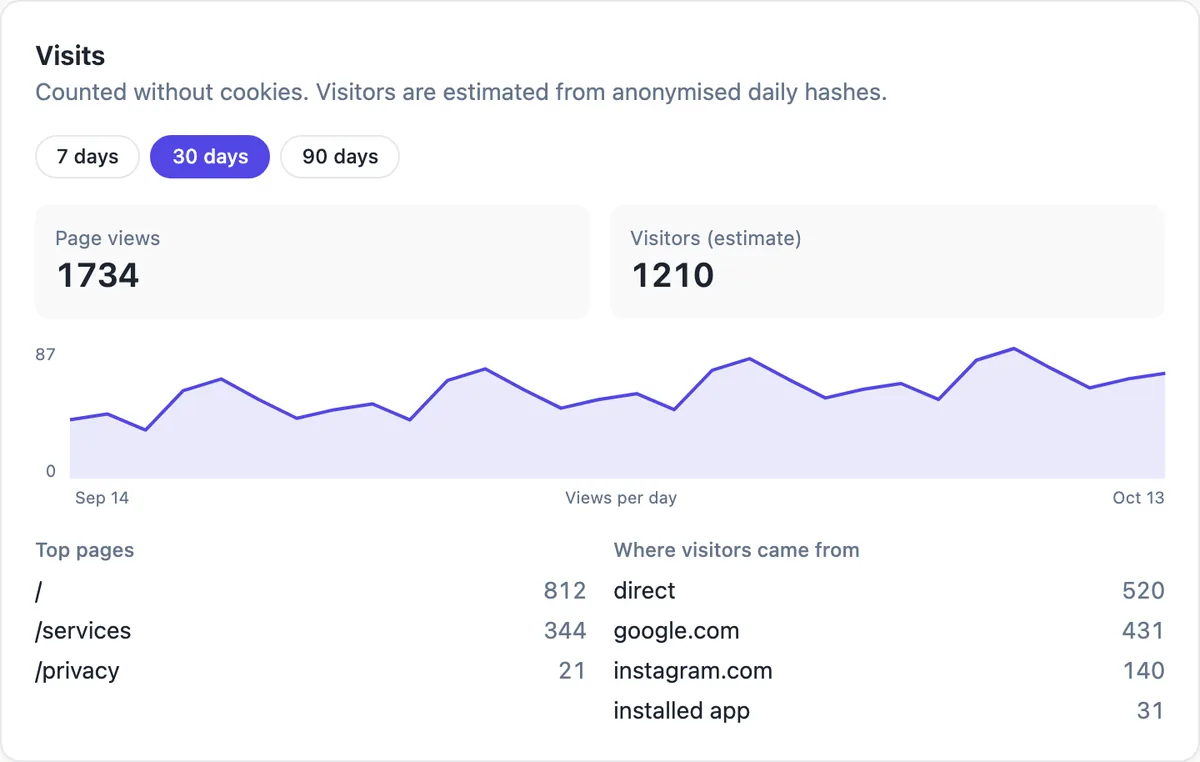
Each page load of the published site sends one small beacon with the page path and the site the visitor came from. Views per day, top pages and top referrers come straight from those. Visitors are estimated from a hash of the IP address that changes every day, so one person on two days counts twice, and two people behind one office connection may count once. The card says estimate for that reason.
No cookies, no banner
The counter sets no cookies and stores no IP address, only a salted daily hash, so it does not need a cookie banner for itself. It only runs on the published site, never in the builder preview, so your own editing does not inflate the numbers. You can switch counting off in the Analytics card if you prefer no counting at all.
Reading the referrers
Referrers show the host a visitor came from: google.com, instagram.com, a directory, or direct when there was none, which includes typed addresses, QR codes and many apps. A site installed to a phone home screen shows its visits as installed app. A spike from one host after a post tells you that post worked; nothing else needs to be measured to learn that.
Where you see it
The Visits card sits in site settings once a site has been published, with 7, 30 and 90 day ranges. Each live site card on your sites home shows the last 7 days of visits as a small chart, and an unread message count, so you can glance across all your sites at once.
What it does not tell you
There are no conversion funnels, no events, no time on page and no individual visitor paths. Top pages and referrers show the top ten. For campaign tracking or goals, add a Google Analytics measurement ID, which runs alongside the built in counter, and say so in your privacy page because Google Analytics can set cookies.
How it works, in three steps
Step 1
Publish the site
Counting starts with the first published visit; the Visits card appears in settings after the first publish.
Step 2
Pick a range
Switch between 7, 30 and 90 days to see totals, views per day, top pages and referrers.
Step 3
Act on it
Compare referrers before and after a post or flyer, and improve the pages that get visits but no messages.
Limits worth knowing
- Visitors are an estimate from a daily hash; the same person on two days counts twice.
- Top pages and referrers list the top ten.
- No events, funnels or time on page; use Google Analytics for those.
- Counting can be switched off per site in the Analytics card.
Questions people ask
Why do my visits look lower than Google Analytics?
They count differently. The built in counter records one view per page load from a beacon, while Google Analytics uses its own script and sessions, and ad blockers treat them differently. Use one tool for trends rather than comparing the two numbers directly; both show whether traffic is rising.
Do my own visits count?
Views in the builder preview never count, because the beacon is only added to published pages. Opening your published site in a browser does count like any visitor. If you check your live site many times a day, keep that in mind for a quiet site with small numbers.
Is it compliant with privacy laws?
The counter stores no cookies and no raw IP addresses, only a daily salted hash used for the visitor estimate, page paths and referrer hosts. That is a light footprint, but your obligations depend on where you operate, so describe it in your privacy page in plain words.
Can I see stats for one page?
The top pages list shows views for the ten most viewed pages in the range. There is no separate report per page beyond that. For deeper per page analysis, add Google Analytics, which tracks every page and lets you filter by it.
How quickly do new visits appear?
Each visit is added to the daily totals as the beacon arrives, so the numbers update as soon as you reload the card. Days with no visits are shown as zero, so gaps in the chart are real quiet days rather than missing data.
Does the counter slow my site down?
No. It is one small beacon sent with the browser's background send method after the page loads, with no extra script library and no third party request. Pages stay fully static and cacheable, which is part of why they load quickly on phones.
Make your own website
The button opens the generator with this use case already described. Change the wording to match yours, generate, then edit anything you like.
Create a website with OneCraftRelated pages
Landing page generator: one offer, one action
A landing page is a single page with a single job, such as joining a waitlist, booking a call or buying one product. A generator helps most when it builds the page around that one action and leaves out everything that competes with it.
Website from a template: open it as is, or let the AI rewrite it for you
Starting a website from a template means beginning with a finished design for your kind of business and replacing its words and photos with yours. It is the fastest route when a starter already looks right, and the AI can do the rewriting from your description if you prefer.
Add Google Analytics to your website: paste the G- ID and publish
Adding Google Analytics to a website means loading Google's tag on every page with your property's measurement ID, which starts with G-. On a site built here there is no code to paste, only the ID, and it runs beside the built in visit counter.
More finished work of this kind is on the website examples hub.
Written and checked by the OneCraft team. Last checked .