Websites
Website contact form: every enquiry in one inbox
A website contact form turns a visitor question into a message you can answer, without publishing your email address for spammers to collect. What matters is that every message reaches you, bots do not, and you can see at a glance which ones still need a reply.
Three field sets
A contact section can ask for name, email and message; name, email, phone and message; or a quote request with name, email, phone, job address and a What do you need done box. Name, email and message are required; the others are optional and say so. The button text, the thank you line and the message shown if sending fails are yours to write in the section panel.
Where each message goes
A sent form lands in the messages inbox for that site, a bell appears in the app, and you get an email laid out in two columns with every field, with the reply to address set to the visitor email so pressing reply answers them. If you turned on push notifications, your phone shows New message on your site as well.
Spam, without a puzzle
Every form carries a hidden field people never see; bots fill it, and those submissions are dropped without being stored. Submissions are also rate limited per visitor and per site. There is no picture puzzle for real visitors to solve, which keeps the form quick to fill on a phone. Forms only accept messages while the site is live.
Working through the inbox
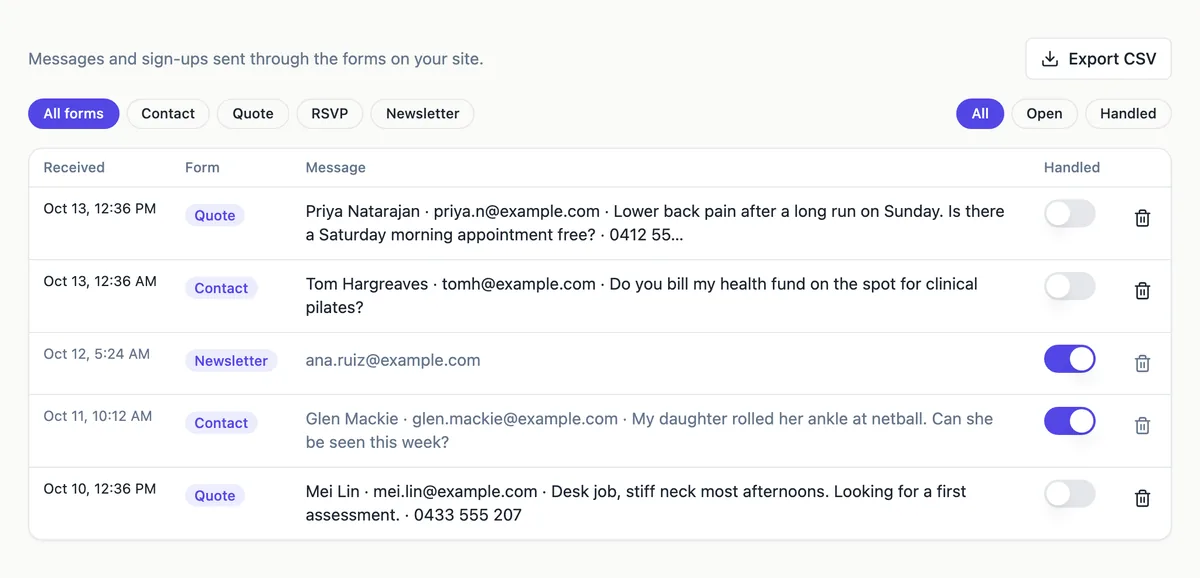
Chips filter by form type, contact, quote, RSVP or newsletter, and by open or handled. Opening a row shows every field. The handled switch marks it done, delete removes it, and Show older messages loads the next page. Export CSV downloads every message with fixed columns for received, type, handled, page, name, email, phone, address and message, ready for a spreadsheet or a CRM.
When to embed a longer form
The built in forms are short on purpose. For an application, a detailed brief or a booking with several choices, the form embed section shows a OneCraft form inside the page, with its own fields, logic and responses screen. Use the built in form for first contact and an embedded form when you need structured answers before you reply.
How it works, in three steps
Step 1
Add a contact section
Pick a layout: details beside the form, the form first, or a map beside the form.
Step 2
Choose the fields
Name, email and message; add phone; or use the quote request set with a job address.
Step 3
Publish and answer
Messages arrive in the inbox and by email; reply from your email and mark them handled.
Limits worth knowing
- A form takes up to 20 fields of up to 2,000 characters each.
- Forms only accept messages while the site is published and active.
- Submissions are rate limited: 10 a minute per visitor and 60 a minute per site.
- The CSV export covers up to 20,000 messages.
Questions people ask
Will I get an email for every message?
Yes. Each message that passes the spam check is stored and sent to your account email, with the visitor address as the reply to, so you can answer straight from your mail app. Check your spam folder the first time, and add the sending address to your contacts so later messages land in the inbox.
Can visitors see my email address on the site?
Only if you type it into the contact details beside the form. The form itself posts to the platform, not to your mailbox, so your address is never in the page code. Many businesses show a phone number and leave the email off, relying on the form.
What does handled mean?
It is your own marker for messages you have dealt with. Turning it on moves the message out of the open filter so the inbox shows only what is still waiting. It does not reply or notify the visitor. The handled column also appears in the CSV export.
Can I send messages to a team member instead?
Messages go to the account email of the site owner. To share them, forward from that inbox or set up a forwarding rule in your email. Exporting the CSV regularly is a simple way to hand a list of enquiries to someone else.
Is the form accessible?
Each field has a visible label, optional fields say they are optional, required fields are marked for browsers, and the result message is announced to screen readers. Keep the intro text short and specific, because it is the only instruction a visitor gets before typing.
Can I change what the thank you message says?
Yes. Each contact section has its own thank you message and its own failure message, shown in place of the form after sending. Use the thank you line to say when you will reply, such as within two working days, which reduces follow up emails.
Make your own website
The button opens the generator with this use case already described. Change the wording to match yours, generate, then edit anything you like.
Create a website with OneCraftRelated pages
Booking request form for your website: requests in, confirmations out
A booking request form lets a client ask for a time, and leaves the confirming to you. It suits businesses whose diary has judgement in it, such as the right practitioner, the length of a first visit or travel between jobs, where a self service calendar would book the wrong thing.
Website newsletter signup: collect the address, then take it to your email tool
A newsletter signup on a website asks for one thing, an email address, in exchange for a clear promise of what will arrive and how often. The form is the easy part; the promise and what you do with the list are what decide whether it grows.
Nonprofit website maker: show the mission, prove the impact, ask for help
A nonprofit website has to earn trust from people who will never visit in person: donors, volunteers, partners and the people it serves. It does that with a plain statement of the mission, numbers that show the work, one real story and a clear way to help.
More finished work of this kind is on the website examples hub.
Sources
Written and checked by the OneCraft team. Last checked .