Websites
Website data collections: lists your site reads and visitors fill
A data collection is a list of items with the same fields, such as menu dishes, class times or reservation requests, that a website reads from instead of having the content typed into the page. You edit the list like a spreadsheet and the site updates, or visitors add to it through a form.
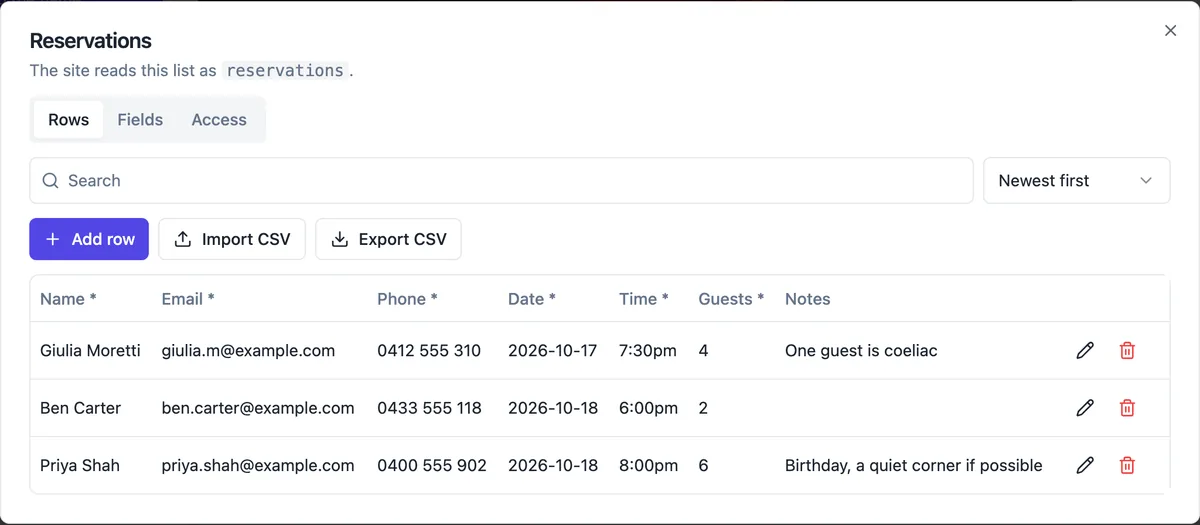
Two jobs for a collection
Content collections hold things the site shows: menu items, case studies, a class timetable, a projects gallery. You edit rows and the published site reads them, without a new publish. Submission collections hold things visitors send: reservation requests, enrolments, RSVPs. Visitors can add rows through a form but cannot read them, and each new row emails you and sends a push.
Fields and limits
Each collection has up to 30 fields of these types: text, rich text, number, yes or no, date, date and time, email, web address, image and choice. A site can have up to 20 collections of up to 10,000 rows each. Rows are coerced to the field types, unknown fields are refused, and choice fields offer up to 50 options.
Access in plain words
The Access tab sets two switches: whether the site can read the collection, and whether visitors can add to it. A list that visitors fill and that also shows email or text publicly needs an explicit confirmation, so private details are not exposed by accident. Visitor submissions carry a hidden spam field and a rate limit.
Editing like a spreadsheet
The Rows tab searches text, sorts by any field, adds and edits one row at a time, deletes, imports a CSV with a dry run that shows problems before anything is saved, and exports a CSV of every row. Image fields upload through the same picker as the rest of the builder.
How the AI uses them
In Code mode the AI can declare a collection, with its fields and access, and seed up to 50 starter rows while it writes the site, then write the page code that reads or submits to it. Collections belong to Code mode; the section builder uses its fixed sections and the messages inbox instead. The templates for a course, an event, a restaurant, an agency and a photographer all use collections.
How it works, in three steps
Step 1
Ask for it or add it
Ask the AI to keep the timetable in a collection, or open the Data tab and add one with its fields.
Step 2
Set access
Choose whether the site reads it and whether visitors can add to it.
Step 3
Edit rows
Add, import or edit rows; the published site reads content collections without a new publish.
Limits worth knowing
- Data collections are part of Code mode, which is on the paid plans.
- Up to 20 collections a site, 30 fields each and 10,000 rows per collection.
- Visitor submissions cannot include images.
- There is no database beyond collections and the store tables.
Questions people ask
Do I need to publish after editing a row?
No, for collections the site reads. The published site fetches public rows when a visitor opens the page, so an edited price or a new class appears straight away, with up to a minute of caching. Changes to the page design itself still need a publish.
Can visitors see what other visitors submitted?
Not unless you allow it. A submissions collection is private by default: visitors can add rows but the site cannot read them back. Making a list both writable and readable with text or email fields needs an explicit confirmation, because it would publish what people typed.
Can I use a collection in the section builder?
No. Collections are for Code mode sites, where the AI writes the code that reads them. The section builder has its own sections, store products and the messages inbox for forms. Ejecting a Sections site to Code makes collections available for it.
How do I get notified about new submissions?
Each visitor submission to a collection sends you an email with the values as fields and a reply to address taken from the first valid email in the row, plus a push notification if you turned push on. The row also appears at the top of the Rows tab.
Can I import an existing spreadsheet?
Yes. Import CSV matches columns to field names, ignoring case, spaces and dashes, and leaves other columns out. The dry run shows the first 50 rows with any problems before you confirm. Files up to 2 MB are accepted, which is thousands of rows of ordinary text, and the export uses the same column names so a list can round trip through a spreadsheet.
What is the difference between a collection and the store?
The store holds products with variants, stock, prices and checkout, and is used by every kind of site with the store on. A collection is a general list with your own fields and no payment. Use the store for anything sold, and collections for timetables, menus without ordering, case studies and requests.
Make your own website
The button opens the generator with this use case already described. Change the wording to match yours, generate, then edit anything you like.
Create a website with OneCraftRelated pages
Booking request form for your website: requests in, confirmations out
A booking request form lets a client ask for a time, and leaves the confirming to you. It suits businesses whose diary has judgement in it, such as the right practitioner, the length of a first visit or travel between jobs, where a self service calendar would book the wrong thing.
Push notifications for new website orders and messages
A push notification for a new order or enquiry means you see it within seconds, not when you next check email. For a pickup menu or a busy service business that is the difference between a customer waiting and a customer served.
Live preview while the AI builds your website
A live preview shows the site changing while the AI is still writing it, instead of a progress bar followed by a reveal. It is the fastest way to catch a misunderstanding early, before the AI spends the rest of the turn on the wrong idea.
More finished work of this kind is on the website examples hub.
Written and checked by the OneCraft team. Last checked .