Websites
Booking request form for your website: requests in, confirmations out
A booking request form lets a client ask for a time, and leaves the confirming to you. It suits businesses whose diary has judgement in it, such as the right practitioner, the length of a first visit or travel between jobs, where a self service calendar would book the wrong thing.
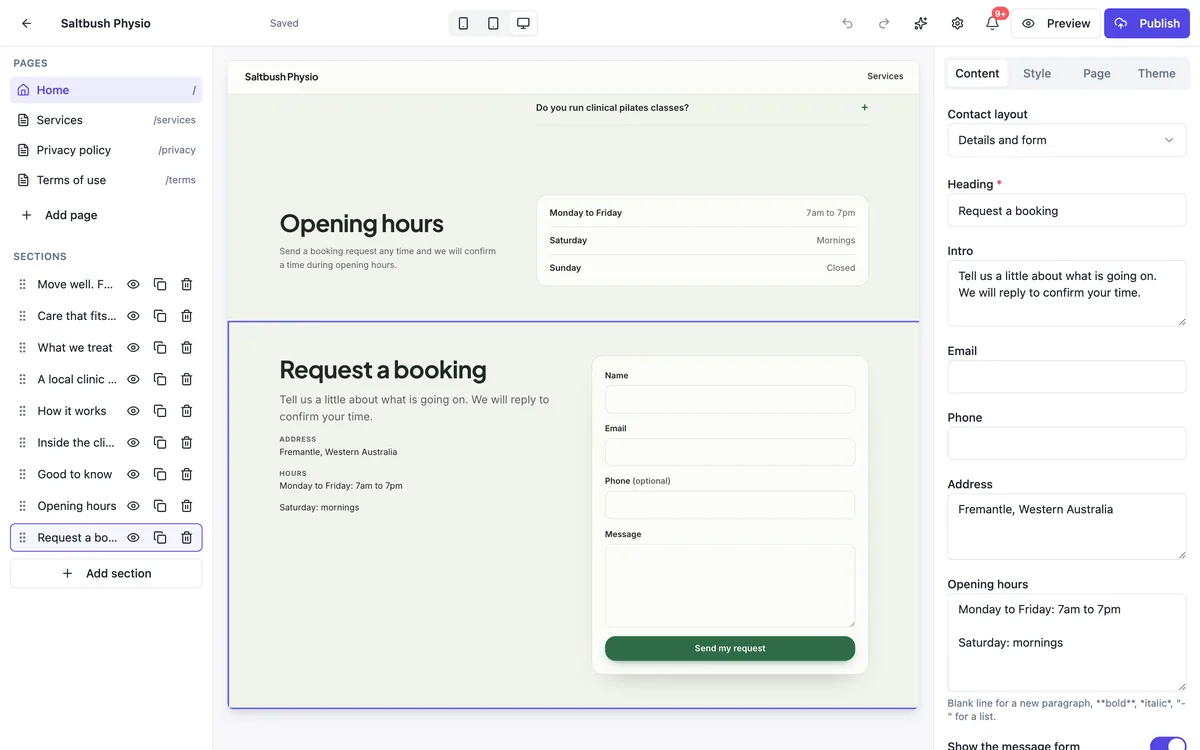
Three ways to take requests
The contact section with a request style heading and intro, as in the screenshot, collects name, email, phone and a message, or a job address with the quote request field set. The form embed section shows a longer OneCraft form, where you can ask for the service, preferred days and a time of day. In Code mode, a reservations data collection can take structured requests with a date and party size, as the restaurant template does.
Say how confirmation works
The intro under the heading is where you set expectations: we confirm by email within one working day, or we call you back to find a time. Put opening hours beside the form so people suggest times you are open. The thank you message can repeat the promise, so nobody thinks they have a confirmed slot when they have a request.
Make the request easy to act on
Ask for what you need to book in one reply: the reason for the visit, a phone number and two preferred times in the message. Each request arrives in the messages inbox and your email with the visitor address as reply to, so confirming is a single reply. Mark it handled once it is in your diary.
A sticky Book button on phones
On a long page the request form is far down. A call to action layout pins one short line and a Book button to the bottom of phone screens, linking to the form section. Put the same button in the hero. Visitors on phones make up most of the traffic for clinics and salons, so this matters more than the form design.
When you need real online booking
A request form has no calendar, no availability, no automatic confirmations, reminders or deposits. If clients should pick a free slot themselves, use a booking service and link to it from your buttons, or embed it if it offers an embed in Code mode. The request form stays useful for new clients who need a conversation first.
How it works, in three steps
Step 1
Add a contact section
Choose a layout with details beside the form or a map beside it, and title it Request a booking.
Step 2
Word the request
Set the field set, write how and when you confirm, and add your opening hours.
Step 3
Publish and confirm
Requests arrive in the inbox and by email; reply to confirm and mark them handled.
Limits worth knowing
- There is no calendar, availability check, automatic confirmation or reminder.
- Built in field sets are name, email, phone, job address and message; other fields need an embedded form.
- Deposits at booking are not taken by the form; a paid plan store can sell a fixed deposit product.
- Requests arrive only while the site is published.
Questions people ask
Is a booking request form enough for a clinic?
For many small clinics, yes, especially for new patients who need the right practitioner and appointment length. Existing patients who just want their usual slot may prefer self booking. A common setup is a request form for new clients and a link to a booking system for returning ones.
Can clients pick a date on the form?
The built in field sets have no date picker; clients write preferred times in the message. An embedded OneCraft form can include date and time fields, and in Code mode a data collection can have date fields with a proper picker, as the restaurant reservations template shows.
Can the form take a deposit?
No. A request form only collects details. If you want a deposit before confirming, reply with a payment link, or on a paid plan sell a fixed deposit as a store product and link to it from your confirmation. Explain the deposit on the page so it is not a surprise.
How do I stop people thinking the booking is confirmed?
Name the section Request a booking, not Book now, write how you confirm in the intro, and use the thank you message to say the request was received and when you will reply. Clear wording prevents no shows from people who assumed a slot was theirs.
Will I miss requests while I am busy?
Every request is stored in the inbox even if the email is missed, and you can turn on push notifications so your phone shows each new message. Check the open filter at the end of each day and mark requests handled as you confirm them.
Can I offer different forms for different services?
Yes. Put a contact section on each service page with its own heading and intro, such as Request a pilates assessment. The inbox records the page each message was sent from, which tells you the service even when the client does not mention it.
Make your own website
The button opens the generator with this use case already described. Change the wording to match yours, generate, then edit anything you like.
Create a website with OneCraftRelated pages
Website contact form: every enquiry in one inbox
A website contact form turns a visitor question into a message you can answer, without publishing your email address for spammers to collect. What matters is that every message reaches you, bots do not, and you can see at a glance which ones still need a reply.
Website data collections: lists your site reads and visitors fill
A data collection is a list of items with the same fields, such as menu dishes, class times or reservation requests, that a website reads from instead of having the content typed into the page. You edit the list like a spreadsheet and the site updates, or visitors add to it through a form.
Website newsletter signup: collect the address, then take it to your email tool
A newsletter signup on a website asks for one thing, an email address, in exchange for a clear promise of what will arrive and how often. The form is the easy part; the promise and what you do with the list are what decide whether it grows.
More finished work of this kind is on the website examples hub.
Written and checked by the OneCraft team. Last checked .