Proposals · Alternative
A Qwilr alternative for proposals clients accept and pay
Qwilr sends a proposal as an interactive web page the buyer scrolls, clicks to accept and pays on. OneCraft Proposals sends a private link to a paged proposal with a live pricing table, lets the client accept online, and turns the acceptance into an invoice with a Stripe pay link. The difference sits in the page itself and in the sales tooling around it, set out row by row below.
Updated , competitor details checked . Qwilr is a trademark of its owner. OneCraft is not affiliated with or endorsed by it, and every claim here comes from a public page or a source file.
Indunil Asanka · Co-founder
3 min read · Published
The short verdict
Qwilr suits a sales team that wants the proposal to be a rich web page with video, calendar links and ROI calculators, recurring payments and CRM sync. OneCraft suits a consultant or small firm that wants the proposal written from a brief, priced with optional extras and a deposit, accepted online with a certificate and paid by card into their own Stripe account.
| Feature | Qwilr | OneCraft |
|---|---|---|
| Starting price | Starter at $35 USD per user a month on annual billing, or $49 per user billed monthly, with 1 user included checked 2026-09-20 | A free plan at $0 with 150 AI credits a month, then $8, $25 and $125 a month; proposals capped at 3 on Free and 25 on Starter |
| Team pricing | Growth at $275 USD a month for 5 users and Scale at $750 USD a month for 10 users, both annual billing only, with extra users at $55 and $75 checked 2026-09-20 | Plans meter AI credits per account rather than seats; each new proposal uses 1 credit from the pool shared with decks, flyers and forms |
| What the buyer receives | An interactive page carrying dynamic content such as calendar links, videos, surveys, Looms and GIFs checked 2026-09-20 | A private tracked link to the proposal as pages, with the pricing table live for optional items and quantities, and a PDF download |
| Accept and pay | An Accept block that lets buyers accept in a single click, and QwilrPay for one off or recurring payments checked 2026-09-20 | Click to accept, then invoices are created and Pay now opens Stripe Checkout; one off card payments only |
| Engagement analytics | Analytics and notifications that track buyer interactions, with page history kept 60 days on Starter, 120 on Growth and unlimited on Scale checked 2026-09-20 | Opens and time viewed per link on an activity page, with a notification on the first open |
| AI generation | A Smart Proposal Engine and AI Prefill, both listed on the Scale plan only checked 2026-09-20 | On every plan: a brief of up to 8,000 characters with fields for the client, deliverables, price hints, deposit and validity |
| Tables and charts | Interactive pricing plans and quotes, plus interactive ROI calculators checked 2026-09-20 | One pricing table with optional items, editable quantities, tax, discounts and a deposit; no ROI calculator |
| Signing | Built in e-signature described as getting deals signed instantly with legally binding signatures checked 2026-09-20 | Click acceptance with a name, an email, a drawn signature and a consent box, recorded on a certificate page |
| Themes and branding | An asset library of reusable, approved content, with password protection and view limits on sharing checked 2026-09-20 | A brand kit and a colour palette picked in the generator |
| Reusable content | An asset library holding reusable approved blocks for the whole team checked 2026-09-20 | 18 starter templates and a duplicate action; no shared asset library |
| Integrations | HubSpot, Quickbooks, Salesforce, Slack, Zoho CRM, Zapier, Pipedrive, Stripe and Microsoft Dynamics 365 checked 2026-09-20 | Stripe through a connected account for payments; no CRM or accounting connector |
| Research behind the draft | Not itemised on the features page, which lists dynamic content, pricing, analytics and integrations checked 2026-09-20 | One web research step on the client's website or company name before writing |
Where Qwilr is better
The proposal is a real web experience
A Qwilr page carries video, calendar links, surveys and Looms inside the proposal, and it resizes for a phone as a web page. OneCraft shows the proposal as the same pages its PDF prints, with no video, booking or survey blocks. If the buying experience is part of the pitch, that is Qwilr's ground.
Recurring payments at acceptance
QwilrPay takes one off or recurring payments at the moment of acceptance. OneCraft takes one off card payments through Stripe Checkout, and a monthly fee is a line item rather than a subscription, so an ongoing retainer is billed with an invoice each month.
ROI calculators and deeper engagement
Qwilr's ROI calculators let a buyer model the return, and its page history runs 60, 120 or unlimited days by plan. OneCraft's table recalculates only for optional items and quantities, and its tracking reports opens and time viewed per link, not attention by section.
An approved content library and CRM sync
Qwilr keeps reusable approved blocks and connects to HubSpot, Salesforce, Pipedrive, Zoho CRM, Slack, Quickbooks and Stripe. OneCraft has 18 starter templates, no shared library and no CRM or accounting connector, so a sales team with governed content and pipeline automation is describing Qwilr.
Where OneCraft is different
Written from the brief, on every plan
AI drafting is not held back for a top tier: the free plan writes proposals too, up to its cap of 3. The brief, the client and the price hints become a full proposal with one pricing table, and a research step reads the client's website first when one is given.
A quote the client shapes
Optional items and editable quantities live in the pricing table itself, so the buyer ticks the extras they want and the totals move with them. The acceptance stores that exact selection, and the invoices are built from it.
Evidence on file
Click acceptance adds a certificate page with the signer, the time, the IP address, the browser and a content hash, and the accepted PDF with that page is emailed to both sides.
One account covers more than proposals
The same login writes the pitch deck, the flyer, the intake form and the promo video for the same engagement, metered from one credit pool. That breadth is the trade for the sales tooling Qwilr wraps around a single proposal page.
A finished example
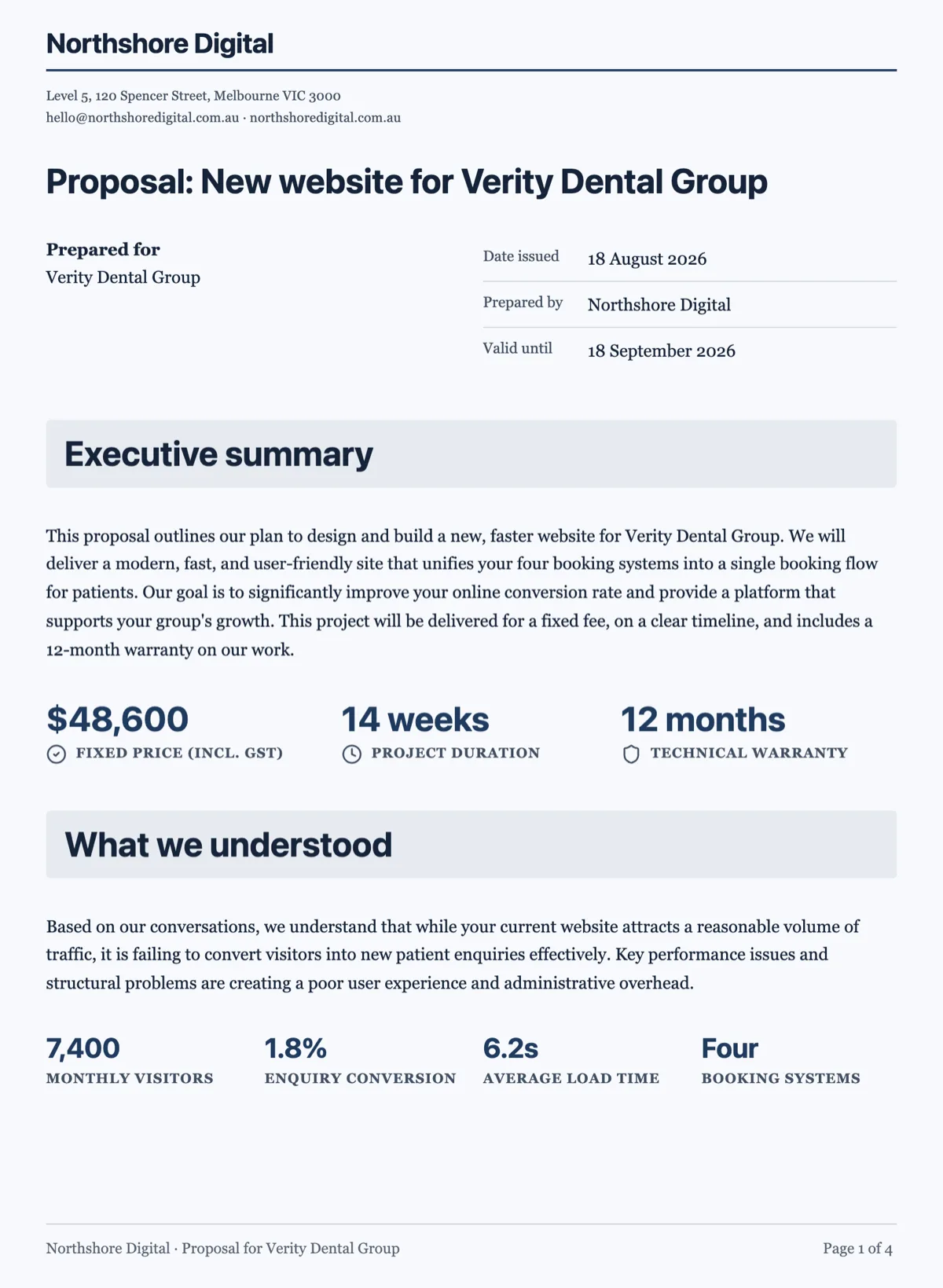 Business proposal template with the fixed fee on page oneMade with OneCraft, exactly as the generator and editor left it. Open the page for the full breakdown.
Pricing in plain terms
Qwilr's pricing page, checked 20 September 2026, lists Starter at $35 USD per user a month on annual billing or $49 billed monthly, Growth at $275 USD a month covering 5 users, and Scale at $750 USD a month covering 10 users, both larger plans annual billing only. The Smart Proposal Engine and AI Prefill sit on Scale. OneCraft's pricing page lists Free at $0 with 150 AI credits a month, Starter at $8, Pro at $25 and Pro Plus at $125, metered by credits rather than seats, with proposals capped at 3 on Free and 25 on Starter and a platform fee on card payments of 2% on Starter, 1% on Pro and 0.5% on Pro+.
Moving a proposal across
There is no import from Qwilr, because a Qwilr page is a web document with interactive blocks. The practical move is to take the words and the prices: paste the substance into the generator brief, put the fees in the price hints so they become line items exactly, and let the proposal be written fresh. Accept blocks, calculators and embedded media do not carry over, and pages already accepted should be archived where they are.
What could not be checked
Qwilr's pricing page prices in US dollars and its plan cards list features by tier, so per plan placement above is taken from those cards. The features page does not itemise PDF or document export, so that row says exactly what the page says rather than assuming parity.
How the OneCraft side was verified
Every OneCraft cell names a row in an internal fact ledger checked against the product's source: the 8,000 character prompt cap, the client research step, the pricing table columns, the tracked link heartbeat, the acceptance certificate, the Stripe Connect pay link and the plan caps. The absences, a CRM connector, a content library, recurring payments and Word export, are ledger entries too.
Who should stay with Qwilr
Stay with Qwilr if the proposal should be a rich web page with video and booking blocks, if buyers start a recurring plan at acceptance, if ROI calculators help close, or if approved content blocks and a CRM sync run your sales process. This page is for the sender who wants the proposal written fast, accepted with evidence and paid by card.
Questions people ask
Can a client accept a OneCraft proposal online?
Yes. The client opens a private link, reviews the pages, picks any optional items and presses Accept, typing a name, drawing a signature and ticking a consent box. Acceptance creates the invoices, and the accepted screen offers a Pay now button for the deposit or the total.
Is there anything like Qwilr's interactive pricing?
Yes, within one pricing table. Items can be optional, ticked by default or not, and quantities can be left editable between a minimum and a maximum, so the buyer builds the quote and the totals follow on screen. There are no ROI calculators and no separate plan tiers to switch between beyond those items.
Do I get told when the client opens the proposal?
Yes. A notification arrives on each link's first open, and the activity page shows every open, the total time viewed and the outcome per recipient. Time viewed comes from a heartbeat sent every 15 seconds while the page is visible. There is no per section attention report or page history of the kind Qwilr keeps.
Can I reuse a proposal as a template?
Yes, by duplicating it, which copies the document, the pricing settings and the items into a new draft. There are also 18 starter templates for common services and trades. What is missing is a shared asset library of approved blocks for a whole team, which is why Qwilr holds that row.
What file does the client actually receive?
A private link to the proposal as pages, and a PDF rendered on the server that matches those pages. Invoices have their own PDF and pay page. There is no Word export, so a counterparty who redlines in Word needs the change made in the builder and the proposal sent again as a new version.
Can the client pay a monthly retainer automatically?
No. Payments are one off card payments through Stripe Checkout against an invoice. A monthly fee goes in the proposal as one item with month as its unit, and each month is billed with its own invoice. QwilrPay's recurring payments are the better fit when the retainer itself should charge automatically.
Try the proposal side of OneCraft
The button opens the generator with a starting prompt already filled in. Change the wording to match your own work before you run it.
Create a proposal with OneCraftMore comparisons
- A PandaDoc alternative for proposals and quotesOneCraft as a PandaDoc alternative: AI proposals with optional items, tracked links, online acceptance and Stripe pay links, and where PandaDoc is better.
- A Better Proposals alternative with AI drafting and pay linksA Better Proposals alternative that writes the proposal from a brief, tracks each link and takes deposits through Stripe, with their stronger features named.
- A Canva Docs alternative for contracts and reportsA Canva Docs alternative for contracts and reports: page based layout, numbered clauses, charts and certified signing, with Canva's template library named.
Step by step in the builder: Send a proposal and get paid.
Written and checked by the OneCraft team. Last checked .