Proposals · Alternative
A PandaDoc alternative for proposals and quotes
PandaDoc joins a document editor, a content library, pricing tables, payments and e-signature into one sales workflow tied to a CRM. OneCraft Proposals writes the proposal from a brief with one pricing table, sends a tracked link, lets the client accept online and collects payment through Stripe, and stops before the CRM. The table below draws that line feature by feature.
Updated , competitor details checked . PandaDoc is a trademark of its owner. OneCraft is not affiliated with or endorsed by it.
Nuwan Madhusanka · Co-founder
4 min read · Published · Updated
The short verdict
PandaDoc suits sales teams running proposals through a CRM, with a content library, approvals and a product catalog behind the pricing table. OneCraft suits a freelancer or small firm that wants each proposal written by AI from a brief, priced with optional extras and a deposit, accepted online and paid into their own Stripe account, without per seat sales tooling around it.
| Feature | PandaDoc | OneCraft |
|---|---|---|
| Creating a document | A drag and drop editor with an AI document assistant and AI data extraction checked 2026-09-02 | Written by AI from a brief of up to 8,000 characters plus fields for the client, deliverables, price hints, deposit and validity, or started from one of 18 templates |
| Components | Pricing tables, smart content, content locking and a product catalog among listed features checked 2026-09-02 | One pricing table per proposal with item, quantity, unit price, tax, discount and amount columns, and group labels for stages of work |
| Themes and branding | Custom branding and themes, with email white labeling listed separately checked 2026-09-02 | A brand kit and a colour palette picked in the generator |
| Pricing tables | Interactive pricing tables with line items, units or quantities, discounts and taxes checked 2026-09-02 | Optional items the client ticks, quantities the client changes between a minimum and a maximum, tax, discounts and a percent or fixed deposit |
| Templates and content library | A content library for layouts, snippets and branded assets, and a 1000+ template gallery checked 2026-09-02 | 18 starter templates, 12 proposals and 6 quotes; no library of approved snippets |
| E-signature | Legally binding e-signatures meeting ESIGN and eIDAS requirements, with an audit trail and a digital certificate checked 2026-09-02 | Click acceptance with a name, an email, a drawn signature and a consent box, recorded on a certificate page |
| Approvals | Approval workflows, listed under the Business plan checked 2026-09-02 | No approval workflow |
| View analytics | Document tracking that shows who has opened, viewed and signed, with recipient analytics checked 2026-09-02 | Opens and time viewed for each tracked link on an activity page; no per page attention report |
| CRM integrations | Embedded integrations with HubSpot, Salesforce, Pipedrive and monday.com checked 2026-09-02 | No CRM connector; clients are a list inside Proposals |
| Payment on signing | Clients can pay as documents are signed, through Stripe, ACH, PayPal and others checked 2026-09-02 | Acceptance creates the invoices, and a pay link takes cards through Stripe Checkout into the owner's connected Stripe account; Stripe only, on paid plans |
| Export | Not itemised on their features page checked 2026-09-02 | PDF for proposals and invoices, rendered on the server; no Word export |
| Research grounding | AI data extraction and an AI document assistant are the listed AI features checked 2026-09-02 | One web research step on the client's website or company name before writing |
Where PandaDoc is better
The content library and template gallery
PandaDoc stores approved layouts, snippets and branded assets, and its gallery claims more than a thousand templates. OneCraft has 18 starter templates and no library of approved blocks. A sales team assembling twenty proposals a week from vetted sections is describing PandaDoc, not OneCraft.
A product catalog behind the pricing
PandaDoc wires its pricing tables to a product catalog, so a rep picks items rather than typing them. In OneCraft the items come from the price hints in the brief or are typed in the Pricing panel for each proposal, and nothing pulls from a catalog.
Approvals before sending
On the Business plan, PandaDoc routes documents through approvers, with conditional rules on value and discount. OneCraft has no approval step of any kind; whoever holds the account can send. Firms with deal desk controls cannot run them here.
CRM and more ways to pay
PandaDoc embeds in HubSpot, Salesforce, Pipedrive and monday.com, and takes payment through Stripe, ACH, PayPal and others as the client signs. OneCraft connects to no CRM and takes cards through Stripe Checkout only, and a free account cannot take card payments at all.
Where OneCraft is different
The proposal is written from the brief
A brief plus fields for the client, the deliverables, the prices, the deposit and the validity becomes a full proposal with exactly one pricing table and the terms as numbered clauses. Every price given in the brief becomes a line item at exactly that amount.
The client chooses the options
Optional items show a checkbox in the client's view and editable quantities show a control held between a minimum and a maximum. The totals follow each choice, and the acceptance records exactly the selection the client made.
Acceptance that leaves evidence
Click acceptance captures a name, an email, a drawn signature and a consent box, then adds a certificate page with the time, IP address, browser and a hash of the content.
From accepted to paid
Acceptance creates the invoices, a deposit invoice due that day when there is a deposit, and the pay link takes the card through Stripe Checkout into the owner's connected account. Reminders then follow up unpaid invoices on a gentle, standard or firm schedule.
A finished example
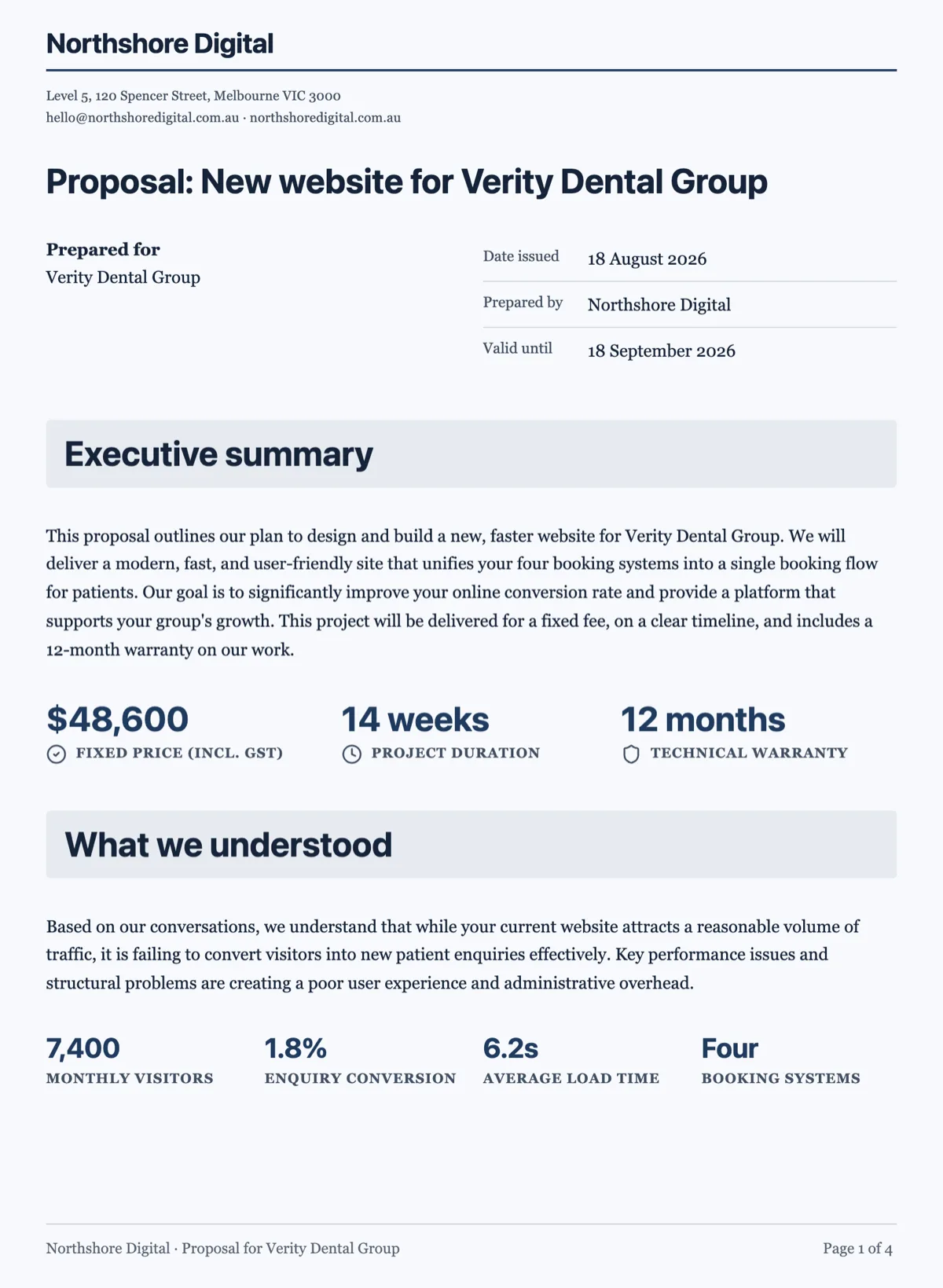 Business proposal template with the fixed fee on page oneMade with OneCraft, exactly as the generator and editor left it. Open the page for the full breakdown.
Pricing in plain terms
PandaDoc's pricing page, checked 2 September 2026, lists a Free plan with 60 documents a year, Starter at $19 USD per seat a month billed annually, and Business at $49 USD per seat a month billed annually, with approvals, CRM integrations, content library and bulk send in the Business tier. OneCraft's pricing page lists Free with 100 AI credits a month, Starter at $8 a month and Pro at $25, priced per account rather than per seat. Proposals have their own cap, 3 on the free plan, 25 on Starter and unlimited from Pro, and card payments carry a platform fee of 2% on Starter, 1% on Pro and 0.5% on Pro+, on top of Stripe's own fees.
Moving across
A PandaDoc proposal does not import. The workable move is to take its substance, the scope, the line items and the prices, and write them into the generator brief and price hints, where every price given becomes an item at exactly that amount. Starting from the closest of the 18 templates and editing it works too. Signed documents should be downloaded from PandaDoc and archived as they are.
What we could not check
PandaDoc's site blocks simple automated fetches, so its pages were read with a full browser; every claim above comes from a page that actually rendered. Its export formats are not itemised on the features page, so the table says so. Per plan placement of some features is taken from the plan cards on the pricing page, and anything ambiguous there was left out.
How the OneCraft side was verified
Every OneCraft cell names a row in an internal fact ledger checked against the product's source code: the pricing table columns, the item fields and their limits, the tracked links and their heartbeat, the acceptance certificate, the Stripe Connect pay link and the reminder presets. The absences, a CRM connector, approvals, a content library and Word export, are ledger entries too.
Who should stay with PandaDoc
Stay with PandaDoc if proposals run through a CRM, if a content library and approvals keep a sales team on approved wording, if quotes pull from a product catalog, or if clients need to pay by ACH or PayPal. OneCraft Proposals covers writing, pricing, acceptance and card payment for a small business, not that sales machinery.
Questions people ask
Can I make a proposal template in OneCraft?
There are 18 starter templates, twelve proposals and six quotes for trades and services, each with its sections in order and three to six sample items. A finished proposal can also be duplicated as the start of the next one. What there is not is a library of approved snippets that a team inserts block by block, which is where PandaDoc's content library holds the row.
Can the client accept and pay in one step?
Close to it. The client accepts in the browser, and acceptance creates the invoices at once: with a deposit, a deposit invoice due that day plus a draft balance invoice. The accepted screen offers a Pay now button that opens Stripe Checkout, and the money lands in the owner's connected Stripe account. Card is the only method, where PandaDoc also lists ACH and PayPal.
Does OneCraft track when a client opens the proposal?
Yes. Every recipient gets a separate tracked link, and the activity page shows when each link was opened, how long it was viewed and whether the client accepted or declined. An open is counted at most once per link every 30 minutes. There is no per page attention or engagement score, which is where PandaDoc's recipient analytics go further.
Do the pricing tables calculate?
Yes. Each item has a quantity, a unit price, a tax rate and a discount, totals are worked out in whole cents, and the table shows the subtotal, the tax, the total, the deposit due now and the balance. Items can be optional and quantities can be left for the client to change within limits. What is missing is a product catalog to pull items from.
Is there a content library?
No. Nothing stores approved paragraphs, images or clause blocks for a team to insert. Consistency comes from the starter templates, the brand kit and a good brief kept for reuse, since the prices in a brief become items exactly as typed. If legal or marketing must lock wording across a team, PandaDoc's library and content locking are the right tools.
Can I export to Word?
No. Proposals and invoices download as PDF, rendered on the server so the file matches the pages the client saw. If a counterparty redlines in Word, that is a real limitation; the change is made in the builder and the proposal is sent again, which saves it as a new version beside the earlier one.
Try the proposal side of OneCraft
The button opens the generator with a starting prompt already filled in. Change the wording to match your own work before you run it.
Create a proposal with OneCraftMore comparisons
- A DocuSign alternative for small businessOneCraft e-signature as a DocuSign alternative for small business: fields, signing order, identity checks, audit trail and certified PDFs, with the gaps named.
- A Jotform alternative for forms, PDFs and signingOneCraft as a Jotform alternative: classic and conversational forms, fillable PDFs, e-signature and AI generation, with Jotform's breadth stated honestly.
What the module actually does, feature by feature: the AI proposal generator page.
Step by step in the builder: Send a proposal and get paid.
Written and checked by the OneCraft team. Last checked .