E-signatures · Alternative
A DocuSign alternative for small business
DocuSign is the enterprise standard and priced like one, with envelope allowances per plan. For a business sending a handful of agreements a month, the real question is which parts of that standard you actually use, and this page answers it feature by feature with both vendors' pages quoted.
Updated , competitor details checked . DocuSign is a trademark of its owner. OneCraft is not affiliated with or endorsed by it.
Nuwan Madhusanka · Co-founder
3 min read · Published
The short verdict
DocuSign suits businesses that send the same template to many people, need CRM and API integration, or must verify a signer's government ID. OneCraft suits a small business sending a few agreements a month that wants certified PDFs, a hash chained audit trail and signing built into the account that generated the contract in the first place.
| Feature | DocuSign | OneCraft |
|---|---|---|
| Envelope allowance | Personal: five envelopes a month; Standard and Business Pro: 100 envelopes per user per year, as served in AUD checked 2026-09-02 | No envelope allowance is listed on the pricing page; an envelope holds up to 25 recipients and 500 fields |
| Field types | Send, sign and track with configurable workflows, web forms and conditional logic among listed features checked 2026-09-02 | 10 field types, from signature and initials to a structured signature block with name, title, company and date lines |
| Identity checks | One time passcodes by SMS or phone call, knowledge based authentication, and government ID with a biometric check checked 2026-09-02 | Email link, an access code shared out of band, or an emailed one time code; 5 failed attempts locks the recipient for 15 minutes |
| Reminders | Automated email reminders for signers, with deadline notifications that expire untouched documents checked 2026-09-02 | OneCraft has no automatic reminders. The sender resends manually, which rotates the link and kills the old one |
| Envelope expiry | A sender can set a contract expiration date for an envelope checked 2026-09-02 | Fixed at 30 days from creation. No setting changes it, and expired links return a clear message |
| Templates and bulk send | Reusable templates that save fields and routing; Bulk Send is included in eSignature Business Pro checked 2026-09-02 | OneCraft does not have reusable templates or bulk send. Each envelope is prepared from its PDF |
| Audit evidence | Digital signatures and certificates listed among eSignature features checked 2026-09-02 | 18 audit event types in a hash chained log, verified on screen, plus a three section certificate of completion |
| PDF certification | The technical signing profile is not itemised on their product page checked 2026-09-02 | Signed PDFs are PAdES certified with DocMDP P=1, so later edits break the seal; RFC 3161 timestamping is supported but off by default |
| Signing order | Configurable workflows with conditional routing checked 2026-09-02 | Sequential or parallel per envelope: sign in order invites one signer at a time and blocks out of turn signing |
| In-person signing | Not itemised on their product page checked 2026-09-02 | The owner can host an in person signing session when it is that recipient's turn, with the email check waived for the session |
| Integrations and API | 900+ integrations claimed, naming Salesforce, Microsoft and Google, with a developer API checked 2026-09-02 | No public API. Envelopes arrive from a PDF upload or straight from generated documents and form responses in the same account |
| Payment at signing | Docusign Payments, included in Business Pro and Enterprise Pro plans checked 2026-09-02 | OneCraft does not collect payment at signing |
| Document intake | Not itemised on their product page checked 2026-09-02 | PDF upload to 25 MB; rotated or password protected PDFs are rejected at upload with the reason |
Where DocuSign is better
Verifying who is signing
DocuSign Identify offers SMS and phone passcodes, knowledge based authentication and government ID checks with a biometric challenge. OneCraft's strongest check is an emailed one time code. When a counterparty's identity genuinely needs proving, DocuSign has tools OneCraft does not.
Templates and bulk send
A DocuSign template saves fields, routing and settings for reuse, and Bulk Send delivers one document to many recipients on Business Pro. OneCraft prepares every envelope from its PDF, one at a time. HR teams onboarding cohorts or landlords with a standard lease will feel this gap weekly.
Reminders and expiry you control
DocuSign automates signer reminders and lets the sender set the expiration date. OneCraft's expiry is fixed at 30 days and nudging a signer means pressing resend yourself. For long running deals with slow counterparties, DocuSign's automation does the chasing.
Integrations and an API
More than 900 integrations by their product page's count, with Salesforce, Microsoft and Google named, plus a developer API. OneCraft's signing has no public API and integrates only with its own document and form generators. Anything CRM driven belongs with DocuSign.
Collecting payment with the signature
Docusign Payments takes payment as part of signing on Business Pro and Enterprise Pro plans, through gateways including Stripe. OneCraft cannot charge anyone at signing, so deposits with the contract require a separate step.
A long list of compliance certifications
DocuSign's trust pages name ISO 27001, SOC 2 Type II, PCI DSS and many more. OneCraft quotes no equivalent certification list, and regulated buyers who must tick those boxes should weigh that plainly.
Where OneCraft is different
The contract and the signature live together
A document generated in the same account carries its signature block into an envelope automatically, each party becoming a recipient, and a form response can be sent for signing the same way. There is no exporting from one product and importing into another.
Certified PDFs on every plan
Every completed envelope is PAdES certified with DocMDP P=1, meaning any later edit breaks the seal a PDF reader can check, and certification failure stops the envelope rather than shipping an unsealed file. This is the default behaviour, not an upgrade.
An audit trail you can verify on screen
The 18 event log is hash chained, each event sealing the one before it, and the envelope page shows whether the chain verifies. The certificate of completion lists the envelope, every signer's verification method and IP, and the full event log.
Priced for a handful of envelopes
OneCraft's pricing page lists no envelope allowance on any plan; sending for signature is part of the account, from the free tier up. DocuSign's Personal plan caps at five envelopes a month, which is exactly the small business pain this page exists for.
A finished example
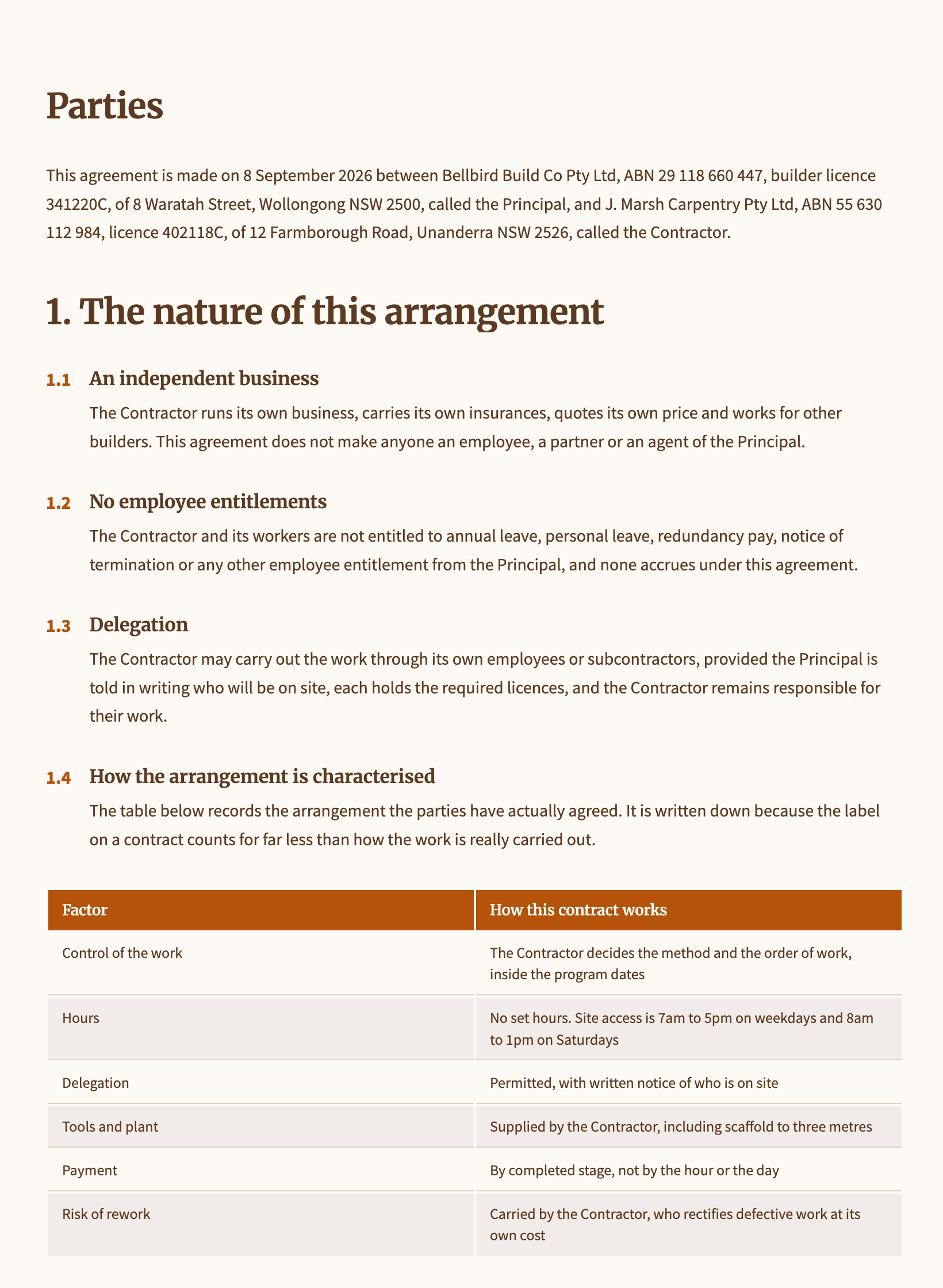 Independent contractor agreementMade with OneCraft, exactly as the generator and editor left it. Open the page for the full breakdown.
Pricing in plain terms
DocuSign's pricing page, checked 2 September 2026 and served in Australian dollars for our region, lists Personal at AU$15 a month billed AU$180 annually with five envelopes a month, Standard at AU$37 a month per user, and Business Pro at AU$59 a month per user, the latter two with 100 envelopes per user per year. Prices vary by region, so check the page in your currency. OneCraft's pricing page lists Free, Starter at $8 a month and Pro at $25, metering AI credits; it lists no envelope allowance for signing.
Moving across
There is no template migration, because OneCraft has no templates to migrate into. Moving is as simple and as manual as it sounds: upload the PDF you already send, place the fields, add recipients and their verification, and send. Completed DocuSign envelopes stay in DocuSign; download the signed PDFs and certificates you need before closing an account.
What we could not check
Whether DocuSign's identity verification features cost extra or sit in specific plans is not stated on the Identify page we fetched, so it is not claimed either way. USD prices were not obtainable from our region's fetch, which is why the pricing section names the currency it saw. In-person signing and PDF intake rules are not itemised on DocuSign's product page, so those cells say so rather than assuming parity.
How the OneCraft side was verified
Every OneCraft cell names a row in an internal fact ledger verified against the signing service's source code: the 25 recipient and 500 field caps, the scrypt hashed access codes and 15 minute lockout, the 18 audit event types, the DocMDP P=1 certification and the timestamping default. The absences, templates, bulk send, reminders, custom expiry, API and payments, are recorded the same way.
Who should stay with DocuSign
Stay with DocuSign if you send templated documents in volume, need bulk send, automatic reminders or custom expiry, verify identities with SMS or government ID, collect payment at signing, or integrate with a CRM through an API. OneCraft's signing covers none of that; its case is the small sender who wants strong evidence without the enterprise machinery.
Questions people ask
Are OneCraft signatures legally binding?
OneCraft produces standard electronic signatures with strong evidence: an identity check per recipient, a hash chained audit log, a certificate of completion and a PAdES certified PDF. Whether an electronic signature binds in your situation depends on your jurisdiction and document type, and the questions page on e-signature legality walks through it.
How many people can sign one document?
Up to 25 recipients per envelope, with up to 500 fields between them. Signing can run in parallel or in a strict order, where only the next signer is invited and anyone out of turn is blocked. Each signer gets their own verification method, from a plain email link up to an emailed one time code.
Can I set my own expiry date?
No. Every envelope expires 30 days after creation, a nightly sweep marks outstanding recipients expired, and an expired link returns a clear message. DocuSign lets the sender choose the expiration date, and if your deals run longer than 30 days that difference matters.
Are there automatic reminders?
No. Chasing a signer is a manual resend, which also rotates the signing link so the old email dies. DocuSign automates reminders on a schedule you set. For a few envelopes a month the manual nudge is fine; at volume it is not, and this page counts that for DocuSign.
Can I reuse a document as a template?
No. There are no reusable templates; each envelope starts from its PDF and fields are placed fresh. The partial offset is that a document generated in OneCraft carries its signature block into the envelope automatically, so the repetitive part can sit in the generator prompt instead.
Is there an API?
No public API exists for OneCraft signing. Envelopes are created in the app, or automatically from the account's own generated documents and submitted form responses. DocuSign's developer platform and 900+ integrations are the right answer for anyone wiring signatures into other systems.
Does OneCraft verify government ID?
No. The three verification methods are the emailed link itself, an access code you share with the signer out of band, and a six digit emailed one time code, with lockout after five failed attempts. DocuSign Identify adds SMS codes, knowledge based checks and photo ID with a biometric match.
Try the signing flow side of OneCraft
The button opens the generator with a starting prompt already filled in. Change the wording to match your own work before you run it.
Send a document for signingMore comparisons
- A PandaDoc alternative for proposals and quotesOneCraft as a PandaDoc alternative: AI proposals with optional items, tracked links, online acceptance and Stripe pay links, and where PandaDoc is better.
- A Jotform alternative for forms, PDFs and signingOneCraft as a Jotform alternative: classic and conversational forms, fillable PDFs, e-signature and AI generation, with Jotform's breadth stated honestly.
What the module actually does, feature by feature: the E-signature software page, and the e-signatures maker page.
Step by step in the builder: Send a document for e-signature, then Add e-signatures with multiple signers.
Written and checked by the OneCraft team. Last checked .