Classic form
Dog boarding booking form with feeding and medication tables
A dog boarding booking form has to prove each dog is vaccinated and tell the kennel exactly how to feed and medicate it, because staff will do both without the owner there. This one takes the certificate as an upload, sets feeding and medication out as tables, and has the owner sign an emergency vet consent with a dollar limit.
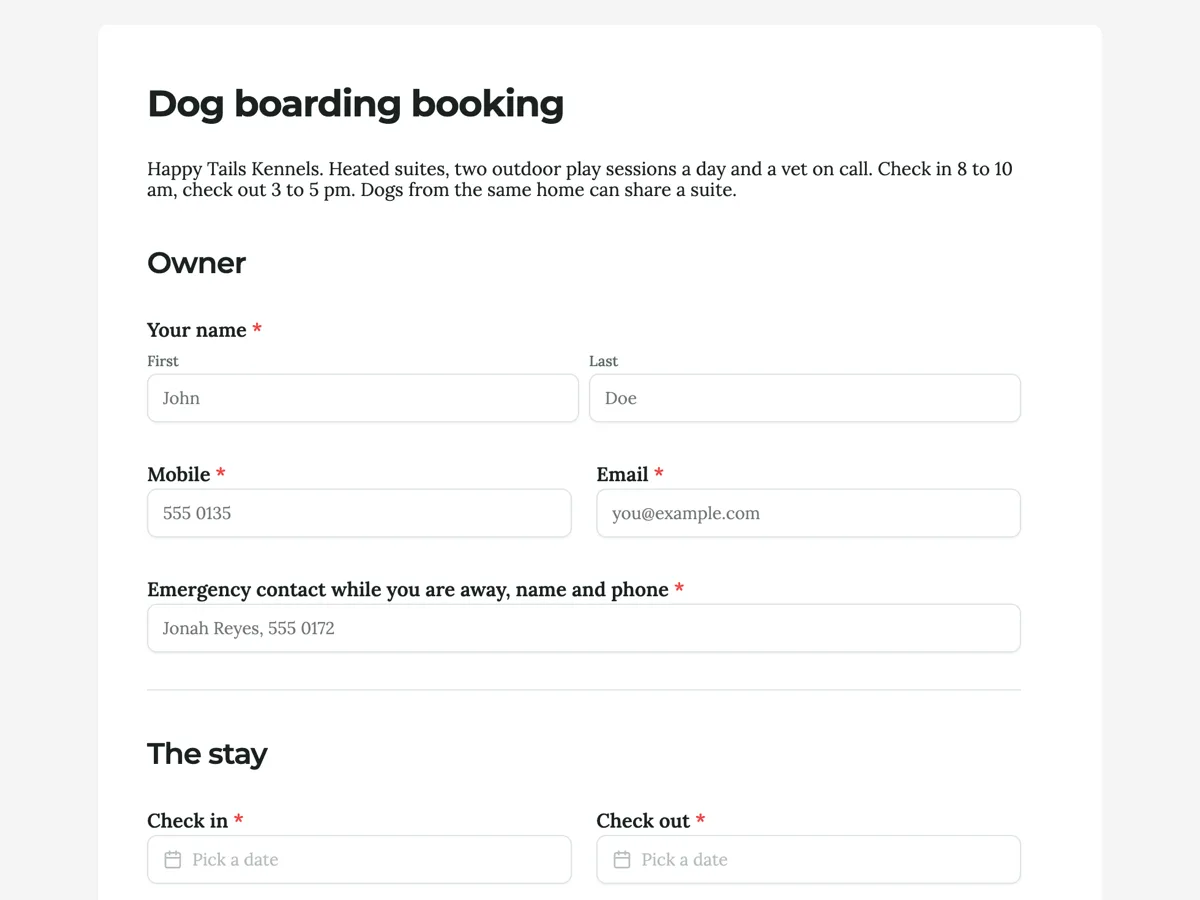
The form itself
A static copy of the finished form, exactly as it renders. Nothing here can be filled in or submitted, so read it as a reference and build your own from the button above.
Every field, and what it collects
The complete field list, in the order respondents meet it.
- Your nameNameRequired
- MobileShort textRequired
- EmailShort textRequired
- Emergency contact while you are away, name and phoneShort textRequired
- Check inDateRequired
- Check outDateRequired
- Dogs stayingTableRequired
- Columns: Name · Breed · Age
- Vaccination certificateFile uploadRequired
- Core vaccinations and kennel cough must be current on the check in date and given at least 14 days before it. A photo of the certificate or a PDF from your vet.
- FeedingTableRequired
- Columns: Dog · Food and amount · Time
- MedicationTable
- Columns: Dog · Medicine and dose · When given
- Walks on top of the two play sessionsSingle choiceRequired
- Options: None, play sessions are enough · One 30 minute lead walk a day, $12 · Two 30 minute lead walks a day, $20
- Your usual vet, clinic and phoneShort textRequired
- Emergency vet treatmentMultiple choiceRequired
- Options: I consent to emergency vet treatment as described above
- Owner signatureSignatureRequired
Owner
The stay
Care
Consent
What each field on this form collects
Your name, mobile and email identify the owner, and the emergency contact is a required line for someone reachable while they travel. Check in and check out are two dates on one row. Dogs staying is a three row table with name, breed and age. Vaccination certificate is a required upload of images or PDF, and its description, which shows on the published form, states the 14 day rule. Feeding is a three row table of dog, food and amount, and time. Medication is an optional two row table of dog, medicine and dose, and when given. Walks is a radio of three priced options. Your usual vet takes the clinic and phone. A paragraph sets out the emergency rule, followed by a required consent tick and the owner signature.
Why feeding and medication are tables
Kennel staff feed thirty dogs in a morning, from labelled bags, against a care sheet. A long text box gives them a paragraph to interpret; a table gives them a row per meal with the dog, the amount and the time, which is exactly how the care sheet is laid out. The same goes for medication, where the dose and the time must not be misread. Each table renders a fixed number of rows and cannot grow, so the form uses three feeding rows and two medication rows, enough for most homes, and the paragraph above explains how to fill them.
How to adapt this form
A cattery replaces walks with a litter preference and adds an indoor only question, and swaps kennel cough for the feline vaccinations. A dog day care keeps the dog table and the vaccination upload, removes the dates for a days of the week checkbox, and adds a temperament assessment booking. A home pet sitter adds the house access arrangements and an alarm code question, and moves the emergency consent onto the sitter's own vet.
What makes this form work
Care instructions arrive as a care sheet
Feeding and medication are tables with the dog, the amount or dose and the time in their own columns. Staff read a row per meal rather than a paragraph, which is how a kennel actually feeds thirty dogs before 9 am.
Proof of vaccination before the door
The certificate is a required upload of an image or PDF, with the 14 day rule in its description. Missing kennel cough is found when the booking lands, not when the owner is standing at reception with a suitcase.
Emergency consent with a ceiling
The paragraph names who is called first, then second, and caps treatment the kennel may approve at $1,000 per dog. The tick and the signature sit directly under it, so the rule is agreed before the dog is in the building.
Questions people ask
Why is the vaccination certificate a required upload on a dog boarding form?
Because kennel cough and the core canine diseases spread fastest where many dogs share air and play areas, and the kennel has to see proof before check in, not hear it at the door. The upload takes a photo or a PDF from the vet, and the description states the 14 day rule so a dog vaccinated last week is caught early.
What does the 14 day rule mean?
A vaccine takes time to give protection, so most kennels ask for core vaccinations and kennel cough to have been given at least 14 days before check in, as well as being in date. The thank-you screen says the reply names any missing vaccine, which gives the owner time to book the vet.
Why does the emergency consent have a dollar limit?
Because the kennel may have to approve treatment without reaching the owner, and an open ended consent is unfair to both sides. A limit of $1,000 per dog covers most urgent care, such as a stitched wound or a night on a drip, while anything larger waits for the owner or the emergency contact.
Can one form book three dogs?
Yes, for dogs from the same home. The dogs table has three numbered rows and the feeding table three rows, one per meal or per dog. A household with four or more dogs would need a second booking or a version of the form with larger tables, since a table field shows a fixed number of rows.
Why ask for the usual vet if the kennel has a vet on call?
Because the usual vet holds the dog's history, its allergies, past surgery and what it reacted to before. If the on call vet treats the dog, the first call is to that clinic for the records. It is required for the same reason the emergency contact is: nobody plans an emergency.
Build your own in about a minute
The button below opens the generator with this use case already described. Change the wording to match your own, generate, then edit anything you like.
Make one like thisOther form examples
Restaurant reservation form with the occasion and the seating
A restaurant reservation form has to settle the night, the time, the number of covers and where the party sits, because those four decide whether the table exists. This one adds the occasion, the dietary needs and a high chair, so the floor manager can place the booking before service instead of during it.
Nail appointment booking form that asks about removal first
A nail appointment overruns for one reason more than any other, which is that the previous set had to come off and nobody booked time for it. This booking form asks about removal on the second screen, before the date is chosen, and takes the saved design as an upload so the technician can say whether it fits the slot.
Airport transfer booking form with the flight and the luggage
An airport transfer booking form has to tell a driver which flight to track, how many people and suitcases are coming, and which car fits them. This one does it in eleven fields, with the vehicle choice written as passenger and suitcase limits so the customer picks a car that will actually close.
Want the steps in the builder? Read Form builder components, then View, export and manage your responses. For everything this generator can do, see the form maker.
Written and checked by the OneCraft team. Last checked .