Classic form
Payroll details change form
Payroll fraud almost always arrives as a convincing request to change where somebody's pay lands. This form is built around the control that stops it: a call back on the number already held, stated on the welcome screen, in the bank section and again on the thank you screen, so nobody is surprised by it. It also puts the pay run cut off where people will read it. Classic, because the sections are only relevant to some people and everyone needs to see which ones to skip.
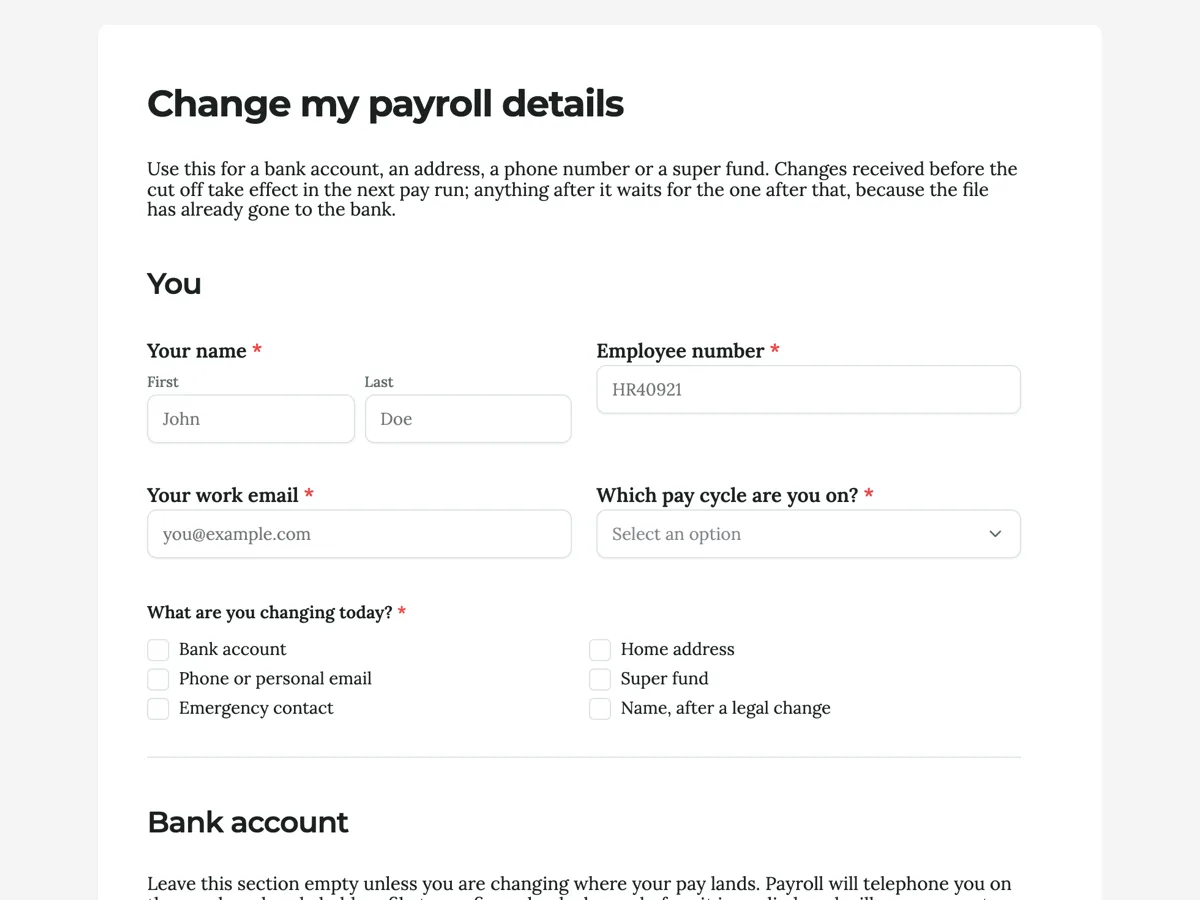
The form itself
A static copy of the finished form, exactly as it renders. Nothing here can be filled in or submitted, so read it as a reference and build your own from the button above.
Every field, and what it collects
The complete field list, in the order respondents meet it.
- Your nameNameRequired
- Employee numberShort textRequired
- Your work emailShort textRequired
- Which pay cycle are you on?DropdownRequired
- Options: Weekly, Thursday · Fortnightly, Wednesday · Monthly, last working day · I am not sure
- What are you changing today?Multiple choiceRequired
- Options: Bank account · Home address · Phone or personal email · Super fund · Emergency contact · Name, after a legal change
- Account nameShort text
- BSBShort text
- Account numberShort text
- BankShort text
- Is this replacing an account or adding a second one?Single choice
- Options: Replacing my only account · Replacing one of two accounts · Adding a second account for a split
- If you split your pay, what percentage goes to this account?Number
- Your home addressAddress
- Mobile numberShort text
- Personal emailShort text
- Fund nameShort text
- Your member numberShort text
- Fund USI or ABNShort text
- Take effect fromDate
- Letter of compliance or fund confirmationFile upload
- One PDF or photo, under 10 MB. Your fund can generate this from its member portal in a minute. Payroll cannot start contributions to a self managed fund without it, and this is the attachment people forget.
- I confirmMultiple choiceRequired
- Options: These are my own details and I am authorised to change them · I have checked the account number against my bank, not against an old document · I understand a bank change is confirmed by phone before it is applied · I know a change after the cut off takes effect in the following pay run
- SignatureSignature
- DateDateRequired
You
Bank account
Address and contact
Superannuation
Before you send it
What makes this form work
The call back is promised three times before it happens
On the welcome screen, in the bank section, and on the thank you screen. A verification step people are expecting gets answered on the first ring. One nobody mentioned gets treated as the scam, and the real change sits unapplied through a pay run.
Every section says out loud that it can be skipped
A classic form has no conditional logic, so somebody changing only their address still scrolls past the bank fields. Leading each section with a line about when to leave it empty is what keeps a five field change from feeling like a twenty field one.
The super section explains what it does not do
Changing the fund here redirects future contributions and does not move an existing balance. That single sentence prevents the most common misunderstanding on any payroll form, and it is written above the fields rather than in a policy nobody opens.
Questions people ask
How do you stop a payroll change form being used for fraud?
Not with the form. The control is procedural: a change of bank account is confirmed by ringing the employee on a number already held, never on one supplied with the request. What the form can do is publish that rule three times so nobody treats the call as suspicious, and put the form behind login so a submission is tied to an account rather than arriving from anywhere.
Should one form cover bank, address and super together?
Yes, as long as each section says it can be left empty. People change several things at once after a move, and three separate forms means three separate cut off misses. What matters is that the sections are visibly optional, since a published form shows every field to everybody and cannot hide the ones that do not apply.
Who should be able to open this form?
Not the public. Login required with the staff domain on the allow list is the right access type here, and the setting is versioned with the form, so a form published today keeps the access rules it had at publish time even after the draft changes. A secret key is weaker for payroll, because keys get forwarded.
What does the signature actually add?
A dated instruction in the employee's own hand, drawn or typed, that prints into the response PDF alongside the values. It is not an identity check and should not be treated as one. Its job is to make the record complete when the file is looked at a year later, which is why the date field beside it is required and the signature itself is not.
Why does the form ask what you are changing today?
So people know which sections to fill in. This is the first real question, and it tells the person whether to fill in bank details, an address, superannuation or all three, since every section always shows and the rest stay empty. Asking it up front is also a small fraud control, because it makes the intent explicit before any account number is typed.
Should a payroll form handle split pay?
If your payroll supports it, ask for the split here rather than by email. This form asks whether the new account replaces or adds to an existing one, then asks what percentage goes to it. Two answers stop the common failure where a second account is added and the whole pay silently moves.
Build your own in about a minute
The button below opens the generator with this use case already described. Change the wording to match your own, generate, then edit anything you like.
Make one like thisOther form examples
Warranty claim form that gets a decision in one reply
Warranty claims stall because the first email has no receipt, no serial and a photo of the wrong side. This form asks for all three before the description, offers repair, replacement or refund as a choice, and tells the customer that the consumer guarantees apply regardless of the warranty card.
Reimbursement request form
A community club runs on people who buy things with their own money and then feel awkward asking for it back. This request makes asking straightforward and gives the treasurer the four things a set of club books needs: the budget line, the approver, the receipt and a payment method. It is a classic form, because the treasurer's rules sit in paragraphs right above the fields they govern, and the receipt is the whole point.
New employee onboarding form
A new employee onboarding form collects everything payroll, IT and the manager need before a new starter's first day: legal name, contact details, right to work, bank and super details, the role, equipment and policy acknowledgements. This one is the single pre start collection for an Australian employer, ordered by who needs each answer, so the new starter types their address once instead of three times. It is a classic form, because people and culture reads the whole response in one pass and forwards each block to the team that owns it.
Want the steps in the builder? Read Control who can fill in your form, then Automate your form with add-ons. For everything this generator can do, see the form maker.
Written and checked by the OneCraft team. Last checked .