Classic form
Lunch order form for a school canteen, one day at a time
A school lunch order form has to tell the canteen which child, which class, which day and exactly what to make, and flag any food that child must not eat. This one prints the priced menu above a four row items table, makes the allergy question required, and closes with a parent signature on the allergy details.
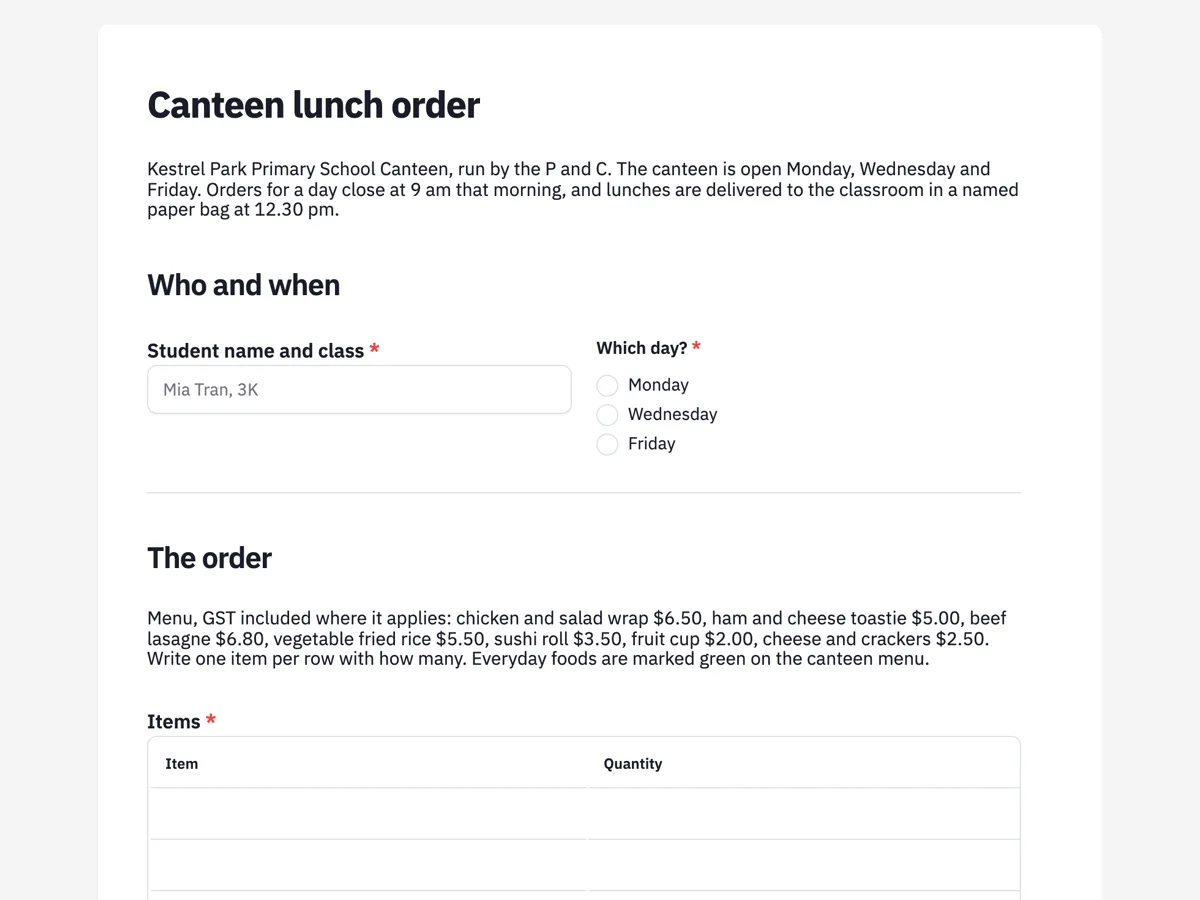
The form itself
A static copy of the finished form, exactly as it renders. Nothing here can be filled in or submitted, so read it as a reference and build your own from the button above.
Every field, and what it collects
The complete field list, in the order respondents meet it.
- Student name and classShort textRequired
- Which day?Single choiceRequired
- Options: Monday · Wednesday · Friday
- ItemsTableRequired
- Columns: Item · Quantity
- DrinkDropdownRequired
- Options: No drink · Water, 600 ml, $2.00 · Reduced fat milk, 300 ml, $2.50 · Flavoured milk, 300 ml, $3.00 · 99 percent juice, 250 ml, $2.50
- Allergies or foods your child must not haveLong textRequired
- Parent or carer mobileShort textRequired
- Parent or carer signature, confirming the allergy details are correctSignatureRequired
Who and when
The order
Allergies and consent
What each field on this form collects
Student name and class is one short text, with a placeholder showing the format, beside which day, a radio of the three canteen days. A paragraph prints the priced menu, then items is a required four row table of item and quantity. Drink is a dropdown of five with prices, including no drink. A privacy paragraph explains who sees allergy details and says the kitchen handles nuts, egg, milk, wheat and sesame. Allergies is a required long text, answered none if there are none. Parent or carer mobile follows. A payment paragraph gives the paper bag and bank transfer options, and a parent signature confirms the allergy details. All seven fields are required.
Why allergies are required on every order
Canteen volunteers change from day to day, and the person packing Wednesday lunches may not know which child in 3K cannot have sesame. Asking on every order puts the allergy on the paper bag label, next to the food. Required with a placeholder of write none means a blank never passes as no allergies. The privacy paragraph is there because allergy details are health information, and parents should know who reads them and for how long. The signature confirms the details came from a parent, not from the child filling the form in at the kitchen table.
Australian terms behind the form
Australian states run healthy canteen policies that sort food into everyday and occasional categories, which is why the menu note says everyday foods are marked green. School allergy guidance from the Australian Society of Clinical Immunology and Allergy asks canteens to know which children are at risk and to avoid relying on bans alone, so the form asks per order. The Australian Privacy Principles treat allergy details as sensitive health information. The payment line uses an Australian BSB in a placeholder pattern.
How to adapt this form
A high school canteen with a daily service swaps the day radio for a date and adds recess as a second table. A school using a cashless system replaces the payment paragraph with the student account number. An outside school hours care program adds afternoon tea and drops the classroom delivery.
What makes this form work
The priced menu sits above the table
Seven items with prices, GST included where it applies, are printed right above the four row items table. Parents write what is on the menu, in the menu's own words.
Allergies are asked every time
A required long text with a write none placeholder means each bag carries current allergy details. Volunteers who change by the day never rely on memory.
A parent confirms the details
The signature label says it confirms the allergy details are correct. An order filled in by a child still needs a parent to stand behind what it says about food.
Questions people ask
Why does a canteen lunch order need a signature?
The signature confirms a parent or carer has checked the allergy details, which matters because children sometimes fill in their own orders. It is drawn or typed on the form and printed with the response, so the canteen has a dated record. It does not replace the anaphylaxis action plan the school already holds.
Can one form order lunch for two children?
No. The welcome screen says one form per child per day, because each order becomes one labelled paper bag for one classroom. Two children in one order would mean two labels from one response. Siblings in different classes are a common reason lunches go to the wrong room.
What if a parent forgets the payment?
The thank-you screen says the lunch is still made and the amount is added to the next order. A school canteen does not let a child go without lunch over a missed payment. The form does not take payment itself; it shows the paper bag and bank transfer options in a paragraph above the signature.
Does the form add up the order?
No. Prices are printed in the menu paragraph and beside each drink, so a parent can add them up, but the form does not total the table. Canteen volunteers check each order against the money in the bag, which they would do anyway because cash orders arrive without the form open.
Why only four rows in the items table?
Four lines cover a main, a snack and a fruit cup for one child, plus room for a second snack. A table renders a fixed number of rows and cannot grow, so four keeps the form short for the usual order. A larger order, such as a class party, goes to the canteen manager directly.
Who sees the allergy information?
The privacy paragraph says canteen staff and the school office, only to prepare that order, and that it is kept with the order for the term. The form owner controls access to responses in the account. Writing this down before the question is what the Australian Privacy Principles expect when collecting health information.
Build your own in about a minute
The button below opens the generator with this use case already described. Change the wording to match your own, generate, then edit anything you like.
Make one like thisOther form examples
School uniform order form for a primary school uniform shop
A school uniform order form has to say which child, which class, which items in which sizes, and how the parcel and the money will meet. This one lists GST inclusive prices above a six row item table, sends orders to the classroom or the shop counter, and asks for the bank transfer reference so payment can be matched.
Christmas order form for a butcher's ham and turkey
A Christmas order form for a butcher has to commit the customer to a ham size, a turkey and a pickup time weeks ahead, so the cool room and the counter can cope with the three busiest days of the year. This one prices each choice per kilogram, offers three pickup days in half hour slots, and confirms the $50 deposit.
Gift hamper order form with a recipients table and gift messages
A gift hamper order form has to send many hampers from one buyer to many people, each with their own address and card message, on one dispatch date. This one puts recipients in a numbered six row table with name, delivery address and message columns, and takes the invoice details with an ABN.
Want the steps in the builder? Read Form builder components, then View, export and manage your responses. For everything this generator can do, see the form maker.
Written and checked by the OneCraft team. Last checked .