Classic form
Staff availability form
A roster is only as good as the availability it was built from, and most availability arrives as text messages that contradict each other. This form turns the whole question into one grid of days against shift blocks, then asks the four things a grid cannot express. It is a classic form, because a seven by four grid and a table of dates away need the width of a page rather than a phone screen.
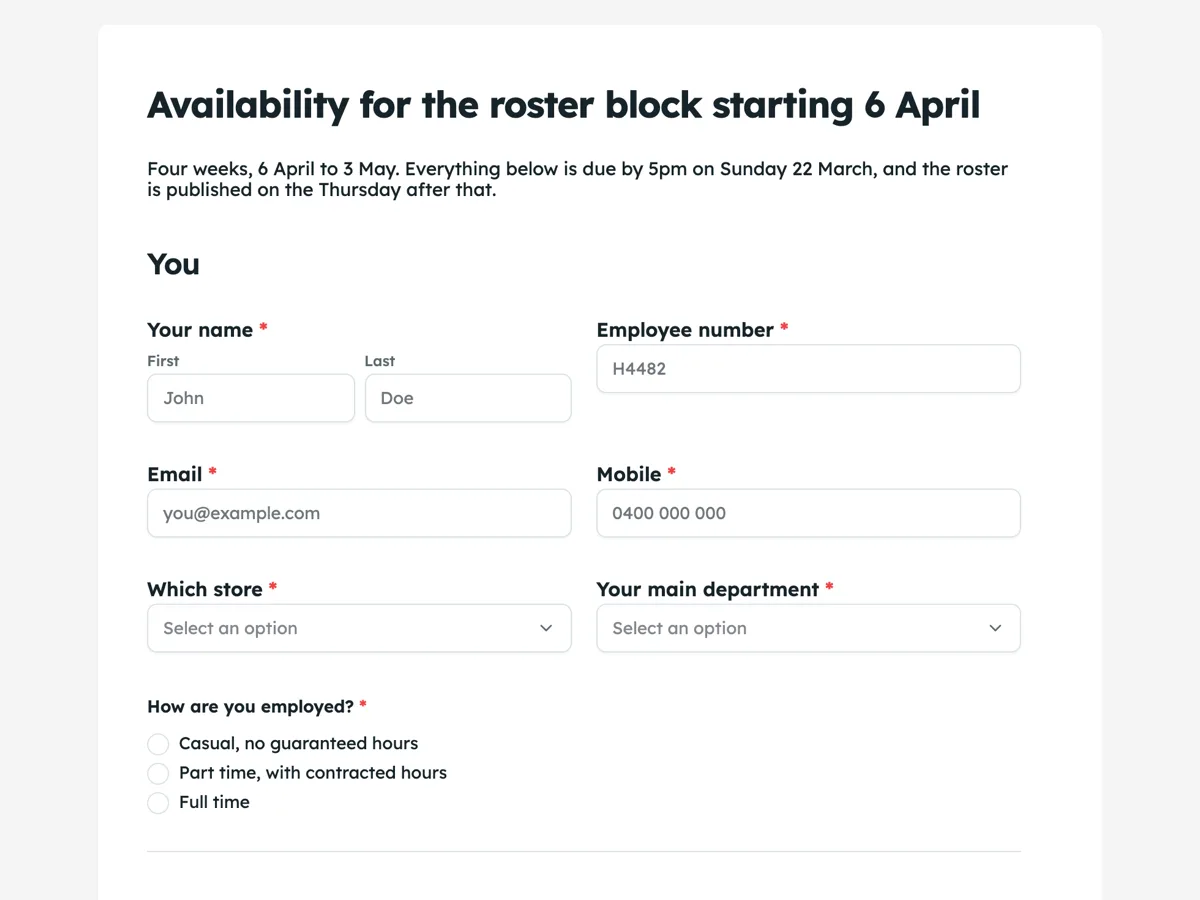
The form itself
A static copy of the finished form, exactly as it renders. Nothing here can be filled in or submitted, so read it as a reference and build your own from the button above.
Every field, and what it collects
The complete field list, in the order respondents meet it.
- Your nameNameRequired
- Employee numberShort textRequired
- EmailShort textRequired
- MobileShort textRequired
- Which storeDropdownRequired
- Options: Highbourne Central · Riverside Plaza · Kentmere Road · Warehouse and online picking
- Your main departmentDropdownRequired
- Options: Checkout and service desk · Produce · Deli and seafood · Bakery · Nightfill and replenishment · Online picking
- How are you employed?Single choiceRequired
- Options: Casual, no guaranteed hours · Part time, with contracted hours · Full time
- Shift blocks you are available forRating gridRequired
- Statements:
- Monday
- Tuesday
- Wednesday
- Thursday
- Friday
- Saturday
- Sunday
- Most shifts you want in a weekNumberRequired
- Most hours you want in a weekNumberRequired
- Happy to be rung for a shift you have not ticked?Single choiceRequired
- Options: Yes, ring me and I will say yes or no · Only for the same department · No, please only roster the blocks above
- Anything that happens every week at a fixed timeLong text
- Dates in this block you cannot workTable
- Columns: First day · Last day · Why · Already approved by
- Can you get home after a shift that finishes at 11pm?Single choiceRequired
- Options: Yes, I drive · Yes, someone collects me · Only if the last bus still runs · No, please do not roster me past 9pm
- Are you under eighteen?Single choiceRequired
- Options: No · Yes, and I am still at school · Yes, and I have left school
- I confirmMultiple choiceRequired
- Options: Every block I have ticked is one I can genuinely work · I will tell my manager as soon as anything above changes, not on the day · I understand a ticked block is availability, not a guaranteed shift
You
When you can work
The things that break a roster
Before you send it
What makes this form work
The grid is prefaced with what a tick means
One sentence says a tick is availability rather than a promise of a shift, and that an empty box costs nothing. Without it people tick generously to look willing, and the roster is built on optimism that collapses in week two.
The dates away table has four rows and a why column
The table renders exactly the rows it was given, so four is a deliberate size: enough for a normal block, small enough to look answerable. The "already approved by" column is the one that stops a manager relitigating leave that was signed off in February.
The transport question protects a late shift
Asking how somebody gets home after 11pm is the difference between a late roster that works and one that produces a call at 10.45. It sits with the availability answers rather than in a welfare survey, which is the only place it will ever get answered.
Questions people ask
What is the best way to collect availability without twenty separate questions?
One rating grid with the days as rows and the shift blocks as columns, set to allow several ticks per row. Seven questions become one field, the answer is readable at a glance, and it takes a worker under a minute. What the grid cannot say is the recurring class or the fortnight in July, which is why two more fields follow it.
How does a grid like this come out in the responses?
As one column, not twenty eight. The export joins a grid into a single cell as statement and answer pairs, so Monday reads with its ticked blocks beside it. That is fine for reading a person's availability and awkward for building a spreadsheet roster, so it is worth knowing before you plan to pivot the file.
What happens when somebody sends the form twice?
Both responses are kept and each carries its submitted time, which is the first column of the export and a column in the responses table. The later one wins. That timestamp is also why this form needs no signature: a roster dispute turns on what was submitted and when, and both are already recorded.
Why ask for maximum hours and whether somebody is under eighteen?
Because they are the two answers that make a roster legal rather than merely convenient. Weekly hour ceilings, minimum rest between shifts and tighter limits for under eighteens are set by working time rules, and a roster built from ticks alone cannot see any of them. Two number fields and one choice field is the cheapest way to keep the grid honest.
Why ask about things that happen every week at a fixed time?
Because a recurring class, a carer shift or a standing medical appointment breaks a roster more reliably than a one off. This form asks for it as a free text answer, separate from the availability grid. A grid captures the pattern, and this question captures the exception the grid cannot express.
What is the late finish question for?
It is a safety and practicality check, not a preference. This form asks whether you can get home after a shift that finishes at 11pm. Somebody relying on a bus that stops at ten cannot take a close, and finding that out from a roster rather than from a form costs a shift and a taxi.
Build your own in about a minute
The button below opens the generator with this use case already described. Change the wording to match your own, generate, then edit anything you like.
Make one like thisOther form examples
Shift swap request form
A shift swap is agreed in a corridor and then forgotten by everyone except the person who did not turn up. This request writes the whole arrangement down in eleven taps: the exact shift, the exact colleague, whether they actually said yes, and what is coming back the other way. It is conversational, because it is answered on a phone between tables, and because every answer is a tap or a single line.
Timesheet form
A timesheet is a payroll document and an invoicing document at the same time, which is why the job number matters as much as the hours. This one gives each week its own seven row table, asks for real start and finish times rather than rostered ones, and is signed. It is a classic form, because a supervisor checks two weeks of rows against the totals, and that is easier when both tables and the signature sit on one page.
Leave request form
Most leave requests are refused or delayed for one of three reasons: the dates are ambiguous, nobody knows who is covering, or the evidence rule was never stated. This form closes all three in one page and puts the notice periods where the person is standing when they pick their dates. It is written for an Australian employer under the Fair Work rules, and it is a classic form because a manager reads a request as a whole, with the notice periods and the certificate rule beside the fields they govern.
Want the steps in the builder? Read Every form field and when to use it, then View, export and manage your responses. For everything this generator can do, see the form maker.
Written and checked by the OneCraft team. Last checked .