Classic form
Timesheet form
A timesheet is a payroll document and an invoicing document at the same time, which is why the job number matters as much as the hours. This one gives each week its own seven row table, asks for real start and finish times rather than rostered ones, and is signed. It is a classic form, because a supervisor checks two weeks of rows against the totals, and that is easier when both tables and the signature sit on one page.
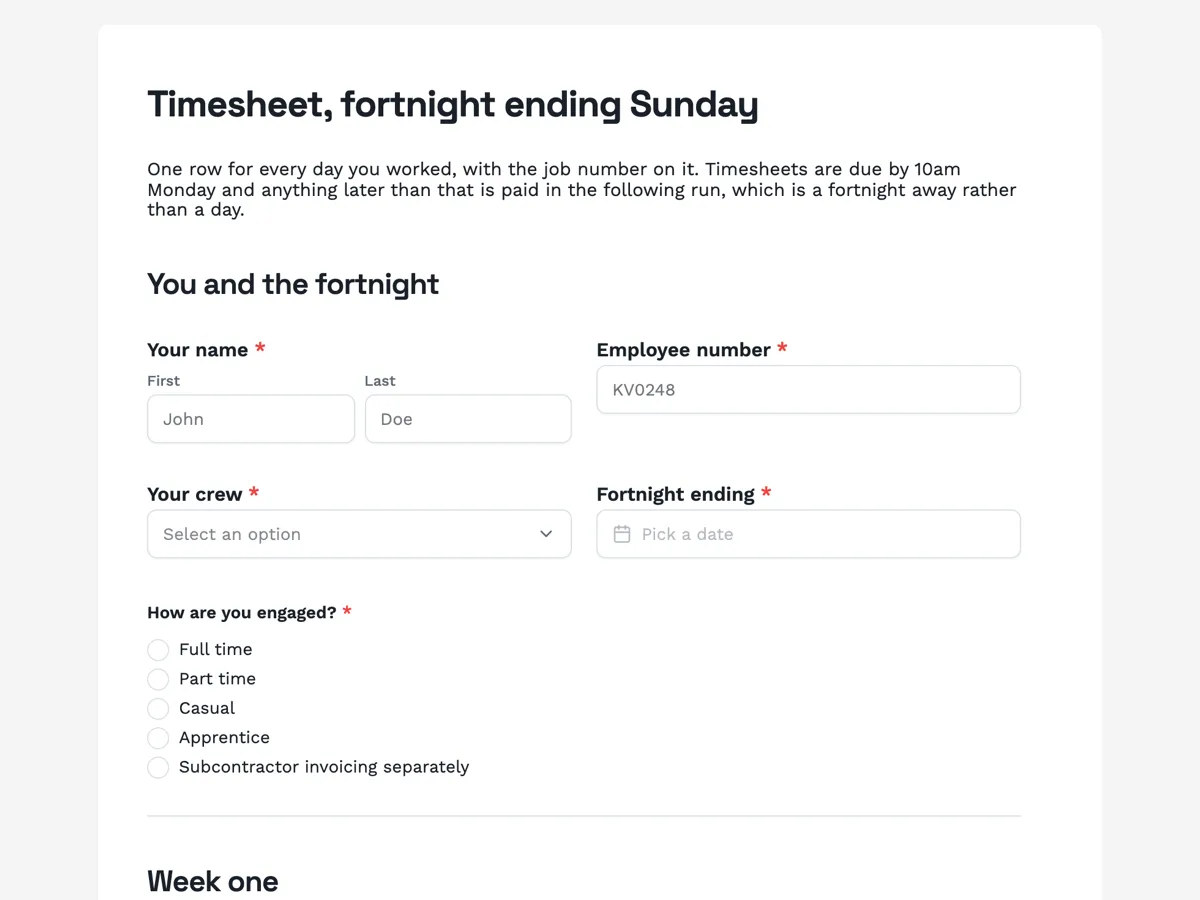
The form itself
A static copy of the finished form, exactly as it renders. Nothing here can be filled in or submitted, so read it as a reference and build your own from the button above.
Every field, and what it collects
The complete field list, in the order respondents meet it.
- Your nameNameRequired
- Employee numberShort textRequired
- Your crewDropdownRequired
- Options: Carpentry · Concrete · Electrical · Plumbing · Plant operators · Labour hire · Workshop
- Fortnight endingDateRequired
- How are you engaged?Single choiceRequired
- Options: Full time · Part time · Casual · Apprentice · Subcontractor invoicing separately
- Monday to Sunday, week oneTable
- Columns: Date · Job number · Start · Finish · Break mins
- Monday to Sunday, week twoTable
- Columns: Date · Job number · Start · Finish · Break mins
- Ordinary hours this fortnightNumberRequired
- Hours beyond your ordinary hoursNumber
- When those extra hours started and finishedShort text
- Were any of them on a Saturday, a Sunday or a public holiday?Single choiceRequired
- Options: No · Yes, and they are in the tables above
- Take the extra hours as time in lieu instead of pay?Single choiceRequired
- Options: No, pay them · Yes, bank them as time in lieu · No extra hours this fortnight
- Allowances you are claimingMultiple choice
- Options: Travel, for a site more than fifty kilometres out · Meal, for an unbroken shift past nine hours · Height, for work above two storeys · Confined space · First aid officer · Tool allowance · None of these
- Anything that explains an unusual rowLong text
- I declareMultiple choiceRequired
- Options: These are the hours I actually worked, and the breaks I actually took · Every job number above is the job I was on that day · I have not claimed an allowance I did not earn
- Sign hereSignatureRequired
You and the fortnight
Week one
Week two
Totals and allowances
Sign it
What makes this form work
It says what an empty row means
An empty row is a day not worked; a zero is a day worked for no hours. Those are different facts and a timesheet that does not distinguish them produces a fortnightly argument. One sentence above the table settles it.
Breaks are in minutes, with worked examples
Thirty for a half hour lunch, zero for a crib break worked through. Break fields collect hours, minutes and blanks in equal measure when the unit is not stated, and the resulting mess is corrected by hand for every worker every fortnight.
The allowances list ends with "none of these"
A tick list with no negative option leaves payroll unable to tell a worker who claimed nothing from one who skipped the question. One extra option removes a whole category of follow up calls.
Questions people ask
Why one table per week instead of one for the fortnight?
Because a fourteen row table is a wall, and because a week is the unit people reconstruct from memory. Two seven row tables under their own headings let somebody finish week one, stop, and come back to week two. The row counts are fixed when the form is built, so seven is a deliberate choice rather than a maximum.
Can the form total the hours?
No. Nothing adds up between fields, so the totals are typed by the worker and checked against the rows by payroll. That is stated on the form rather than hidden, and it turns out to be useful: a total that disagrees with the table is exactly the signal a payroll officer wants to see.
What does the signature actually do here?
It is drawn or typed by the person filling the form and it is printed into the response PDF beneath the tables. That PDF is the artefact a supervisor approves and payroll keeps. It is not an e-signature request sent by email to a second party, which is a different feature for a different job.
Why ask when the extra hours started and finished?
Because ten hours on a Saturday is not one rate. Under most awards the first block is one multiple and the rest another, and a total on its own forces payroll to guess. Recording when the extra hours began and ended, on top of the count, is also what the record keeping rules expect.
Why ask how somebody is engaged?
Because the same hours pay differently for a full time employee, a casual and a subcontractor. This form asks it in the first section, before either week table. Payroll needs it to apply the right rate and the right loading, and asking on the timesheet means it is right even when the employment record is out of date.
Should a timesheet offer time in lieu instead of pay?
Only if your agreement allows it, and then ask on the timesheet. This form asks whether to take the extra hours as time in lieu, right after the weekend and public holiday question. Recording the election with the hours it applies to is far cleaner than a separate email that payroll has to match up later.
Build your own in about a minute
The button below opens the generator with this use case already described. Change the wording to match your own, generate, then edit anything you like.
Make one like thisOther form examples
Payroll details change form
Payroll fraud almost always arrives as a convincing request to change where somebody's pay lands. This form is built around the control that stops it: a call back on the number already held, stated on the welcome screen, in the bank section and again on the thank you screen, so nobody is surprised by it. It also puts the pay run cut off where people will read it. Classic, because the sections are only relevant to some people and everyone needs to see which ones to skip.
New employee onboarding form
A new employee onboarding form collects everything payroll, IT and the manager need before a new starter's first day: legal name, contact details, right to work, bank and super details, the role, equipment and policy acknowledgements. This one is the single pre start collection for an Australian employer, ordered by who needs each answer, so the new starter types their address once instead of three times. It is a classic form, because people and culture reads the whole response in one pass and forwards each block to the team that owns it.
Workplace grievance form
A grievance form that only asks "describe your complaint" produces a page of frustration nobody can act on. This one asks for the account and then a dated table of incidents beside it, keeps witnesses separate, and finishes with the question that decides what happens next: what would a good outcome look like. It is written for an Australian workplace, and it is a classic form, because somebody writing something difficult needs to see the whole shape of it before they start.
Want the steps in the builder? Read Every form field and when to use it, then Shape the PDF version of your form. For everything this generator can do, see the form maker.
Written and checked by the OneCraft team. Last checked .