uk-UA · Ukrainian
Ukrainian AI voiceover
Unlike its Russian neighbour, Ukrainian carries the complete set: eight uk-UA voices across energetic, instructional, warm and neutral styles. The director writes the whole video in Ukrainian, and captions follow the voice word by word.
The Ukrainian voices, with samples
Each sample reads the same line so you can compare them fairly.
Puck
energetic · maleТак звучить мій голос, коли я читаю ваш сценарій у звичайному темпі, без музики на тлі.
Laomedeia
energetic · femaleТак звучить мій голос, коли я читаю ваш сценарій у звичайному темпі, без музики на тлі.
Charon
instructional · maleТак звучить мій голос, коли я читаю ваш сценарій у звичайному темпі, без музики на тлі.
Erinome
instructional · femaleТак звучить мій голос, коли я читаю ваш сценарій у звичайному темпі, без музики на тлі.
Umbriel
warm · maleТак звучить мій голос, коли я читаю ваш сценарій у звичайному темпі, без музики на тлі.
Sulafat
warm · femaleТак звучить мій голос, коли я читаю ваш сценарій у звичайному темпі, без музики на тлі.
Iapetus
neutral · maleТак звучить мій голос, коли я читаю ваш сценарій у звичайному темпі, без музики на тлі.
Aoede
neutral · femaleТак звучить мій голос, коли я читаю ваш сценарій у звичайному темпі, без музики на тлі.
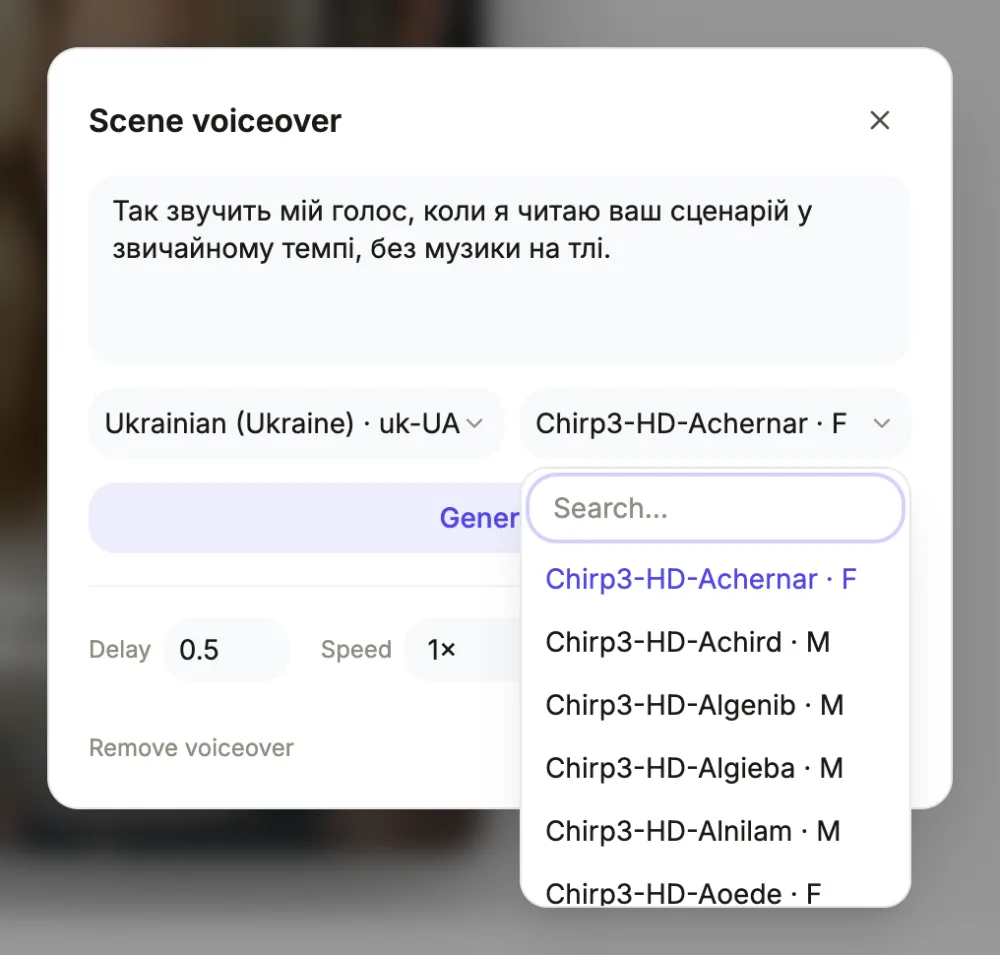
Full casting depth, unlike ru-RU
The uk-UA locale carries all eight premium characters, which makes Ukrainian one of the best-served Cyrillic languages here. The director casts by style and gender exactly as it does for English: Puck or Laomedeia when your brief reads like an ad, Charon or Erinome when it teaches, Umbriel or Sulafat when warmth fits, Iapetus or Aoede for the plain corporate voice. Tutorials cannot take the energetic pair, a rule enforced in code. Every scene can still be re-cast individually, and the voice dialog's search spans the whole live catalogue past the automatic eight.
From your brief to a Ukrainian script
The Language field is the only switch: set to Ukrainian, it makes the director compose narration and on-screen copy in Ukrainian natively, whatever language the brief arrived in. This is authored text, not translation, so vocative forms and aspect come out the way a Kyiv copywriter would write them. If your business already has Ukrainian wording that must not shift, the tagline on the shopfront or a legal disclaimer, quote it in the brief and it is used verbatim. Free-typed language values outside the mapped list produce no voiceover at all, so stick to Ukrainian as written.
Timing, delays and the mix
Ukrainian sentences fit their scenes much as English ones do, and where they run long the scene grows to hold the clip; dynamic pace lets an overflowing sentence resolve across the following cut. Scene-level controls cover the rest: a delay in seconds holds the voice back while a visual establishes, speed steps between 0.85x and 1.25x adjust the read, and rewriting the line remains the sharpest tool. The soundtrack ducks to 22 percent automatically whenever narration plays, with short ramps in and out, so the voice always sits on top without mixing work.
Script details worth deciding early
Numbers decline in Ukrainian, so write them as words wherever the spoken form matters: двісті гривень settles what 200 грн leaves ambiguous. Foreign names respell into Cyrillic in the narration box, the only pronunciation control, and one respelling usually suffices given how phonetic Ukrainian spelling is. Keep sentences short; caption cues cut on sentence punctuation, and lines past 48 characters split into consecutive cues. Generated narration never includes an em dash by prompt rule, and hand-edited lines flow better honouring that, with commas doing the joining.
Captions in this script
Ukrainian's Cyrillic, including its own і, ї, є and ґ, captions word by word on timings taken from the clip itself. The look decides the typeface: looks whose fonts ship Cyrillic, Cascade on Inter, Terracotta and Foundry on Montserrat, Deep Sea and Signal on IBM Plex Sans, Rosewood and Parchment on Lora, render captions in the design's own font. The remaining looks pull Cyrillic from a fallback font. The ґ specifically depends on the font's Cyrillic completeness, another reason to render a scene and check before shipping.
Questions people ask
Which Ukrainian voices do I get?
All eight premium characters exist in uk-UA: Puck, Laomedeia, Charon, Erinome, Umbriel, Sulafat, Iapetus and Aoede, spanning energetic, instructional, warm and neutral styles in both genders. The per-scene voice search across the full Google catalogue sits behind them for anything more specific.
Can I write the brief in English?
Yes. Output language is decided by the Language field alone, so an English brief with Ukrainian selected returns a video narrated and titled entirely in Ukrainian. Supply any must-keep Ukrainian phrases verbatim in the brief; everything else the director writes fresh in Ukrainian.
How do captions treat Ukrainian letters?
They are generated from the narration text, so і, ї, є and ґ are always the correct characters, highlighted word by word in time with the voice. Looks based on Inter, Montserrat, IBM Plex Sans or Lora show them in the design's font; other looks use a fallback. Per-scene toggles live in the voice dialog.
What about names the voice gets wrong?
Respell them in Cyrillic inside that scene's narration and regenerate the clip, which costs about half a credit. Ukrainian orthography is close to phonetic, so a careful respelling nearly always reads correctly on the next attempt. The caption will display whatever spelling you settle on.
How is the cost calculated?
Narration is billed by length, scene by scene, about half a credit for a typical clip. Edits to text, timing, captions or order between generations are free. An export bills its render time, usually a small amount; exceed 30 seconds, or export with narration still owed, and it needs at least 1 credit left.
Narrate a video in Ukrainian
The button opens the video generator with the language already set in the brief. Pick a voice after the scenes are planned.
Make a videoRelated pages
Russian AI voiceover
Russian is the one language here where the premium tier is thin: only Puck, Charon and Aoede exist in ru-RU, so the usual eight-voice cast collapses to three. The director still writes the whole script in Russian; it just has fewer mouths to give it to.
Romanian AI voiceover
Selecting Romanian assigns one of eight ro-RO voices and has the director write every spoken and on-screen line in Romanian. The ș and ț render correctly in captions across all looks, and each clip is billed by how long its line is.
Hungarian AI voiceover
Hungarian gets eight dedicated hu-HU voices, and the director scripts the entire video in Hungarian the moment the Language field says so. Long agglutinative words shape how captions wrap, which this page covers, along with the styles and the credit cost.
Every locale is listed onthe voiceover languages page.