Videos
Animated map in a video
A map scene is for one specific claim: that you operate somewhere. It draws a world or region map with glowing markers on the cities you name, usually beside a count-up number. It is a coverage graphic, not a mapping tool, and the difference matters before you reach for it.
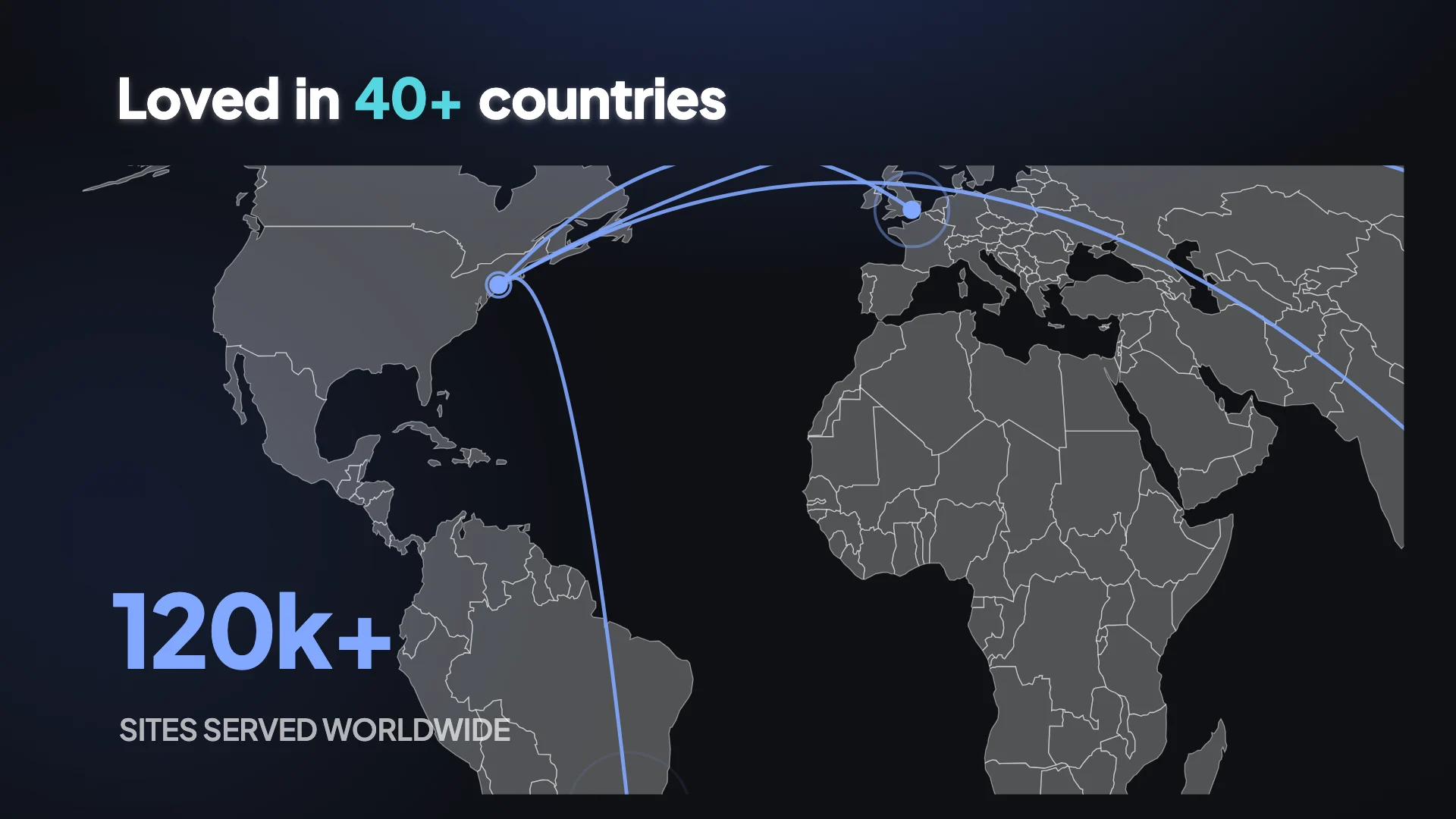
You name cities, the map is drawn
The director is told map components take a major city name, one per marker. It does not take coordinates, addresses or postcodes. The builder then offers a searchable picker over 124 known locations, so a city that is not recognised in the brief can be corrected afterwards by finding it in that list. The first marker is the arc origin, meaning the connecting line is drawn from it to the others.
Six layouts for six kinds of claim
Five markers beside one large count-up number, for a headcount or customer count. Three markers with floating city pills, when the cities themselves are the point. A zoomed single region spotlight, for a national rather than global claim. Five markers over three counting stat chips, for a mixed proof beat. Six markers under one giant figure. And three city cards showing per region performance, when different places have different numbers.
It is a reach claim, so make it true
A map with markers in eight countries says you operate in eight countries. That is a factual claim about your business, and in a professional feed it is the sort of thing a buyer checks. The director will not invent locations, so what appears is what you wrote, which puts the accuracy squarely with you. Use the cities you actually have a presence in rather than the ones you would like.
Where a map is the wrong graphic
For a single location business, which wants a contact scene with an address rather than a marker on a world map. For directions, which a video cannot usefully give. And for anything where the geography is not the claim: if the point is that you serve four industries rather than four countries, that is a feature list or a use case scene.
How it works, in three steps
Step 1
List the cities in the brief
Major city names, in the order you want them, with the origin first. That order is what the arc is drawn from.
Step 2
Give it the number that goes with them
Most map layouts pair markers with a figure. Without one the scene has markers and nothing to say about them.
Step 3
Correct any city in the picker
The map section has a search over the known locations, so a marker that landed in the wrong place is a two click fix.
The full walkthrough with screenshots is in the guide Make a promo video with AI voiceover.
Limits worth knowing
- Cities come from a known list of 124 locations. An unrecognised place has to be replaced with the nearest one on the list.
- There is no address search, no coordinate entry and no custom pin. Markers are cities.
- Map scenes take text and the map only. They will not hold an image.
- It is not a navigable map. There is no zoom control, no street level, no route and no live data.
Questions people ask
Can I show a country rather than cities?
Indirectly, through the zoomed single region layout, which spotlights an area rather than showing the whole world. Markers are still cities, so you place them in the country you are highlighting.
What if my city is not in the list?
Pick the nearest recognised one. At the scale a map scene is drawn, a marker forty miles out is not visible, and being on the wrong continent is.
Does the arc mean anything?
It connects the first marker to the others, so it reads as a hub and spoke relationship. Put your headquarters or main site first if that is the story, and be aware it implies one if it is not.
Will it work in the vertical format?
Yes, like every scene, because each element carries a box for each canvas. A world map in a tall frame is smaller, so the single region layouts read better vertically than the global ones do.
Make your own video
The button opens the generator with this use case already described. Change the wording to match yours, generate, then edit anything you like.
Create a video with OneCraftRelated pages
Animated chart in a video
A chart scene exists for the case where the shape of the data is the point, rather than one headline figure. Bars racing to different heights, a line climbing, a waterfall building to a total. All of it drawn from numbers you actually supply, because the director is not permitted to make any up.
Turn images into a video
Upload eight pictures and eight different decisions get made. Some become scenes. Some are grouped so they play together in one. Some are judged to be references you uploaded to explain the video rather than to appear in it, and those are read for their content and then deliberately kept off screen.
Animated video backgrounds
Backgrounds here are applied one scene at a time, not once for the whole video, and every one of them is built from colour tokens rather than fixed hex values. So a background is not a picture you drop behind the content. It is a treatment that takes on whatever palette the video is using.
More finished work of this kind is on the video examples hub.
Written and checked by the OneCraft team. Last checked .