Websites
Product variants: every size and colour with its own price and stock
Product variants are the buyable versions of one product, such as a linen apron in oat, charcoal or rust and in regular or long. Each variant needs its own price and stock, because the long rust apron can sell out while the regular oat one is plentiful.
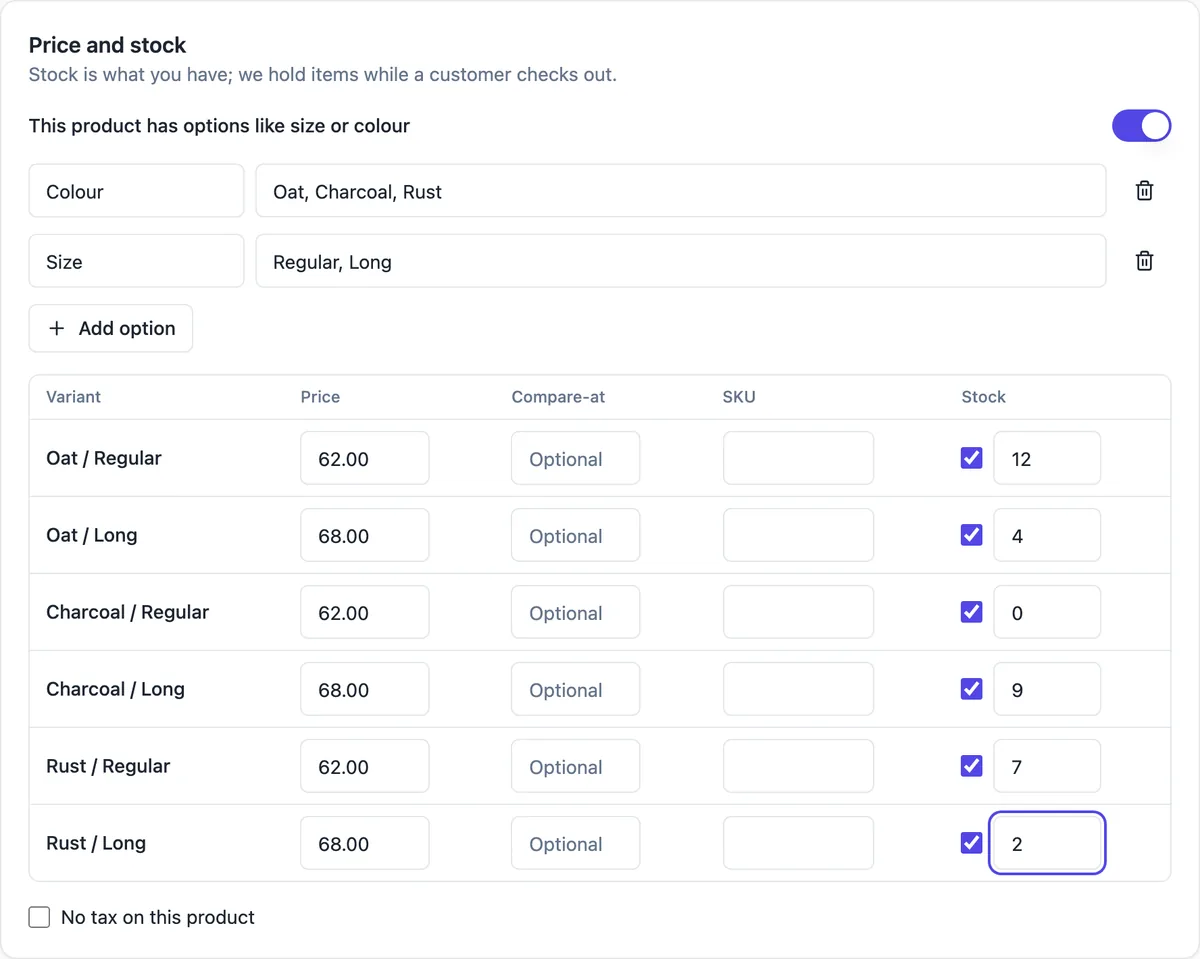
Options make variants
Switch on This product has options like size or colour, name an option and list its values separated by commas: Colour with Oat, Charcoal, Rust; Size with Regular, Long. The editor builds every combination as a row of the variant table. A product can have up to three options and up to 100 variants, which covers colour, size and material together.
Each variant on its own
Every row has a price, an optional compare at price for showing a reduction, a SKU for your own stock system, a track stock tick and a stock number. Download products add a file per variant, so an ebook can deliver EPUB or PDF. A product without options has one Default variant with the same fields.
How buyers pick
On the product page the buyer chooses each option from a select, and the price, availability and Add to cart button follow the chosen combination. Product cards show the price range when variants differ, such as $62 to $68. Sold out combinations cannot be added to the cart, and the server checks availability again at checkout.
Editing variants safely
Saving keeps the identity of existing variants, so orders and stock history stay attached. Removing a variant that is in a buyer checkout right now is refused until that checkout finishes. If an order changes stock while you are editing, the editor asks you to reload instead of overwriting the new number.
Variants or separate products
Use variants when the buyer is choosing one product in different forms. Use separate products when the things are different enough to need their own photos, description and web address, such as a mug and a bowl. Too many variants, every glaze in every size of every shape, makes the choice harder; split by shape and keep options to what changes the price or the stock.
How it works, in three steps
Step 1
Switch on options
In the product editor turn on This product has options like size or colour.
Step 2
Name options and values
Up to three options, values separated by commas; the variant table appears.
Step 3
Fill each row
Price, optional compare at price, SKU and stock for each variant, then Save.
Limits worth knowing
- Up to 3 options and 100 variants per product.
- Prices are stored in cents; currencies without two decimal places cannot use checkout yet.
- Removing a variant that is in an open checkout is refused until it finishes.
- Each variant can have one download file on Download products.
Questions people ask
Can each variant have its own photo?
Variants carry an image reference in the store data, and the product has a photo gallery whose first photo shows on product cards. Show colours clearly in the gallery photos and name them in the alt text so buyers can match photo and option. Keep the photo order in step with the option order.
How do I show a sale price on one variant?
Set the compare at price higher than the price on that variant. The product page shows the old price struck through beside the new one for that combination. Remove the compare at price when the sale ends, because a permanent was price misleads buyers and may break consumer law.
Can I add an option later?
Yes. Add the option and its values; the editor builds the new combinations. Existing variants keep their identity where they still match, so check prices and stock on the new rows before saving, and archive the product briefly if you are reworking options on a busy item.
What does untracked stock mean?
Turning off the track stock tick for a variant means it never sells out, which suits made to order items and digital files. The product list shows not tracked for it, and the low stock list ignores it. Turn tracking on for anything you hold in limited numbers.
Is there a limit on option values?
The limit is on variants: 100 per product. Three colours and two sizes make six, but ten colours, five sizes and two materials would make 100 exactly. Above that, split the product, for example one product per material, each with its colour and size options.
What is a SKU for if I am a small shop?
A SKU is your own short code for a variant, such as APR-OAT-L. It is optional, but it helps when you pack orders, count stock or move to another system later, because names change and codes do not. Keep codes short, unique and readable, and they appear in imports and order details.
Make your own website
The button opens the generator with this use case already described. Change the wording to match yours, generate, then edit anything you like.
Create a website with OneCraftRelated pages
Inventory tracking for a small online store: no overselling, early warnings
Inventory tracking stops a store from selling stock it does not have. For a small shop it comes down to three things: a stock number per variant, holding items while someone pays so two buyers cannot take the last one, and a warning before a bestseller runs out.
Import products from CSV, with a preview before anything is added
Importing products from a CSV moves a whole catalogue in one go: titles, descriptions, options, prices, SKUs and stock. The risk is a half right import you then fix by hand, which is why a preview of exactly what will be created matters more than the import itself.
Link in bio page maker: one page, every link, your address
A link in bio page is the one link a social profile allows, turned into a short page of buttons: the new single, the shop, the booking form, the newsletter. It works when the links are few, current and in the order people actually want them.
More finished work of this kind is on the website examples hub.
Written and checked by the OneCraft team. Last checked .