Websites
Inventory tracking for a small online store: no overselling, early warnings
Inventory tracking stops a store from selling stock it does not have. For a small shop it comes down to three things: a stock number per variant, holding items while someone pays so two buyers cannot take the last one, and a warning before a bestseller runs out.
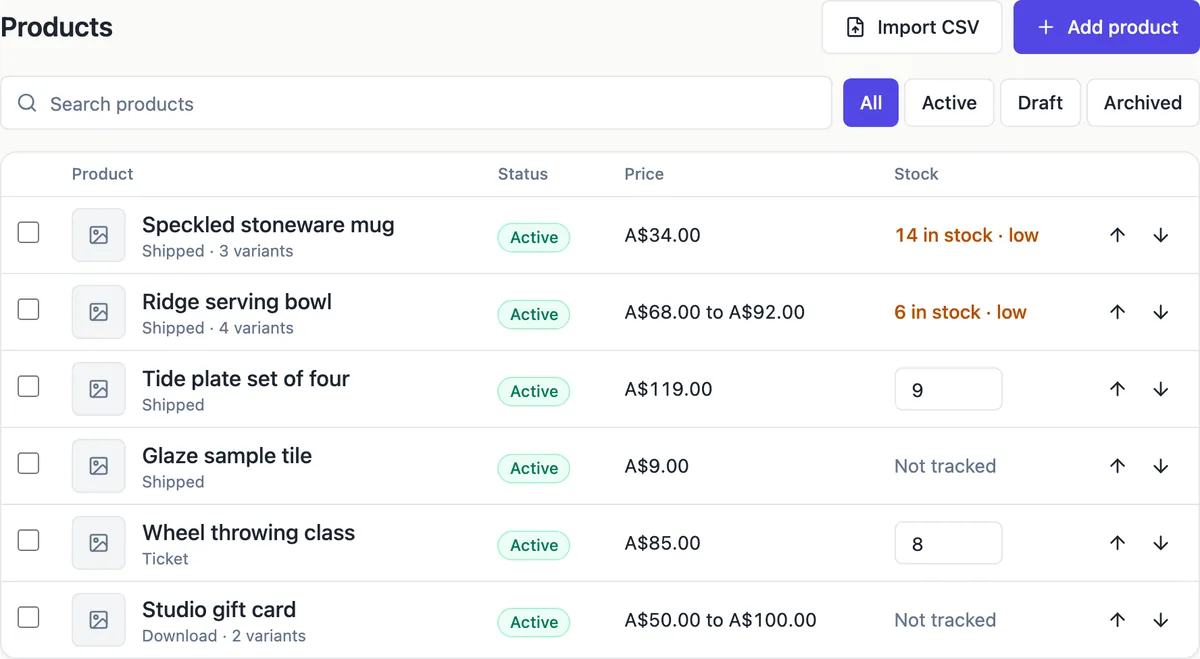
Stock per variant
Each variant has a track stock tick and a number. Tracked variants show their available stock in the products list, sell out at zero and cannot be added to a cart past what is available. Untracked variants, such as made to order work or downloads, never sell out. A ticket for a class with eight places is just a tracked variant with a stock of eight.
Held while the buyer pays
When checkout starts, every line in the cart is reserved together for 35 minutes, or none are and the buyer is told what sold out. Available stock is stock minus what is reserved, so the last mug cannot be paid for twice. A payment that completes commits the reservation to sold stock; an abandoned checkout releases it when its time runs out.
Low stock warnings
A tracked variant with three or fewer available is low stock. The products list flags it, the store dashboard counts it and lists every low variant by product and option, and the site keeps selling until zero. Restock by editing the number in the product editor; there is no supplier ordering or automatic reorder.
Edge cases handled for you
A payment that arrives after its hold was released, which can happen with slower payment methods, still takes the stock directly, so paid orders are never lost. If an order changes a stock number while you are editing it, saving is refused and the editor asks you to reload, so you never overwrite a sale.
What it does not track
There is no multi location stock, no purchase orders, no barcode scanning and no sync with stock you sell in a physical shop or at markets. If you also sell in person, lower the numbers by hand after each market day, or keep in person stock separate from what the website can sell.
How it works, in three steps
Step 1
Tick track stock
In the product editor, tick track stock for each variant you hold in limited numbers and enter the count.
Step 2
Watch the low list
The products list and dashboard flag variants with three or fewer left.
Step 3
Restock
Edit the stock number when new stock arrives; the live site updates within about half a minute.
Limits worth knowing
- Low stock means three or fewer available; the threshold is fixed.
- Items are held for 35 minutes during checkout.
- One stock number per variant; no multiple locations or warehouses.
- No automatic sync with point of sale or market sales.
Questions people ask
Why does the site show fewer in stock than I entered?
Available stock is your number minus items held in open checkouts. If someone is paying for two mugs right now, the site shows two fewer until they finish or the hold expires after 35 minutes. Once paid, the held items become sold and your stock number goes down.
Can the store email me when stock is low?
Low stock shows on the products list and the store dashboard, which lists every variant at three or fewer. There is no separate low stock email. Check the dashboard when you process orders, since paid order emails arrive anyway and are a natural reminder.
Can buyers order items that are out of stock?
Not tracked ones. A tracked variant at zero shows as sold out and the cart and checkout refuse it. If you want to take orders before stock arrives, turn tracking off for that variant and say in the description when it will ship.
Does a cancelled order put stock back?
Cancelling an unpaid order releases its hold, so the items are available again at once. For a paid order you cancel before sending, check the stock numbers of its items afterwards and correct them if the goods are going back on the shelf. The refund itself is made in your Stripe dashboard.
Does inventory tracking work for downloads?
Downloads usually stay untracked, since a file never runs out. You can track them if you want a limited release, such as 100 numbered copies of a pattern or a launch price for the first 50 buyers, and they sell out at zero like any tracked variant.
How do I count stock after a market day?
Subtract what you sold in person from each variant stock number in the product editor. The website does not know about sales made elsewhere, so a quick update after each market keeps the site honest. If in person sales are large, set aside the stock the website may sell and track only that.
Make your own website
The button opens the generator with this use case already described. Change the wording to match yours, generate, then edit anything you like.
Create a website with OneCraftRelated pages
Product variants: every size and colour with its own price and stock
Product variants are the buyable versions of one product, such as a linen apron in oat, charcoal or rust and in regular or long. Each variant needs its own price and stock, because the long rust apron can sell out while the regular oat one is plentiful.
Import products from CSV, with a preview before anything is added
Importing products from a CSV moves a whole catalogue in one go: titles, descriptions, options, prices, SKUs and stock. The risk is a half right import you then fix by hand, which is why a preview of exactly what will be created matters more than the import itself.
Online ordering for restaurants: pickup orders from your own menu
Online ordering lets customers choose from your menu, pay, and collect at a set place without phoning. Taking those orders on your own site instead of a delivery app trades the app audience for keeping the margin and the customer relationship.
More finished work of this kind is on the website examples hub.
Written and checked by the OneCraft team. Last checked .