Websites
AI online store builder: a small shop on your own site
An online store builder adds a catalogue, a cart and a checkout to a website so people can buy without leaving it. For a small shop the questions are simple: can you list your products with their options, does stock stay right, and does the money go straight to your account.
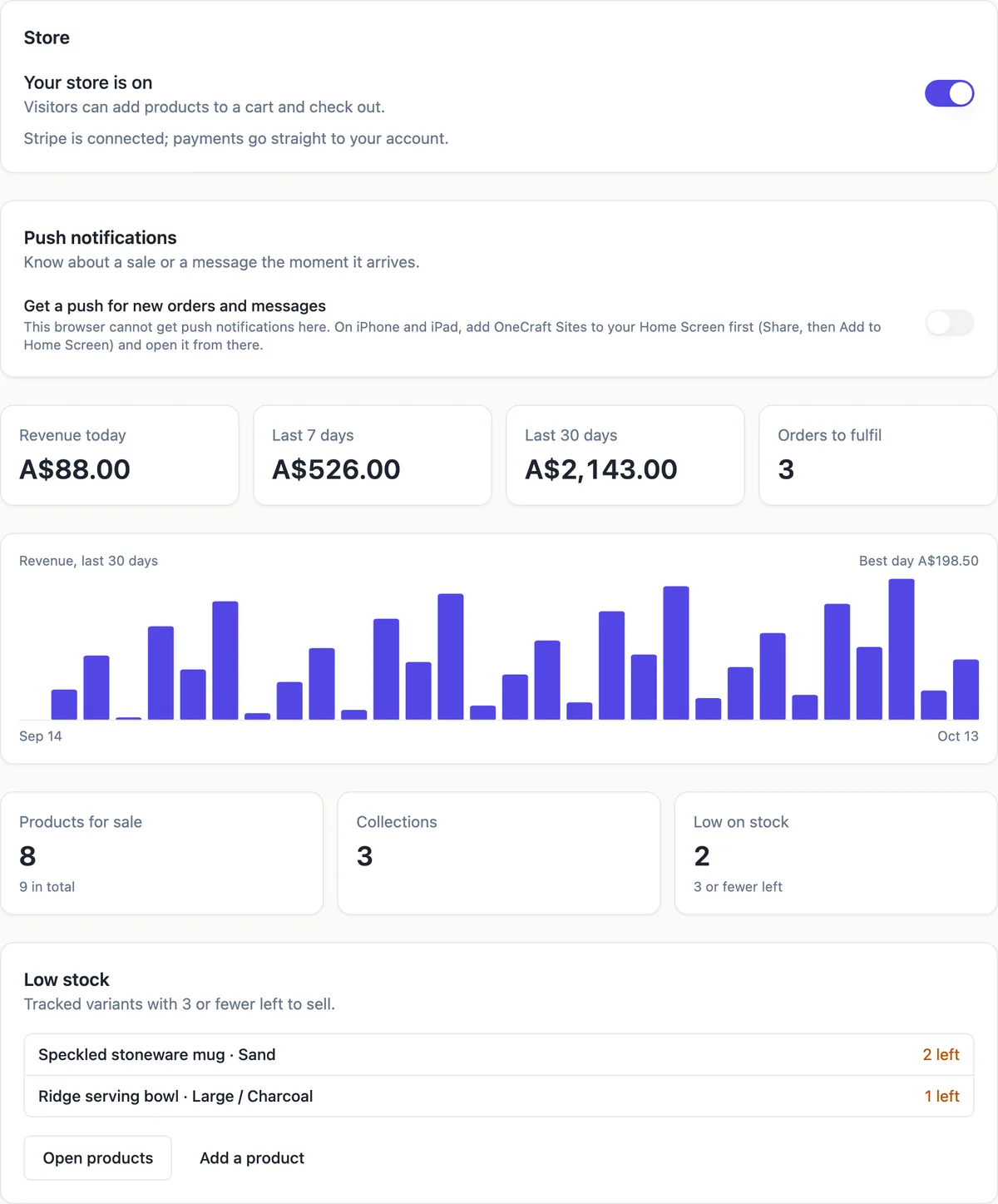
What the store covers
Products with photos, a rich text description, up to three options such as colour and size, and up to 100 variants, each with its own price, compare-at price, SKU and stock. Collections to group them. Four product types: shipped, pickup, download and ticket. Discount codes, shipping zones with rates, pickup locations, tax settings, orders, customers and a low stock list. A published store gets product pages, collection pages and a cart without you building them.
The money goes to your Stripe account
Checkout is Stripe Checkout through your own connected Stripe account, as a destination charge, so payouts and refunds happen in your Stripe dashboard. The platform keeps a fee per payment by plan: 2 percent on Starter, 1 percent on Pro and 0.5 percent on Pro+, with Stripe fees on top. The browser only sends product ids and quantities; prices, discounts, shipping and tax are worked out on the server.
Where the AI comes in
In the section builder the AI writes the site around the shop, not the shop itself: store templates for a boutique, a ceramics studio and a coffee roaster open as they are with six to twelve sample products for you to replace, and the AI chat edits the pages. In Code mode on a paid plan the AI builds every kind of site, stores included, and the catalogue comes from the same store screens.
Stock that stays right
When a buyer starts checkout the items are held for 35 minutes, so two people cannot pay for the last mug. If the payment does not complete, the hold is released by a sweep. A variant shows as low stock at three or fewer available, and the dashboard lists every low variant. Stock you edit while an order comes in is not overwritten, the editor asks you to reload instead.
What it does not do
Payments run through Stripe only: no PayPal, no cash on delivery, no other gateway. There are no marketplace channels, no abandoned cart emails and no shipping label printing; you add tracking details yourself when you mark an order sent. Refunds are issued in your Stripe Express dashboard. For a shop with thousands of products or wholesale accounts, a full commerce platform fits better.
How it works, in three steps
Step 1
Turn the store on
In site settings or the store dashboard, switch the store on and connect Stripe under Settings, Payments.
Step 2
Add products
Add them one by one with options and stock, or import a CSV exported from Shopify, WooCommerce, Square or a sheet.
Step 3
Set delivery and publish
Add shipping zones or pickup locations, check the tax settings, then publish the site.
Limits worth knowing
- The store is part of the paid plans; the free plan cannot switch it on.
- Each product takes up to 3 options and 100 variants.
- Stripe is the only payment method, through your own connected account.
- Stores in currencies with no or three decimal places, such as JPY, cannot take checkout yet.
Questions people ask
Do I need a Stripe account?
Yes, to take payments. You can switch the store on and add products before Stripe is connected, but the checkout refuses orders until your connected account is active. Connecting happens in your account settings under Payments and sends you through Stripe onboarding, where Stripe checks your identity and bank details.
What currency does the store use?
The default currency of your connected Stripe account, so an Australian account sells in Australian dollars. Before Stripe is connected the store shows US dollars. Prices are stored in cents and worked out on the server, and currencies without two decimal places are not supported for checkout yet.
Can I sell on my menu or event site too?
Yes. The store can be switched on for any site, not only the store kind. A restaurant menu with the store on takes pickup orders, an event site can sell tickets as products of the ticket type, and a portfolio can sell prints. The cart and product pages are added to the published site automatically.
How do customers get receipts?
After payment the buyer lands on a thank you page that shows the order, and gets an email receipt listing the items, totals with your tax label, the delivery or pickup details and a download button for any digital item. You get your own email and, if you turned it on, a push notification for each new order.
Can I use the store without a website?
The store lives inside a site, so it needs one, but the site can be as small as a single product page and a cart. Starting from the boutique, ceramics or coffee templates gives you a finished storefront to rename, which is the quickest route if the shop is the whole business.
Is there a limit on orders?
No order cap is set by the store. The limits that matter are the plan fee per payment and Stripe rules for your account. Orders list 50 at a time with Show older, and order and customer lists export to CSV for your accounts.
Make your own website
The button opens the generator with this use case already described. Change the wording to match yours, generate, then edit anything you like.
Create a website with OneCraftRelated pages
Event website with tickets: the page and the sales in one place
An event website has to sell the date before it sells the ticket: what it is, when and where, who is on, and what each ticket gets you. Selling tickets on the same site keeps the buyer on your page and the money in your own payment account.
Restaurant menu website maker: the menu first, then everything around it
A restaurant menu website exists to answer four questions fast: what do you serve, how much is it, when are you open and where are you. Everything else, the story, the gallery, the ordering, is useful only once those four are one tap away on a phone.
Ecommerce website with Stripe: how the checkout actually works
An ecommerce website with Stripe sends the buyer to a Stripe hosted checkout page to pay, then back to the shop with a receipt. The parts worth understanding are who holds the money, how the price is worked out, and what you set for tax and delivery before the first order.
More finished work of this kind is on the website examples hub.
Written and checked by the OneCraft team. Last checked .