Websites
Restaurant menu website maker: the menu first, then everything around it
A restaurant menu website exists to answer four questions fast: what do you serve, how much is it, when are you open and where are you. Everything else, the story, the gallery, the ordering, is useful only once those four are one tap away on a phone.
Two ways to show a menu
The menu section has two layouts. Printed columns sets dishes by course in columns with dotted leaders to the price, like a paper menu, and suits a long menu. Photo rows puts a photo beside each dish with its description and price, for food that sells on looks, such as brunch plates or cakes. Both read the same menu, so switching layout does not mean retyping it.
The menu templates
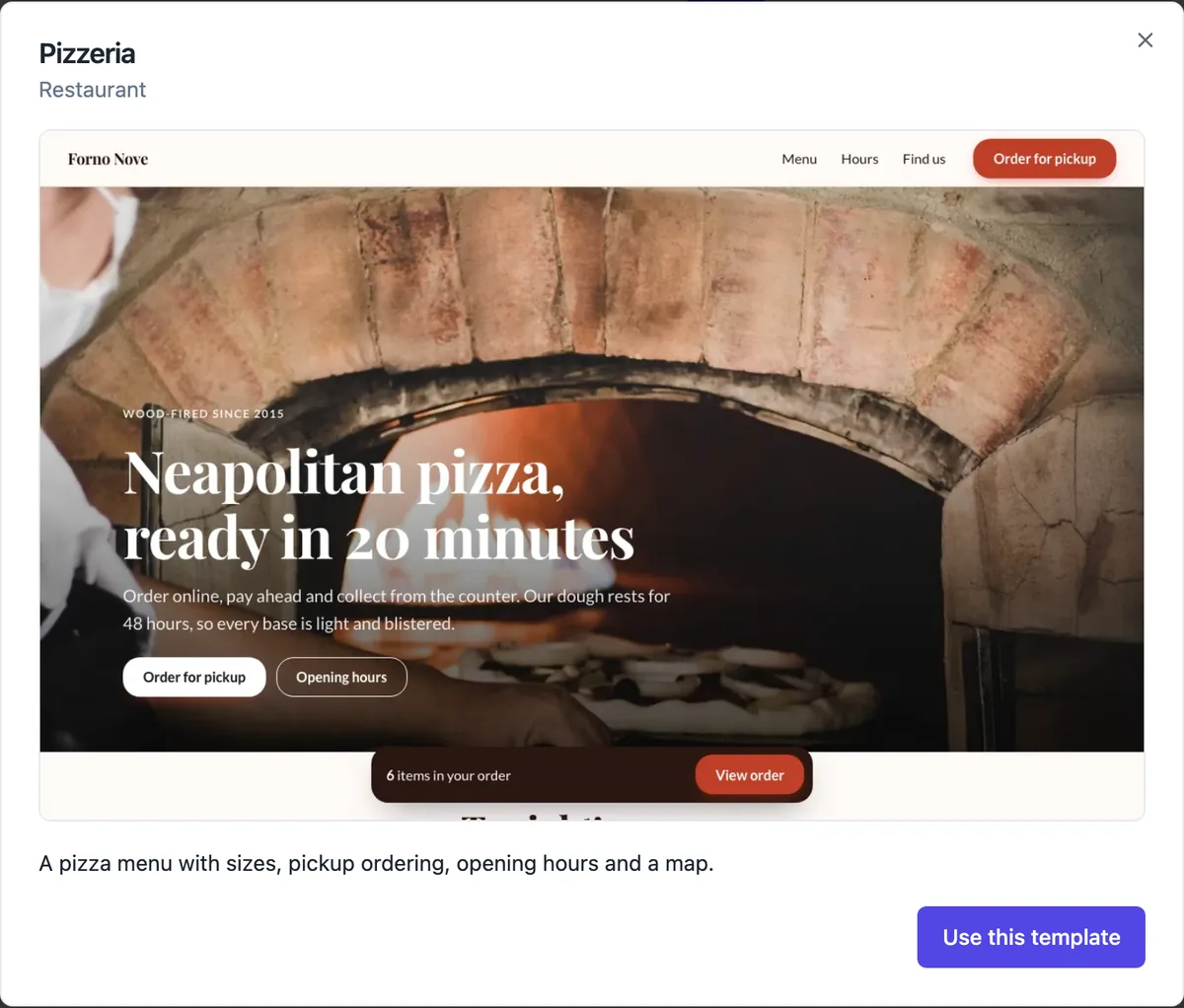
Three menu templates open as they are: a pizzeria with sizes, pickup ordering, hours and a map; a brunch cafe with photo rows, a gallery, hours and a contact map; and a food truck with pickup ordering, where to find the truck this week and a newsletter. Replace the dishes, prices and photos with yours, and the hours and address with your own.
Hours, map and the details people check
Add an opening hours section as a day by day table or a small card with a note about public holidays. The map section embeds Google Maps for your address with an Open in Google Maps link, and only loads when it scrolls near the screen so the page stays fast. Put the phone number in the contact section so it becomes a tap to call link.
From menu to pickup orders
Each dish on the menu is a product in the store. With the store off, the menu shows dishes and prices only. Switch the store on, with pickup enabled, and each dish gets an Add or Choose button and a fixed order bar appears at the bottom of the screen. Buyers pay by card through Stripe Checkout and pick up at the location you set.
Installs like an app on phones
Menu and store sites can be installed to a phone home screen by default: the published site carries a web app manifest, icons and an offline page, and an optional prompt section invites phone visitors to add it. Regulars then open your menu like an app. You can switch this off in site settings.
How it works, in three steps
Step 1
Open a menu template
In the generator pick the Menu kind and open the pizzeria, brunch or food truck template as is.
Step 2
Replace the menu
Edit the dishes and prices as products in the store screens, then the hours, address and photos in the builder.
Step 3
Publish
Publish to your onecraft.live address and put the link on your Google listing and socials.
Limits worth knowing
- In the section builder, menu sites start from a template; the AI does not write a menu site from a description there.
- Ordering needs the store switched on, which is part of the paid plans, and a connected Stripe account.
- A menu site takes pickup orders by default; there is no delivery driver dispatch or table service ordering.
- Store and checkout labels on the published site are in English.
Questions people ask
Can I just show the menu without online ordering?
Yes. With the store off, the menu section shows dishes, descriptions and prices without buttons or a cart, which is all many restaurants want at the start. You can switch ordering on later without rebuilding anything, because the dishes are already products in the store screens.
Should I upload a PDF of my menu instead?
A text menu is better. It reads properly on a phone without zooming, search engines can read the dishes, and screen readers can read it aloud. A PDF is a separate download that most phones open awkwardly. If you keep a printable PDF, link it as an extra, not as the menu itself.
How do I mark vegetarian or gluten free dishes?
Put the marker in the dish name or description, such as GF or V with a key near the top of the menu. The section does not have dietary icons of its own. Keep the wording consistent across dishes so diners scanning for one word find every match.
Can I change prices quickly?
Prices live on the products in the store screens. Change a price there and, on a published site, the menu updates within about half a minute without a full publish, because catalogue changes are pushed to the live pages on their own. Other wording changes need a publish.
Will customers find my menu on Google?
The published site has a search title and description, a sitemap, and LocalBusiness structured data with your address and opening hours when the site has an hours section or an address in its contact section. That helps search engines understand the business. Link the site from your Google Business Profile, which is where most diners look first.
Can I have a separate page for drinks or catering?
Yes. Add a page, put a menu section on it and link it from the menu bar. The Pizzeria template already does this with a full menu page behind a shorter home menu. A catering page with packages often works better with a pricing section than a menu section.
Make your own website
The button opens the generator with this use case already described. Change the wording to match yours, generate, then edit anything you like.
Create a website with OneCraftRelated pages
AI online store builder: a small shop on your own site
An online store builder adds a catalogue, a cart and a checkout to a website so people can buy without leaving it. For a small shop the questions are simple: can you list your products with their options, does stock stay right, and does the money go straight to your account.
Online ordering for restaurants: pickup orders from your own menu
Online ordering lets customers choose from your menu, pay, and collect at a set place without phoning. Taking those orders on your own site instead of a delivery app trades the app audience for keeping the margin and the customer relationship.
Shipping rates for your online store: zones, rates and free over
Shipping rates decide what a buyer pays for delivery and which options they can choose. For a small shop the simplest setup that works is a domestic zone with one or two flat rates, a free shipping threshold, and a rest of the world zone, or none if you only ship at home.
More finished work of this kind is on the website examples hub.
Written and checked by the OneCraft team. Last checked .