Websites
Shipping rates for your online store: zones, rates and free over
Shipping rates decide what a buyer pays for delivery and which options they can choose. For a small shop the simplest setup that works is a domestic zone with one or two flat rates, a free shipping threshold, and a rest of the world zone, or none if you only ship at home.
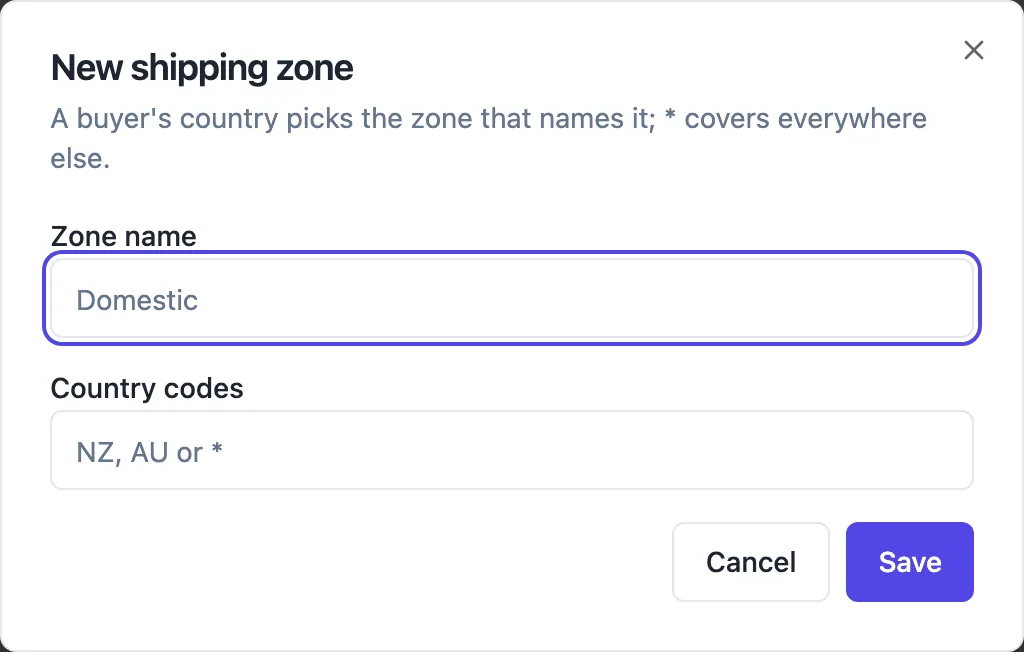
Zones of countries
A zone has a name and a list of countries as two letter codes, such as AU, or a star for everywhere else. When a buyer chooses their country in the cart, the zone that names it wins over the star zone, and when two zones name it, the one with fewer countries wins. Without any zone, shipped items can only be picked up.
Rates inside a zone
Each zone holds the rates a buyer there can choose: a name such as Standard or Express, a fixed amount, an optional free over amount, and an optional delivery estimate in days. Free over compares against the goods total after any discount code. The cart lists the rates with their prices and estimates, and the buyer picks one.
Pickup beside delivery
Pickup locations have an address and instructions, and appear in the cart when offer pickup is on in the store settings. A buyer picks delivery or pickup; pickup orders need no address and show the location and instructions on the receipt. Menu sites are pickup only by default.
What Stripe Checkout receives
For a shipped order the server sends Stripe one fixed rate, the one the buyer chose, with its delivery estimate, and asks Stripe to collect a shipping address for the buyer country. Pickup and download orders send no shipping. Whether shipping is taxed follows the tax shipping switch in the store settings.
Keeping it simple
Buyers abandon carts over surprise delivery costs more than over the cost itself. Say your rates and the free shipping threshold on the site, in an FAQ or a banner. Fewer, clearer rates beat a long list. If parcels vary a lot in size, set the flat rate from your typical order and absorb the odd heavy one.
How it works, in three steps
Step 1
Add a zone
In the store Shipping screen press New zone, name it and list its country codes, or a star for everywhere else.
Step 2
Add rates
Add one or more rates to the zone: name, amount, optional free over amount and delivery days.
Step 3
Add pickup if you offer it
Add pickup locations and turn on offer pickup in the store settings.
Limits worth knowing
- Rates are fixed amounts per zone; there is no weight or size based calculation.
- Countries are two letter ISO codes, or a star for everywhere else.
- No carrier integration, label printing or live carrier rates.
- Free over compares with the goods total after discounts.
Questions people ask
Can I charge shipping by weight?
No. Rates are fixed amounts within a zone. Most small shops use one flat rate, sometimes with an express option and a free shipping threshold. If your products range from a postcard to a heavy pot, consider two zones of rates by speed, and price heavy items to cover their postage.
What happens if a buyer country has no zone?
If no zone names the country and there is no star zone, shipping is not available for that cart, and the buyer can only choose pickup if you offer it. Add a star zone with an international rate, or say on the site where you ship.
How do I add tracking for an order?
When you mark an order sent from its order page, you can add the carrier, tracking number and tracking link. The buyer gets an email saying the order is on its way with those details. Labels are bought from your carrier as usual.
Can I offer free local delivery?
Make a zone for your country with a rate named Local delivery at zero, or offer pickup locations. There is no postcode or suburb level zone, so a local only delivery rate cannot be restricted by postcode; say in the rate name and on the site which area it covers.
Does shipping get taxed?
Only if you turn on tax shipping in the store settings, in which case the tax rate you set applies to the delivery charge too. Whether delivery should carry GST depends on your registration and what you sell, so check that setting with your accountant.
Should I offer free shipping?
A free shipping threshold a little above your average order often lifts order size, because buyers add an item to reach it. Set the free over amount on your standard rate and announce it on the site. Free shipping on everything works only when your prices already carry the postage.
Make your own website
The button opens the generator with this use case already described. Change the wording to match yours, generate, then edit anything you like.
Create a website with OneCraftRelated pages
Event website with tickets: the page and the sales in one place
An event website has to sell the date before it sells the ticket: what it is, when and where, who is on, and what each ticket gets you. Selling tickets on the same site keeps the buyer on your page and the money in your own payment account.
Discount codes for your online store: three kinds, checked on the server
A discount code lets a buyer type a word such as WINTER15 in the cart and pay less. The useful controls are few: what the code takes off, when it works, the smallest order it applies to and how many times it can be used.
Inventory tracking for a small online store: no overselling, early warnings
Inventory tracking stops a store from selling stock it does not have. For a small shop it comes down to three things: a stock number per variant, holding items while someone pays so two buyers cannot take the last one, and a warning before a bestseller runs out.
More finished work of this kind is on the website examples hub.
Written and checked by the OneCraft team. Last checked .