Websites
Event website with tickets: the page and the sales in one place
An event website has to sell the date before it sells the ticket: what it is, when and where, who is on, and what each ticket gets you. Selling tickets on the same site keeps the buyer on your page and the money in your own payment account.
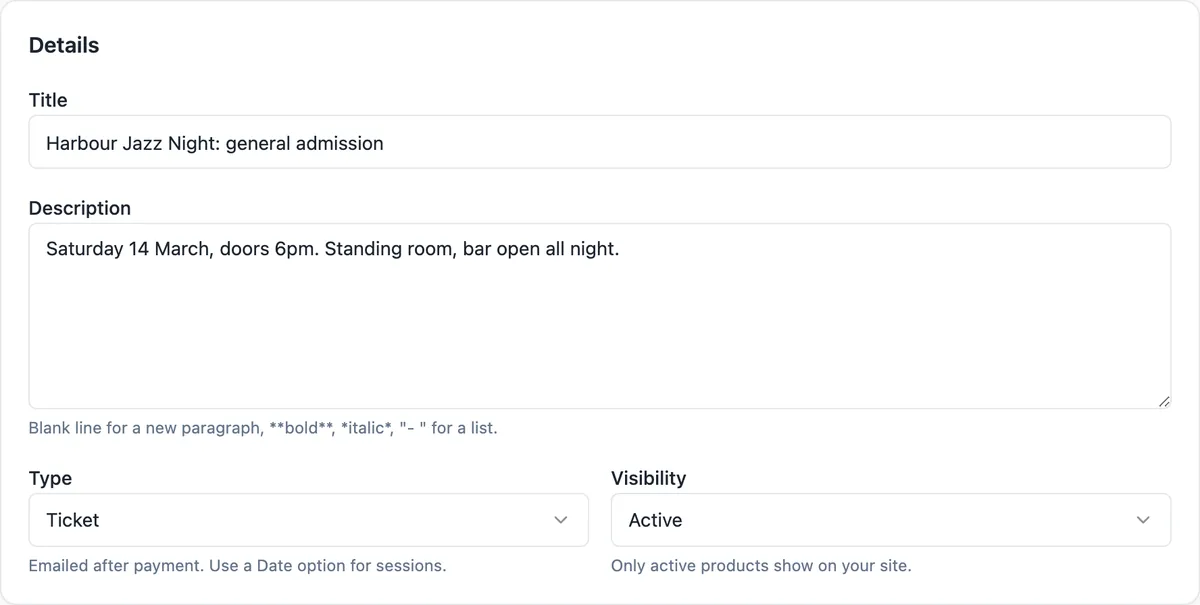
A ticket is a product with a limit
Each ticket type, such as general admission, concession or VIP, is a product of the Ticket type with its own price and a stock number. Stock caps the sales: when 180 general admission tickets are sold, the product shows as sold out. Tickets are held for 35 minutes while a buyer pays, so the last ticket cannot be sold twice, and an order made only of tickets needs no fulfilment step.
What the buyer receives
The product page tells buyers the ticket is emailed after payment. In practice the email receipt and the thank you page are the ticket: they list the order number, the items and the total. There is no QR code, seat map or door scanning app, so check guests against the order list, which exports to CSV with names and emails.
The event templates
Three event templates open as starting designs: a dark conference site with a stat hero, speakers, a programme by date, ticket tiers, FAQ and the venue map; a food festival with nights as event cards, a pass comparison and a gallery; and a wedding page with the story, the day timeline, places to stay and a reply form. The AI can also write an event site from your description.
Sections that sell an event
Events lists several sessions as cards, as a programme by date and time, or as one featured event with its date, place and booking button. Team shows speakers or performers with portraits. Pricing compares ticket tiers side by side, a one line banner at the top can announce early bird pricing, and the map section shows the venue. A newsletter sign-up catches people not ready to buy.
Free events and RSVPs
A free event cannot go through checkout, because a zero total order is refused. For RSVPs, use a contact form that asks for name and email, or a OneCraft form embedded on the page, and read replies in the messages inbox. In Code mode the event template keeps an RSVP list as a data collection while selling paid tickets through the store.
How it works, in three steps
Step 1
Build the event page
Start from an event template or describe the event to the generator: date, venue, line up and ticket types.
Step 2
Add ticket products
Switch the store on, add one Ticket product per ticket type with its price and the number available.
Step 3
Publish and share
Publish the site and share its address; paid orders appear in Orders and the buyer gets an email receipt.
Limits worth knowing
- Selling tickets needs the store, which is part of the paid plans, and a connected Stripe account.
- No QR codes, seat maps or scanning app; the receipt and the order list are the record.
- Free RSVPs go through a form, not checkout.
- Platform fee per payment: Starter 2%, Pro 1%, Pro+ 0.5%, plus Stripe fees.
Questions people ask
Can I cap the number of tickets?
Yes. Turn on stock tracking for the ticket product and set the number available. Each paid ticket reduces it, tickets are held while a buyer is paying, and the product shows as sold out at zero. You can raise the number later if the venue frees up space.
Can I offer an early bird price?
Use a compare at price to show the old price struck through, or create a separate Early bird ticket product with its own limited stock and switch it to draft when the offer ends. A discount code with an end date also works for a promotion shared by email.
Do ticket buyers get a QR code?
No. Buyers get an email receipt and a thank you page with their order number and items. For check in, export the orders to CSV and tick names off at the door, or search the Orders screen by name or email on a phone at the entrance.
Can one site sell tickets for several events?
Yes. Each event and ticket type is its own product, and collections can group them by month or series. The events section on the page describes the programme, and each card can link to the matching product page so buyers go straight to the right tickets.
What if the event is cancelled?
Refund each paid order in your Stripe Express dashboard; the store marks the order refunded when Stripe reports it, and the buyer gets a refund email. Post the cancellation in a banner at the top of the site so people visiting the page see it straight away.
Is GST charged on tickets?
The store applies the tax label and rate you set in store settings, either included in the price or added at checkout, and a product can be marked as having no tax. Whether tickets carry GST depends on your registration, so set the rate after checking with your accountant.
Make your own website
The button opens the generator with this use case already described. Change the wording to match yours, generate, then edit anything you like.
Create a website with OneCraftRelated pages
Discount codes for your online store: three kinds, checked on the server
A discount code lets a buyer type a word such as WINTER15 in the cart and pay less. The useful controls are few: what the code takes off, when it works, the smallest order it applies to and how many times it can be used.
Order management for a small online store: from paid to sent
Order management is the daily routine after a sale: see what is waiting, pack it, tell the buyer it is on its way, and keep a record. For a small shop it should take one screen and a few clicks per order, with the buyer emails sent for you.
Sell digital products online without a marketplace
Selling digital products online means taking payment for a file and handing the file over automatically, at any hour. On your own site that takes three pieces: a product with the file attached, a checkout, and a download link that only paying buyers can use, for a limited time.
More finished work of this kind is on the website examples hub.
Written and checked by the OneCraft team. Last checked .