Websites
Sell digital products online without a marketplace
Selling digital products online means taking payment for a file and handing the file over automatically, at any hour. On your own site that takes three pieces: a product with the file attached, a checkout, and a download link that only paying buyers can use, for a limited time.
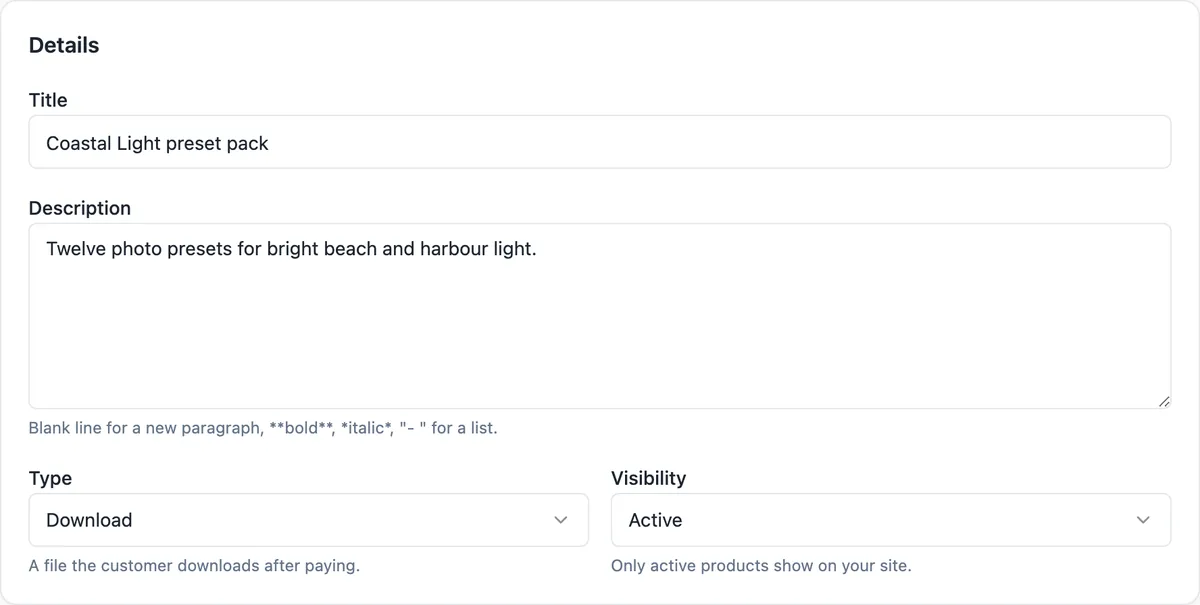
How a download is delivered
You upload the file to the product, one file per variant, in any format up to 500 MB. After payment the thank you page shows a download button for each digital item, and the email receipt carries the same buttons. Each purchased item can be downloaded 5 times within 7 days of payment; every click goes through the store and turns into a link to the file that lasts ten minutes, so a shared link stops working quickly.
No shipping, no waiting
An order made only of digital items or tickets needs no fulfilment, so it never sits in your To send list. The buyer pays through Stripe Checkout without entering an address, and the order is marked paid as soon as Stripe confirms. You still see every sale in Orders and the buyer in Customers, with their total spend.
The digital shop templates
Three templates are built for this: a photo preset shop with a bundle and reviews, an ebook author shop with formats, an audiobook and a signed paperback, and a template shop selling Notion and spreadsheet templates with formats as options. They open as they are with sample products, which you replace with your own files and prices.
Formats as options
A product with options can sell the same thing in different forms: an ebook as EPUB or PDF, a template for Notion or Google Sheets, a preset pack for desktop or mobile. Each combination is a variant with its own price and its own file, and the buyer picks on the product page. Stock tracking can stay off for digital variants, since a file does not run out.
What to know before you start
The files are stored privately and never published with the site pages, so they cannot be found by browsing. Upload counts against your account storage. There is no licence key generation, no subscription billing and no drip content; each sale is a one off payment for a file. For courses with lessons behind a login, Code mode with data collections or a course platform fits better.
How it works, in three steps
Step 1
Add a product
Choose Download as the type, write the title and description and set the price.
Step 2
Attach the file
Upload the file for each variant, up to 500 MB each.
Step 3
Publish
Buyers pay through Stripe Checkout and get download buttons on screen and by email.
Limits worth knowing
- One file per variant, up to 500 MB, any type.
- Each purchased item allows 5 downloads within 7 days of payment.
- The store and Stripe payments need a paid plan.
- There are no subscriptions, licence keys or members only areas in the store.
Questions people ask
Can buyers download again after a week?
Not through the original link. Downloads stop after 7 days or 5 uses, whichever comes first. If a buyer loses the file, you can resend the receipt from the order page, but the download count and the 7 day window still apply, so the cleanest fix for a genuine customer is to send the file yourself.
What file types can I sell?
Any type. The store accepts a zip, PDF, EPUB, audio, video or any other file up to 500 MB per variant, and stores it privately. Large packs are best zipped into one file, both to stay under the limit and so the buyer gets everything with one click.
Can I give a product away for free?
A checkout needs something to pay, so a zero total order is refused. For a free sample, put the file behind a newsletter sign-up you handle yourself, or link to it directly from a page. A discount code for part of the price works normally.
Do I need to collect GST on digital products?
It depends on where you and your buyers are and on your turnover, and the rules for digital sales to overseas buyers differ by country. The store applies the tax rate you set, inclusive or exclusive. Check the rules for your situation with the tax office or your accountant before you set it.
Does the buyer need an account?
No. The buyer pays as a guest through Stripe Checkout and the download link arrives on the thank you page and in the email. There are no customer logins, which keeps buying quick but means the email receipt is the buyer record of their purchase.
Can I sell physical and digital products together?
Yes. One cart can hold shipped, pickup and download items. The checkout asks for delivery details only when something in the cart needs them, and the digital items unlock as soon as the payment is confirmed, without waiting for the parcel to be sent.
Can buyers preview a product before paying?
Use the product photos and the description for that: before and after images for presets, sample pages for an ebook, a screenshot of a template. The download file itself is never public, so any free preview has to be an image or a separate file you link on the page yourself.
Make your own website
The button opens the generator with this use case already described. Change the wording to match yours, generate, then edit anything you like.
Create a website with OneCraftRelated pages
Event website with tickets: the page and the sales in one place
An event website has to sell the date before it sells the ticket: what it is, when and where, who is on, and what each ticket gets you. Selling tickets on the same site keeps the buyer on your page and the money in your own payment account.
Order management for a small online store: from paid to sent
Order management is the daily routine after a sale: see what is waiting, pack it, tell the buyer it is on its way, and keep a record. For a small shop it should take one screen and a few clicks per order, with the buyer emails sent for you.
Ecommerce website with Stripe: how the checkout actually works
An ecommerce website with Stripe sends the buyer to a Stripe hosted checkout page to pay, then back to the shop with a receipt. The parts worth understanding are who holds the money, how the price is worked out, and what you set for tax and delivery before the first order.
More finished work of this kind is on the website examples hub.
Written and checked by the OneCraft team. Last checked .