Websites
Customer list for your online store: who buys, how often, how much
A customer list shows the people who have bought from you, with enough detail to spot regulars and thank them. In a small shop it is most useful for two questions: who are my best customers, and who has not ordered in a while.
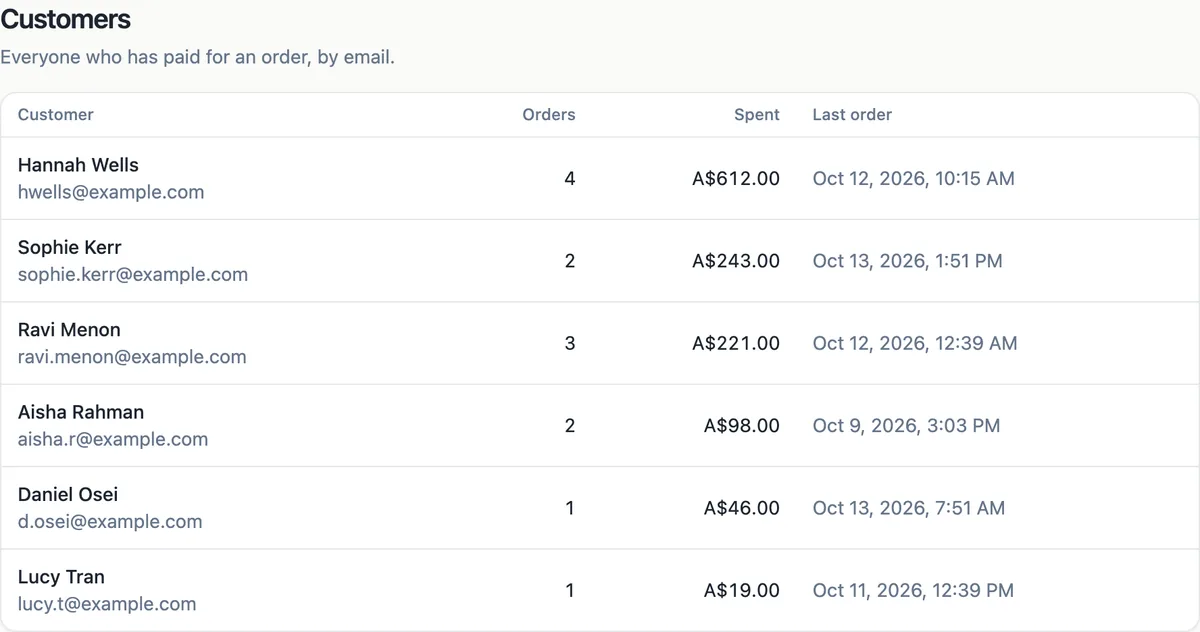
How the list is built
There are no customer accounts. The list is built from paid orders, grouped by the email address the buyer gave at checkout: one row per email with the latest name, the number of orders, the total spent and the date of the last order. Refunded orders add nothing to the total. Unpaid and abandoned checkouts are left out.
Spotting your regulars
Sort by spent to find your best customers and by last order to see who has gone quiet. A buyer with four orders and a last order three months ago is worth a personal email before the next season. A first time buyer with a large order deserves a thank you note in the parcel.
Using it without a CRM
The customer screen is a view, not a marketing tool: there is no email sending, segmentation or tagging. Copy addresses for a personal message, or export orders to CSV and build a list in your email tool, with the buyer permission to email them. A newsletter sign-up on the site is the cleaner source for marketing.
Privacy obligations
Names and emails from orders are personal information you hold as the seller. Use them for the order and for what your privacy policy says, keep them secure, and do not add buyers to marketing lists without consent. The privacy page the generator adds is a starting text to edit to match how you actually use customer details.
Same email, same customer
Because the list groups by email, a buyer who uses two addresses appears twice, and two people sharing one address appear once. That is accurate enough for spotting regulars in a small shop; for a precise count of people, ask buyers to use one address or check names when the numbers matter.
How it works, in three steps
Step 1
Open Customers
In the store screens open Customers to see every buyer from paid orders.
Step 2
Read the columns
Name and email, number of orders, total spent and last order date for each buyer.
Step 3
Act on it
Thank regulars, follow up with quiet ones personally, and keep marketing to people who opted in.
Limits worth knowing
- There are no customer accounts or logins; buyers check out as guests.
- The list is grouped by email from paid orders; refunded orders add nothing.
- No email campaigns, tags or segments from the customer screen.
- A buyer using two emails appears twice.
Questions people ask
Can customers log in to see their orders?
No. Buyers check out as guests through Stripe Checkout and get an email receipt, which is their record. Without accounts, buying is faster, and buyers do not need another password. Order status after payment is shown on the thank you page and in the emails you trigger.
Can I email all my customers about a sale?
Not from the store screens. Emailing buyers for marketing needs their consent in most countries. Invite them to join a newsletter on the site, then send from an email tool. For a single order question, email the buyer directly from the order.
Why is a customer total lower than their orders?
Refunded orders count as zero in the total spent, so a customer with a refund shows less than the sum of their receipts. Open the buyer orders in the Orders screen by searching their email for the full history, including the refunded order and its date.
Can I export the customer list?
Export orders to CSV from the Orders screen; it includes each order customer name and email, which a spreadsheet can group into a customer list with totals. Keep exports secure and delete old copies you no longer need, since they hold personal information.
Does the list include menu and ticket buyers?
Yes. Any paid order from the store, whether shipped goods, pickup food orders, downloads or event tickets, adds to the buyer row. That makes the list useful for a cafe or an event organiser too, for spotting regulars across different kinds of order.
How do I find a customer quickly?
Search the Orders screen by name or email to see every order from one buyer with its status, items and dates. The customer list itself is a summary for spotting patterns, while the order search is the tool for answering a specific buyer question about a delivery or a receipt.
Can I delete a customer?
The list is built from paid orders, so there is no customer record to delete separately. If a buyer asks you to remove their details, handle it under your privacy obligations: keep what tax law requires for the order and delete copies elsewhere, such as exported spreadsheets and email tool lists.
Make your own website
The button opens the generator with this use case already described. Change the wording to match yours, generate, then edit anything you like.
Create a website with OneCraftRelated pages
Order management for a small online store: from paid to sent
Order management is the daily routine after a sale: see what is waiting, pack it, tell the buyer it is on its way, and keep a record. For a small shop it should take one screen and a few clicks per order, with the buyer emails sent for you.
Sell digital products online without a marketplace
Selling digital products online means taking payment for a file and handing the file over automatically, at any hour. On your own site that takes three pieces: a product with the file attached, a checkout, and a download link that only paying buyers can use, for a limited time.
Discount codes for your online store: three kinds, checked on the server
A discount code lets a buyer type a word such as WINTER15 in the cart and pay less. The useful controls are few: what the code takes off, when it works, the smallest order it applies to and how many times it can be used.
More finished work of this kind is on the website examples hub.
Written and checked by the OneCraft team. Last checked .