Websites
Discount codes for your online store: three kinds, checked on the server
A discount code lets a buyer type a word such as WINTER15 in the cart and pay less. The useful controls are few: what the code takes off, when it works, the smallest order it applies to and how many times it can be used.
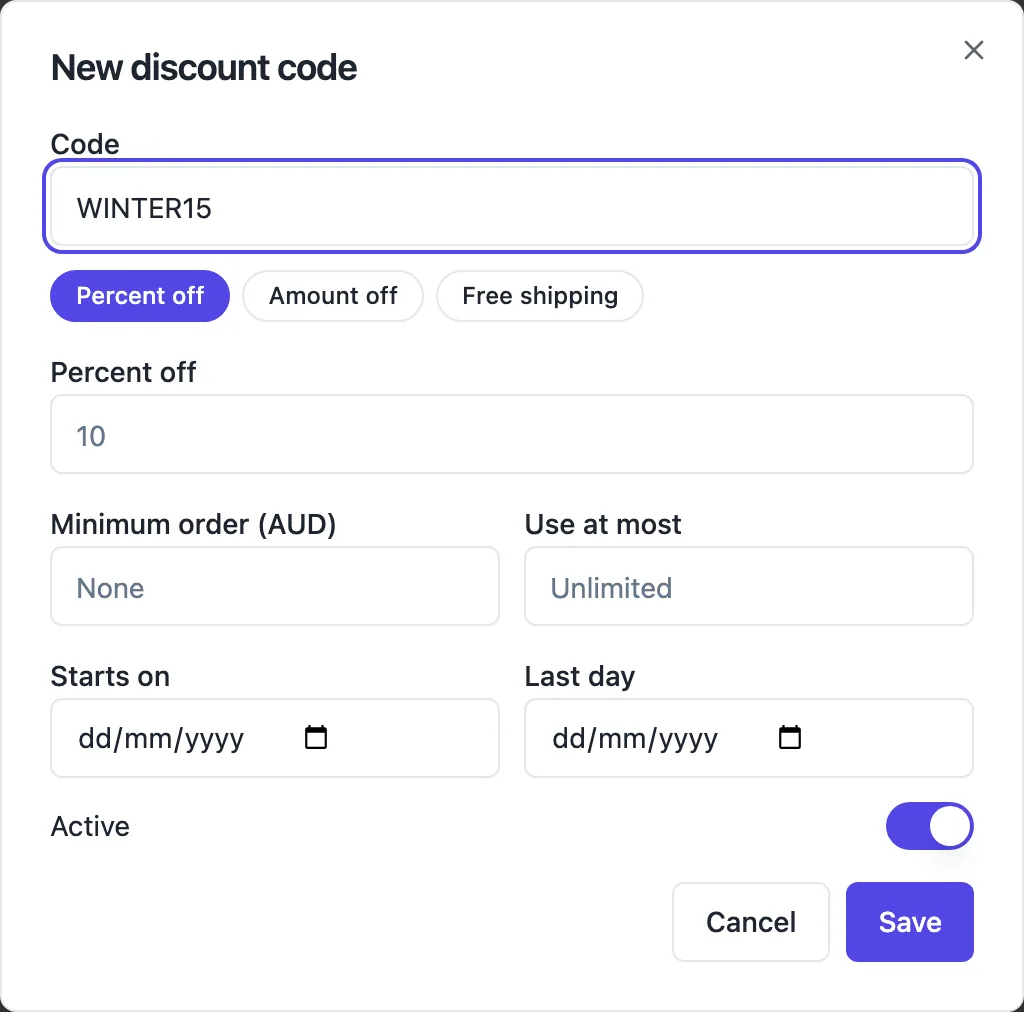
Three kinds of code
Percent off takes a percentage off the goods, such as 15 percent. Amount off takes a fixed amount, such as 10 dollars. Free shipping removes the delivery charge. Each code is 3 to 20 capital letters and numbers, unique within the store, and the buyer types it in the cart, where the server checks it and shows the new total.
Dates, minimums and limits
Starts on and last day bound when the code works; outside them the cart says it has expired. A minimum order sets the smallest goods total the code applies to. Use at most caps how many paid orders can use it, counting orders still holding stock in checkout so a popular code cannot overshoot. The Active switch turns a code off without deleting it.
Checked on the server, twice
The cart sends the code with the product ids and quantities, and the server applies it to its own prices: the buyer never sends an amount. At checkout the code is checked again, including the use limit, before the Stripe session is made. The Stripe page shows Includes code and the code, and each paid order counts one use.
How the discount meets tax and shipping
The discount is spread across the lines in proportion to their value, so tax is worked out on the discounted amounts, with no rounding drift: the line amounts sent to Stripe always add up to the total. Free shipping applies to the chosen rate. Shipping rates can also have their own free over amount, which works without any code.
Using codes well
Give each campaign its own code, such as INSTA10 for a social post and WELCOME10 for new subscribers, so the discounts list shows which worked by uses. Put an end date on every sale code; open ended codes end up on coupon sites. And state the terms where you announce it, such as minimum order and end date, so the cart message is no surprise.
How it works, in three steps
Step 1
Open Discounts
In the store screens open Discounts and press New code.
Step 2
Set the code
Type the code, choose percent off, amount off or free shipping, and set the value.
Step 3
Limit and save
Optionally set the minimum order, use limit and dates, keep Active on and save; share the code.
Limits worth knowing
- Codes are 3 to 20 capital letters and numbers, unique per store.
- One code per order.
- Use limits count paid orders plus orders holding stock in checkout.
- No automatic discounts without a code, and no buy X get Y rules.
Questions people ask
Can a buyer use two codes on one order?
No. The cart takes one code per order. If you want to combine offers, such as free shipping and a percentage off, make that a single code of one kind and use the shipping rate free over amount for the other, which works automatically without a code.
What does the buyer see if a code does not work?
The cart explains the reason: the code is not valid, it has expired or not started, or the order is below the minimum. The buyer can fix the cart or remove the code and still check out. Nothing about the code reaches Stripe unless the server accepted it.
Can I make a code for one product only?
No. Codes apply to the goods in the cart as a whole, with an optional minimum order. For a discount on one product, lower its price and set a compare at price to show the reduction, then put it back when the offer ends.
How do I see how often a code was used?
The discounts list shows each code with its use count, which goes up by one with every paid order that used it. Orders that were abandoned or expired do not count. Compare use counts across campaign codes to see which announcement worked.
Can I offer a discount automatically to everyone?
Not as an automatic cart rule. Either lower the prices for the sale period with compare at prices showing the old amount, or announce one code everywhere. Shipping rates with a free over amount are the one discount that applies automatically.
Do discount codes work on the menu ordering bar?
Yes. Menu orders go through the same cart and checkout as any store order, so a code typed in the cart is checked and applied the same way before the buyer pays through Stripe Checkout. A lunch special code with an end date of the same day works well for slow afternoons.
Make your own website
The button opens the generator with this use case already described. Change the wording to match yours, generate, then edit anything you like.
Create a website with OneCraftRelated pages
Event website with tickets: the page and the sales in one place
An event website has to sell the date before it sells the ticket: what it is, when and where, who is on, and what each ticket gets you. Selling tickets on the same site keeps the buyer on your page and the money in your own payment account.
Order management for a small online store: from paid to sent
Order management is the daily routine after a sale: see what is waiting, pack it, tell the buyer it is on its way, and keep a record. For a small shop it should take one screen and a few clicks per order, with the buyer emails sent for you.
Ecommerce website with Stripe: how the checkout actually works
An ecommerce website with Stripe sends the buyer to a Stripe hosted checkout page to pay, then back to the shop with a receipt. The parts worth understanding are who holds the money, how the price is worked out, and what you set for tax and delivery before the first order.
More finished work of this kind is on the website examples hub.
Written and checked by the OneCraft team. Last checked .