Websites
Add Google Maps to your website: type the address, choose the layout
Adding Google Maps to a website shows visitors exactly where you are and gives them directions in one tap. You should not need an API key or embed code for that, only the address people would type into Maps themselves.
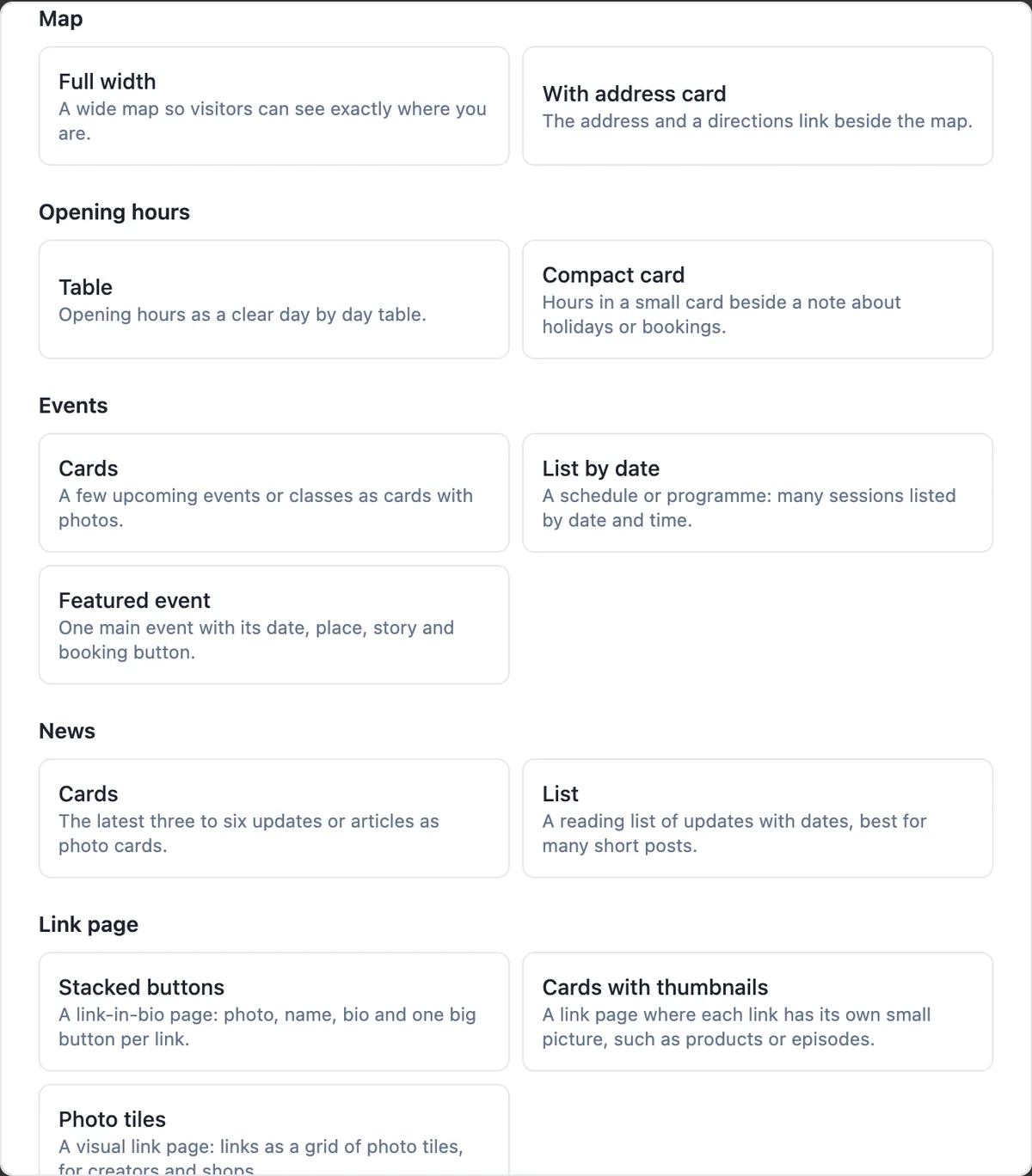
Two map layouts
Full width shows a wide map so visitors can see exactly where you are, good near the end of a home page or on a visit us page. With address card puts the address and a directions link beside the map. Both take three fields: a heading, the address and a place name, and both show an Open in Google Maps link under the map.
No key, no embed code
The map is a Google Maps embed built from the address you type, so there is no API key to create and no code to paste. Write the address the way Google Maps finds it, including the suburb and state, and check the preview: if the pin lands in the wrong place, add the postcode or the business name.
Loaded only when needed
The map does not load with the page. It starts loading only when it scrolls near the screen, so visitors who never scroll that far do not download it and the page shows faster. That matters for phone visitors on mobile data, and it keeps your page speed scores healthy.
Other places a map appears
The contact layout with a map shows your address beside the message form, for places people visit. Restaurant menu templates and the conference template include a map with the address card. If your business comes to the customer, such as a mobile mechanic, skip the map and list the suburbs you cover instead.
Help search engines too
A map helps visitors; structured data helps search engines. When the site has an address in a visible contact section or opening hours, the published home page carries LocalBusiness data with your name, address and hours. Keep that address identical to your Google Business Profile, word for word, so the two reinforce each other.
How it works, in three steps
Step 1
Add a map section
In the builder press Add section and choose Full width or With address card under Map.
Step 2
Type the address
Enter the full address as Google Maps finds it, with a heading and the place name.
Step 3
Check the pin and publish
Look at the preview, adjust the address if the pin is off, then publish.
Limits worth knowing
- Maps come from Google Maps; other map providers are not offered.
- The map shows one address per section; add more sections for more locations.
- There is no custom pin, map style or route drawing.
- The map loads only when it scrolls near the screen.
Questions people ask
Do I need a Google API key?
No. The map is a standard Google Maps embed made from your address, which does not need a key. The Open in Google Maps link under the map opens the full Maps app or website, where visitors get directions from wherever they are.
Can I show several locations?
Each map section shows one address. For two shops, add two map sections, each with its own heading such as City store and Beach store, or put each location on its own page with its hours and map. A single map with several pins is not offered.
Does a map on my site help my Google ranking?
The embed itself is a convenience for visitors. What helps local search is consistent name, address and phone details on your site and your Google Business Profile, plus the LocalBusiness structured data the published home page carries when the site has an address or hours.
Why is the map blank in the builder?
The map loads when it scrolls into view, so give the preview a moment after scrolling. If it stays blank, check that the address field is filled. The published site loads the map the same way, near the screen, to keep pages fast.
Is the map accessible?
The map frame has a title naming the place, so screen readers announce it, and the address is also written as text in the address card layout. Always include the address as text somewhere on the page, because a map alone cannot be read by everyone.
Can I put the map on every page?
You can add a map section to any page, but one map on the home page or a contact page is usually enough. Repeating it everywhere adds load for no benefit. The footer can carry the address as text on every page instead, which is lighter and still lets people copy it.
What if my address is a PO box or I work from home?
Leave the map off. A map of a PO box or a home address helps nobody and can be a safety risk. Describe the area you serve in words, such as the suburbs or a radius, and invite people to get in touch through the contact form.
Make your own website
The button opens the generator with this use case already described. Change the wording to match yours, generate, then edit anything you like.
Create a website with OneCraftRelated pages
Website version history: three layers of going back
Website version history lets you put an earlier state of the site back online after a change goes wrong. It helps to know which layer you need: undo for the edit you just made, a restore for a publish you regret, or a code commit for a site written in code.
AI website generator from a prompt: what to write so the draft is right
A website generator reads a prompt the way a designer reads a brief: who the business serves, what it sells, why people trust it and what a visitor should do next. A prompt that answers those four things gets a draft that needs polishing, and one that only names the business gets a generic page.
Portfolio website maker: the work first, uncropped
A portfolio website is judged in the first few images, so it should show the work large, in its own proportions, and get out of the way. After that it needs only three things: who made it, what they offer, and how to ask about a job.
More finished work of this kind is on the website examples hub.
Written and checked by the OneCraft team. Last checked .