Websites
AI website generator from a prompt: what to write so the draft is right
A website generator reads a prompt the way a designer reads a brief: who the business serves, what it sells, why people trust it and what a visitor should do next. A prompt that answers those four things gets a draft that needs polishing, and one that only names the business gets a generic page.
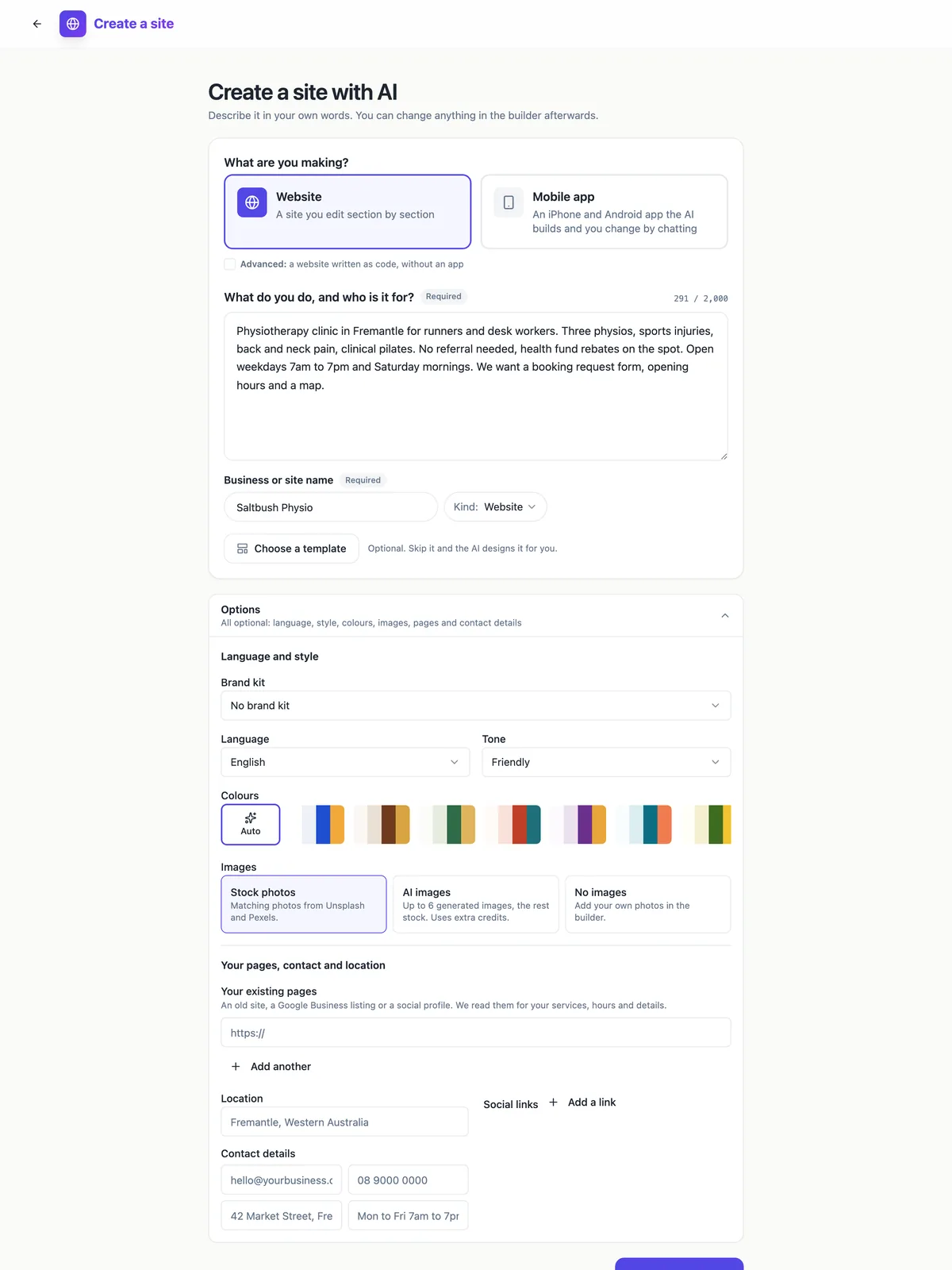
The four things a prompt must answer
Who it is for: runners and desk workers, first home buyers, families with dogs. What you sell: name the three to six services or products, not a category. Why people trust you: years, qualifications, the number of clients, a guarantee you actually offer. What a visitor should do: book, call, order, visit. The generator turns each of those into a section, so a prompt that skips one gets a weaker page or a generic placeholder in that spot.
What the options change
Language sets the words the AI writes and the page language tag. Tone picks between friendly, professional, bold, calm and playful copy. Colours leaves the palette to the AI or fixes one of the curated palettes, and a brand kit overrides both with your own colours and fonts. Images chooses stock photos, up to six AI images with the rest stock, or none. Location and contact details land in the contact section and the footer exactly as typed.
Give it your old pages
Under Your existing pages you can paste up to three web addresses: an old site, a Google Business listing or a social profile. The generator reads them before it writes, which is the quickest way to carry over services, hours and the way you describe yourself. It reads public pages only, so a page behind a login adds nothing, and it never copies photos from those addresses.
A worked example
Saltbush Physio, Fremantle: physiotherapy for runners and desk workers, three physios, sports injuries, back and neck pain, clinical pilates, no referral needed, health fund rebates on the spot, weekdays 7am to 7pm and Saturday mornings, a booking request form, hours and a map. That is 291 characters and it answers all four questions: the audience, the services, the proof (no referral, rebates, three physios) and the action. A draft from a brief like that has something real to say in every section, so editing is mostly swapping photos.
What to fix after it lands
Read every claim, because a draft reads confidently even where you gave it little to go on. Replace stock photos of rooms with your own, add team portraits the AI deliberately left empty, and check that the hours in the hours section match the footer. Then use the chat for structural changes such as adding a pricing section, and the panel for wording, which is faster than asking the AI to change one sentence.
How it works, in three steps
Step 1
Write the description
Audience, services, proof and the one action you want, in up to 2,000 characters. Add the business name.
Step 2
Open Options
Set the language and tone, fix a palette or brand kit, choose the images, paste up to three existing pages and add contact details.
Step 3
Generate site
The button stays off until both required fields are filled; the hint under it names the missing one.
Limits worth knowing
- The description holds up to 2,000 characters; Code mode allows 3,000.
- Up to three existing web addresses are read for facts; pages behind a login add nothing.
- AI images are capped at six per site and use extra credits; the rest fall back to stock photos.
- Team photos, portraits and logos are always left for you to add.
Questions people ask
How long should my prompt be?
Long enough to answer who, what, why and the next step, which is usually 200 to 600 characters. Past that, extra detail helps only when it is a fact the site should show, such as a price list or a qualification. Adjectives about quality add nothing, because the tone setting already decides how the copy sounds.
Should I list prices in the prompt?
Yes, if you want them on the site. The generator puts prices where a section has a price field, such as service cards or a pricing table, and it uses the numbers you give. If you leave them out, the sections still render with their descriptions and you add prices in the builder later.
Can I write the prompt in another language?
You can, and you can also write it in English and pick another language under Options. The language setting decides the language of the copy the AI writes, so a Spanish site from an English brief works. Check names of services in the result, because a direct translation is not always what customers search for.
What does the Kind menu change?
It tells the generator what the site is for, which decides the skeleton: a link page is one page without a menu, a landing page is one long page built around one action, a service site gets a quote form, an event site gets the date and programme. If you are unsure, Website is the general business choice.
Why did my site not use the template I picked?
In Sections mode a template is a starting design the AI follows, not a fixed layout, so it may add or drop sections to fit your description. If you want the template exactly as designed, choose Open as is from the template slot, which copies it unchanged for you to edit.
Does regenerating cost another credit?
Each new site costs 1 credit plus the model use of generating it, so generating again creates and charges a second site rather than replacing the first. It is usually cheaper to fix the draft in the builder or through the chat. Delete the site you do not want from its settings page so it does not count against your plan limit.
Make your own website
The button opens the generator with this use case already described. Change the wording to match yours, generate, then edit anything you like.
Create a website with OneCraftRelated pages
Write a proposal from a brief, with your prices kept
Writing a proposal from a brief means turning what the client asked for into a scope, a price and terms they can accept. The brief supplies the problem and the constraints; you supply the deliverables and the prices; the proposal joins them in the client language.
Export website code: the whole project, one zip
Exporting website code means downloading the source files that produce the site, so you can read them, keep a copy or host the site somewhere else. It matters most as an exit route: knowing you can leave makes it easier to stay.
Link in bio page maker: one page, every link, your address
A link in bio page is the one link a social profile allows, turned into a short page of buttons: the new single, the shop, the booking form, the newsletter. It works when the links are few, current and in the order people actually want them.
More finished work of this kind is on the website examples hub.
Written and checked by the OneCraft team. Last checked .