Proposals
Write a proposal from a brief, with your prices kept
Writing a proposal from a brief means turning what the client asked for into a scope, a price and terms they can accept. The brief supplies the problem and the constraints; you supply the deliverables and the prices; the proposal joins them in the client language.
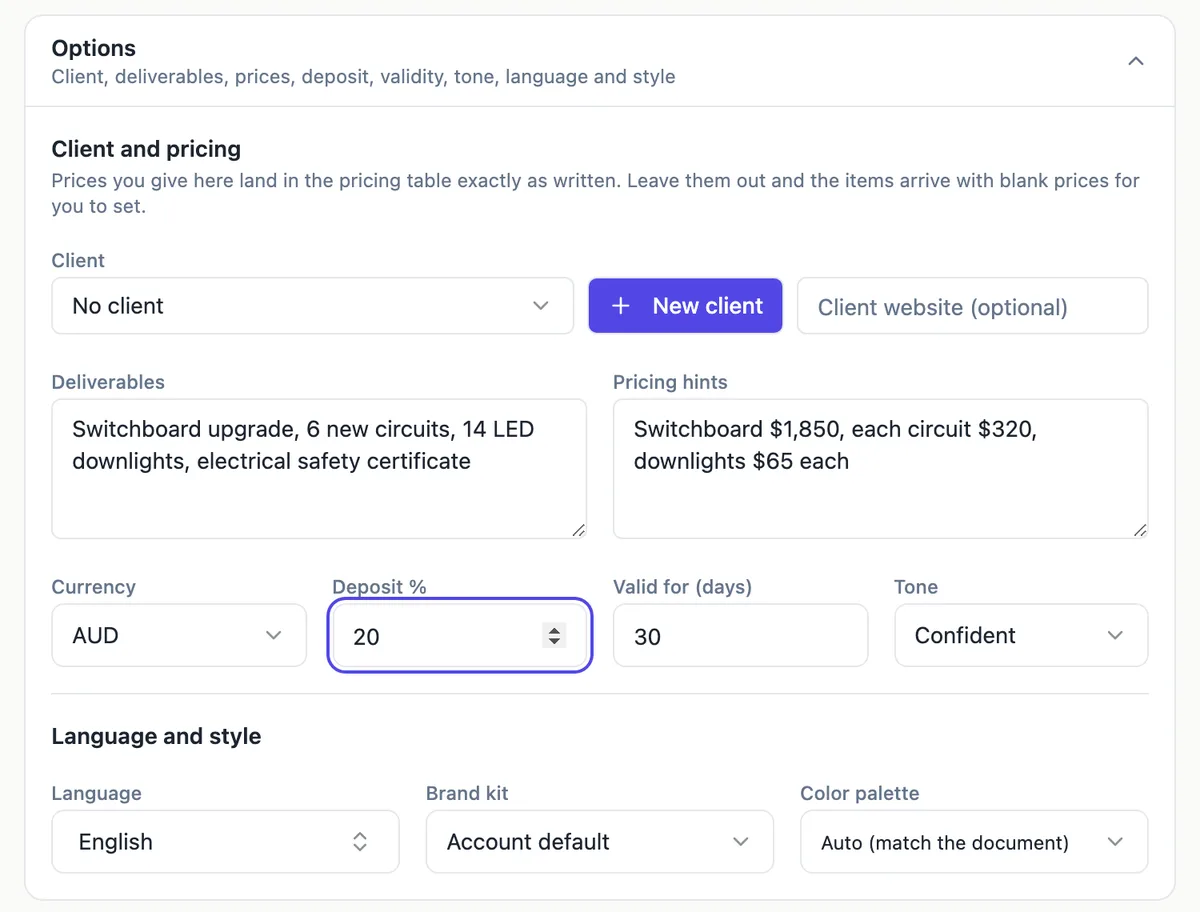
A brief in two halves
The generator separates the free text from the structured fields. The description, up to 8,000 characters, holds the story: who the client is, what they asked for, what success looks like. The Options panel holds the facts that must not drift: the client record, the deliverables, the pricing hints, the currency, the deposit percent, how many days the offer is valid and the tone, which is friendly, formal or confident.
Attaching the client brief
On the Starter plan or above, Build from files reads up to five files of 10 MB each, as PDF, text or images. Attach the brief itself and the generator works from the client own words, which is the quickest way to mirror their language in the opening sections. Use the description to add what the brief does not say: your approach, your constraints and anything you will not do.
Client details and research
Choose an existing client or add one inline, and optionally give the client website. Before writing, a single research step reads that website, or looks up the company name, and the findings ground the understanding your needs section. If neither is available, the research runs on the brief text. Numbers the research did not find are not allowed into the copy, so check every claim about the client before sending.
Deliverables and prices stay separate
List deliverables as short phrases separated by commas, and prices as plain sentences such as fixed fee $18,000. The AI turns deliverables into the scope and items, and any price you give becomes an item at exactly that price. Items without a price arrive blank. Keeping the two apart is what stops a common failure of hand written proposals: a scope that promises more than the price covers.
Reading the draft back against the brief
Before sending, read the draft with the brief open beside it. Every requirement in the brief should map to a section or an item, and every item should map back to something the client asked for or an option you chose to offer. The AI writes a fixed section order with numbered terms; reorder or cut sections in the builder where the brief asks for a different structure.
How it works, in three steps
Step 1
Paste or attach the brief
Summarise the request in the description, or attach the brief file on a paid plan.
Step 2
Fill the structured fields
Choose the client, list deliverables, type price hints, set deposit, validity and tone.
Step 3
Generate and check against the brief
Generate, then tick off each brief requirement against the sections and items before you send.
The full walkthrough with screenshots is in the guide Send a proposal and get paid.
Limits worth knowing
- Description up to 8,000 characters.
- Attachments: 5 files of 10 MB each, Starter plan and up.
- One research step per generation, on the client website or company name.
- At most 40 line items in the generated table.
Questions people ask
What should go in the description versus the options?
Put context and judgement in the description: the client situation, what they asked for and how you will approach it. Put anything that must come out exactly in the options: deliverables, prices, deposit and validity. The options are applied as fixed facts, while the description is interpreted, so a price typed only into the description is less reliable than one in the pricing hints.
Can I attach a tender document?
Yes, on a paid plan, within the five file and 10 MB limits. The generator reads the requirements and writes its own proposal structure, which suits most client briefs. A formal tender that mandates its own response schedule is usually better answered in that schedule; use the generated draft for the pricing and the narrative, then move them into the required format.
Will it copy text from the brief?
It writes in its own words, guided by the brief, and mirrors the client terms where that helps the reader. It will not invent figures about the client beyond what the research step found. Check names, dates and any requirement numbers it quotes from the brief, because a misquoted requirement is worse than a paraphrase.
Which tone should I choose?
Friendly suits small businesses and individuals, formal suits councils, schools and larger organisations, and confident, the default, suits most business clients. The tone changes the wording, not the structure or the prices. If the brief itself is very formal, matching it with the formal tone is usually the safer choice.
Can I regenerate if the draft misses the brief?
You can generate again, but each new proposal costs 1 credit plus model use. It is often quicker to fix the draft: edit sections directly, or ask the AI assistant to rewrite a paragraph or add an item. The assistant previews every change before you apply it, and pricing changes always wait for you to accept them.
Make your own proposal
The button opens the generator with this use case already described. Change the wording to match yours, generate, then edit anything you like.
Create a proposal with OneCraftRelated pages
AI quote generator for trades and service jobs
An AI quote generator turns a few lines about a job into an itemised quote with prices, tax and terms. For a trade or service business the point is speed on site: describe the job once, check the numbers, and send a link the customer can accept from a phone.
A quote with optional extras the client chooses
A quote with optional extras lists the core job at a fixed price and offers add ons the client can take or leave. Done online, the client ticks the extras they want, sees the new total straight away, and accepts that exact selection.
Proposal templates for services and trades
Proposal templates give a business a known section order and sample prices to start from, instead of a blank page. There are 18 here: 12 proposals for services such as web design, consulting and bookkeeping, and 6 quotes for jobs such as repairs, landscaping and catering.
More finished work of this kind is on the proposal examples hub.
Sources
Written and checked by the OneCraft team. Last checked .