Websites
Link in bio page maker: one page, every link, your address
A link in bio page is the one link a social profile allows, turned into a short page of buttons: the new single, the shop, the booking form, the newsletter. It works when the links are few, current and in the order people actually want them.
Three link layouts
Stacked buttons is the classic link page: photo, name, bio and one big button per link. Cards with thumbnails gives each link its own small picture, which suits releases, products or episodes. Photo tiles shows links as a grid of photo tiles, for food creators and shops whose links are visual. A page that opens with a link section drops the site menu bar, so the profile is the header.
Templates for creators
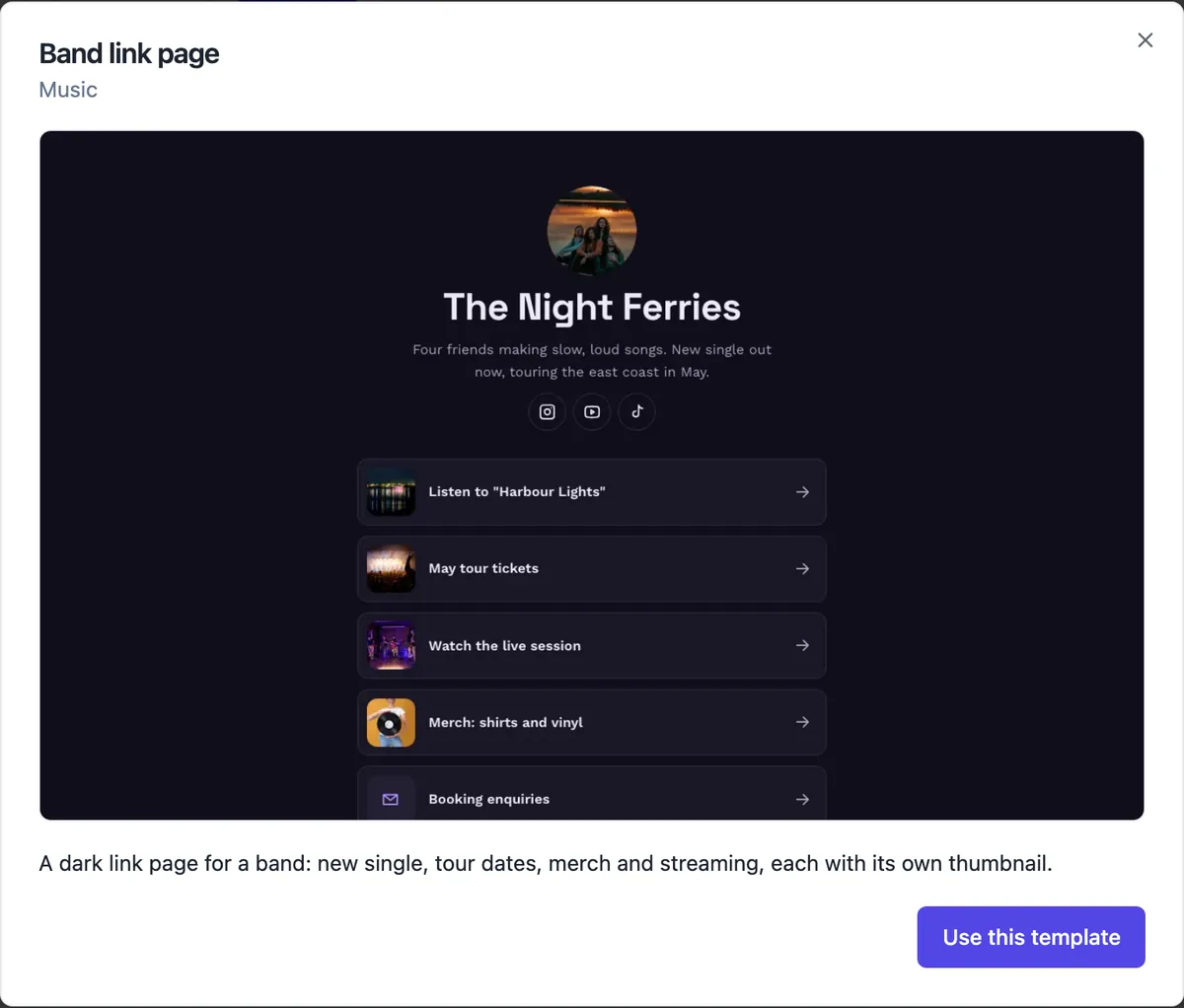
Three link templates open as they are: a dark band page with thumbnails for the single, tour, live video, merch and bookings; a food creator page with recipes and products as photo tiles; and an illustrator page with big buttons to the shop, commissions and newsletter. The generator also writes link pages from a description when you choose Link page as the kind.
Your own address, not a profile on someone else
A link page published here lives at your own onecraft.live address, or on a custom domain on a paid plan, and it is a real page with a search title, a share image and visit counts. That means the link in your bio still works if you change link tools, and the page can grow into a full site by adding pages when you need them.
What makes people tap
Put the link people came for first, usually the newest thing you posted about. Keep it to five to eight links; a long list hides the one that matters. Write each label as the thing they get, not the platform: Listen to Harbour Lights beats Spotify. Retire links when a tour or sale ends, because a dead first link costs the rest.
See which links work
Turn on the visit counter in site settings to see visits per day, the top pages and where visitors came from, such as instagram.com or tiktok.com, without cookies. The counter measures page visits, not clicks on each link; for click counts, add a Google Analytics measurement ID and set up click events there.
How it works, in three steps
Step 1
Choose Link page
In the generator pick Link page as the kind, or open one of the three link templates.
Step 2
Add your links
Write a label, an address and, for thumbnails or tiles, a picture for each link; drag them into order.
Step 3
Publish and paste
Publish, copy your address and paste it into your Instagram, TikTok or YouTube profile.
Limits worth knowing
- Link pages have no menu bar and skip the privacy and terms pages the other kinds get.
- Visit stats count page views, not clicks on individual links.
- Links must be web, email or phone addresses; scripts and other link types are refused.
- The free plan includes one site, so a link page there is your one site.
Questions people ask
Can I add a newsletter sign-up to a link page?
Yes. Add a newsletter section under the links; sign-ups go to your messages inbox with an email to you, and you can export them as a CSV. Keep it near the bottom so it does not push the main links below the first screen on a phone.
Can I sell products from a link page?
On a paid plan you can switch the store on for the site, add products and link to their product pages from your buttons. The photo tiles layout suits this, because each tile can show a product. The cart and checkout pages are added when you publish.
Does a link page help my Google ranking?
A little. It is a real page with a title, description and structured data, so searching your name can find it. It is thin by design, so it will not rank for much else. If search matters, add an about page and a page per main offer.
How is this different from Linktree?
Linktree is a dedicated link page product with its own analytics and integrations. Here the link page is one kind of site in a website builder, on your own address, that can grow into a full site with pages, a store and forms. Pick by whether you only ever want links.
Can I change the colours to match my brand?
Yes. The Theme tab offers 24 palettes, each in light and dark, 16 font pairs and corner styles from square to pill shaped buttons. A saved brand kit applies your own colours in one click. The band template is dark by default; switch it to light mode if your feed is bright.
Can I use a link page as my whole website?
For a creator or a side project, often yes. It loads fast, works on every phone and carries your photo, bio and the places to find you. Once people start asking the same questions in your messages, such as prices or availability, that is the sign to add a page that answers them.
How many links should a link in bio page have?
Five to eight is a good range. Each extra link makes every other one slightly less likely to be tapped, and a list longer than a phone screen hides the bottom links completely. Review the page monthly and remove anything that has ended, such as a sold out tour or a closed sale.
Make your own website
The button opens the generator with this use case already described. Change the wording to match yours, generate, then edit anything you like.
Create a website with OneCraftRelated pages
Turn your website into a mobile app: what the export builds and what is left
Turning a website into a mobile app usually means wrapping the site in a native shell that can be submitted to the App Store and Google Play. The wrapping is the easy part; the store rules about apps that only repeat a website, the developer accounts and the review are where the work is.
Custom domain for your website: two records and a Verify button
Connecting a custom domain means telling the internet that your name, such as www.saltbushphysio.com.au, should open your site. You add two DNS records at the company where you bought the domain, one to prove you own it and one to point it, and the platform does the rest.
Website version history: three layers of going back
Website version history lets you put an earlier state of the site back online after a change goes wrong. It helps to know which layer you need: undo for the edit you just made, a restore for a publish you regret, or a code commit for a site written in code.
More finished work of this kind is on the website examples hub.
Written and checked by the OneCraft team. Last checked .