Websites
Turn your website into a mobile app: what the export builds and what is left
Turning a website into a mobile app usually means wrapping the site in a native shell that can be submitted to the App Store and Google Play. The wrapping is the easy part; the store rules about apps that only repeat a website, the developer accounts and the review are where the work is.
Who can export
The app export is for store and menu sites, or any site with its store switched on, on a paid plan, once the site is published. Brochure sites are refused on purpose: Apple rejects apps that only repeat a website under its minimum functionality rule, so the export is limited to sites where ordering, a cart and order updates give the app a reason to exist.
What is in the zip
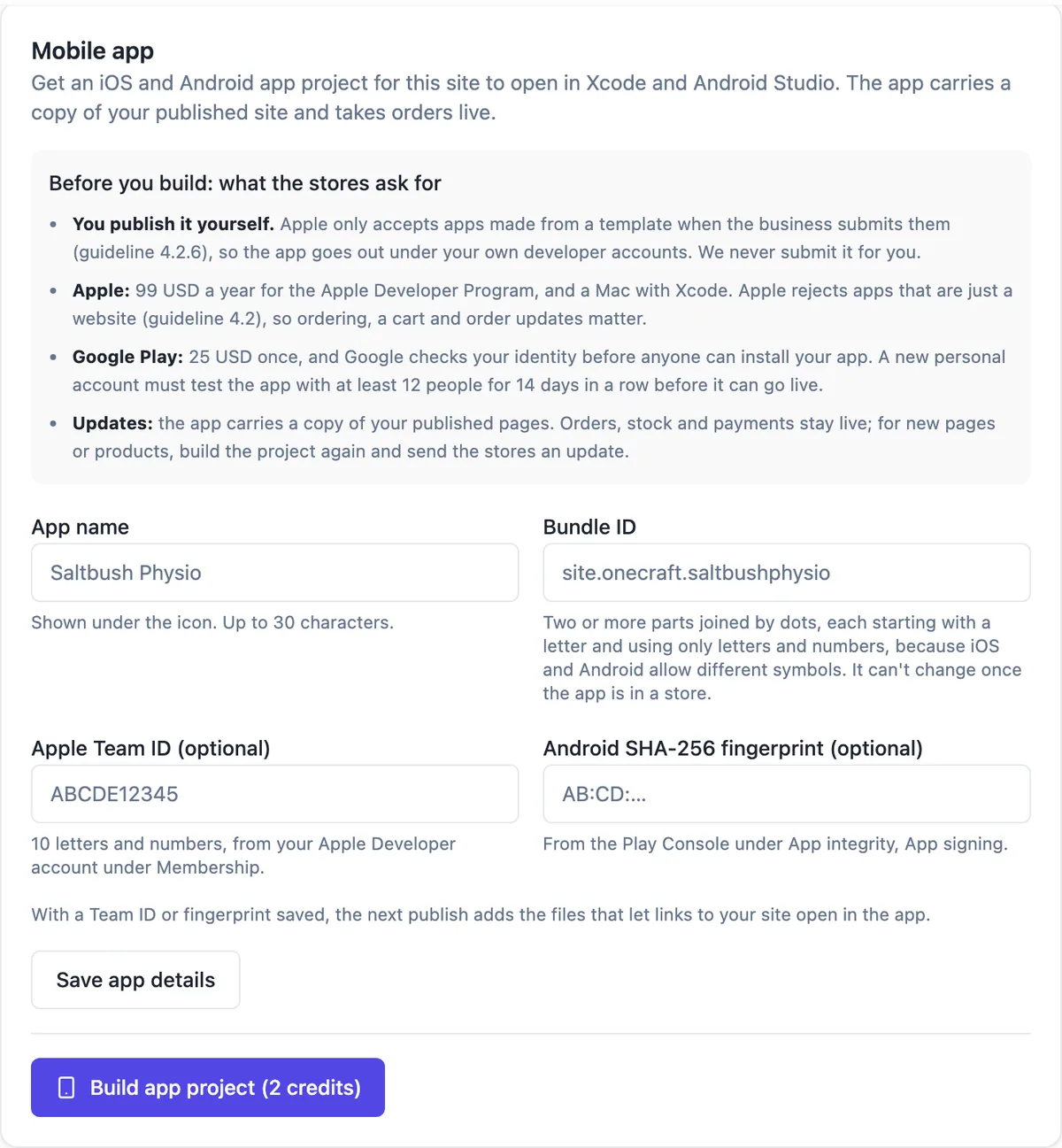
Build app project (2 credits) makes a Capacitor project from your live site: the published pages, styles and media copied in with relative links, app icons and a splash screen from your favicon or lettermark, Stripe Checkout opened in the system browser, and a README with the store steps, costs and push setup. It has no iOS or Android folders; you add them with Capacitor commands. The download link lasts 24 hours.
The app details
Set the app name, up to 30 characters, and the bundle ID, which defaults to site.onecraft plus your site name and cannot change once the app is in a store. An Apple Team ID and an Android SHA-256 fingerprint are optional: with them, the next publish adds the files that let links to your site open in the app.
What you still do
You publish under your own developer accounts: Apple charges 99 USD a year and needs a Mac with Xcode; Google Play charges 25 USD once and checks your identity, and a new personal account must test with at least 12 people for 14 days before release. OneCraft never submits for you. Builder made apps must be submitted by the business itself under Apple rule 4.2.6.
Updates and the alternative
The app carries a copy of your published pages. Orders, stock and payments stay live because they come from the server, but new pages or products need a fresh export and a store update. If you mainly want an icon on customers phones, letting them install the website itself does that today, with no stores involved.
How it works, in three steps
Step 1
Switch the store on and publish
The export needs a store or menu site, or the store switched on, and a live site.
Step 2
Fill the app details
App name, bundle ID, and optionally the Apple Team ID and Android fingerprint, then Save app details.
Step 3
Build app project
Press Build app project (2 credits) and download the zip within 24 hours, then follow its README.
Limits worth knowing
- Store and menu sites, or sites with the store on, on a paid plan; the site must be published.
- Each export costs 2 credits, charged when the zip is written.
- The project is limited to 150 MB of site files.
- You submit to the stores yourself under your own developer accounts.
Questions people ask
Will Apple accept an app made from my website?
Only if it offers more than the website. Apple guideline 4.2 rejects apps that are just a repackaged site, and 4.2.6 requires apps from builders to be submitted by the business itself. A store or menu with a cart, ordering and order updates has a better case than a brochure, which is why the export is limited to those.
Do I need a Mac?
For the iPhone app, yes: Apple builds and uploads go through Xcode on a Mac. The Android app can be built on Windows, macOS or Linux with Android Studio. The README in the zip lists the Capacitor commands for adding each platform and opening it in the right tool.
Does the app update when I change the website?
Orders, stock and payments update live because the app talks to the same server. The pages themselves are copied in at export time, so new pages, products shown in new places or a new design need a fresh export and a new store submission. Plan app updates around bigger site changes.
Can the app send push notifications to customers?
The project README explains how to set up the Capacitor push notifications plugin, but sending customer notifications needs your own setup with Apple and Google. The site builder does not send pushes to app users; its push notifications go to you, the owner, for orders and messages.
What does the export cost in total?
The export itself is 2 credits. The stores cost 99 USD a year for Apple and 25 USD once for Google Play. Your time for testing, store listings, screenshots, privacy details and review is the real cost, typically several days the first time.
Make your own website
The button opens the generator with this use case already described. Change the wording to match yours, generate, then edit anything you like.
Create a website with OneCraftRelated pages
Make your website installable as an app, without an app store
An installable website, often called a progressive web app, can be added to a phone home screen and opens full screen like an app. For a business with regular customers it gets you most of the benefit of an app, an icon on their phone, with none of the app store work.
Import products from CSV, with a preview before anything is added
Importing products from a CSV moves a whole catalogue in one go: titles, descriptions, options, prices, SKUs and stock. The risk is a half right import you then fix by hand, which is why a preview of exactly what will be created matters more than the import itself.
Restaurant menu website maker: the menu first, then everything around it
A restaurant menu website exists to answer four questions fast: what do you serve, how much is it, when are you open and where are you. Everything else, the story, the gallery, the ordering, is useful only once those four are one tap away on a phone.
More finished work of this kind is on the website examples hub.
Written and checked by the OneCraft team. Last checked .