Websites
Portfolio website maker: the work first, uncropped
A portfolio website is judged in the first few images, so it should show the work large, in its own proportions, and get out of the way. After that it needs only three things: who made it, what they offer, and how to ask about a job.
Galleries that respect the picture
The gallery library has four layouts. Mixed shapes shows portfolio work in portrait and landscape uncropped, in a masonry grid, which is the one most photographers want. Equal tiles crops to a tidy grid, one hero with supporting photos leads with a single image, and a swipeable row keeps a long series from taking over the page. Clicking a photo opens it in a lightbox.
Three portfolio templates
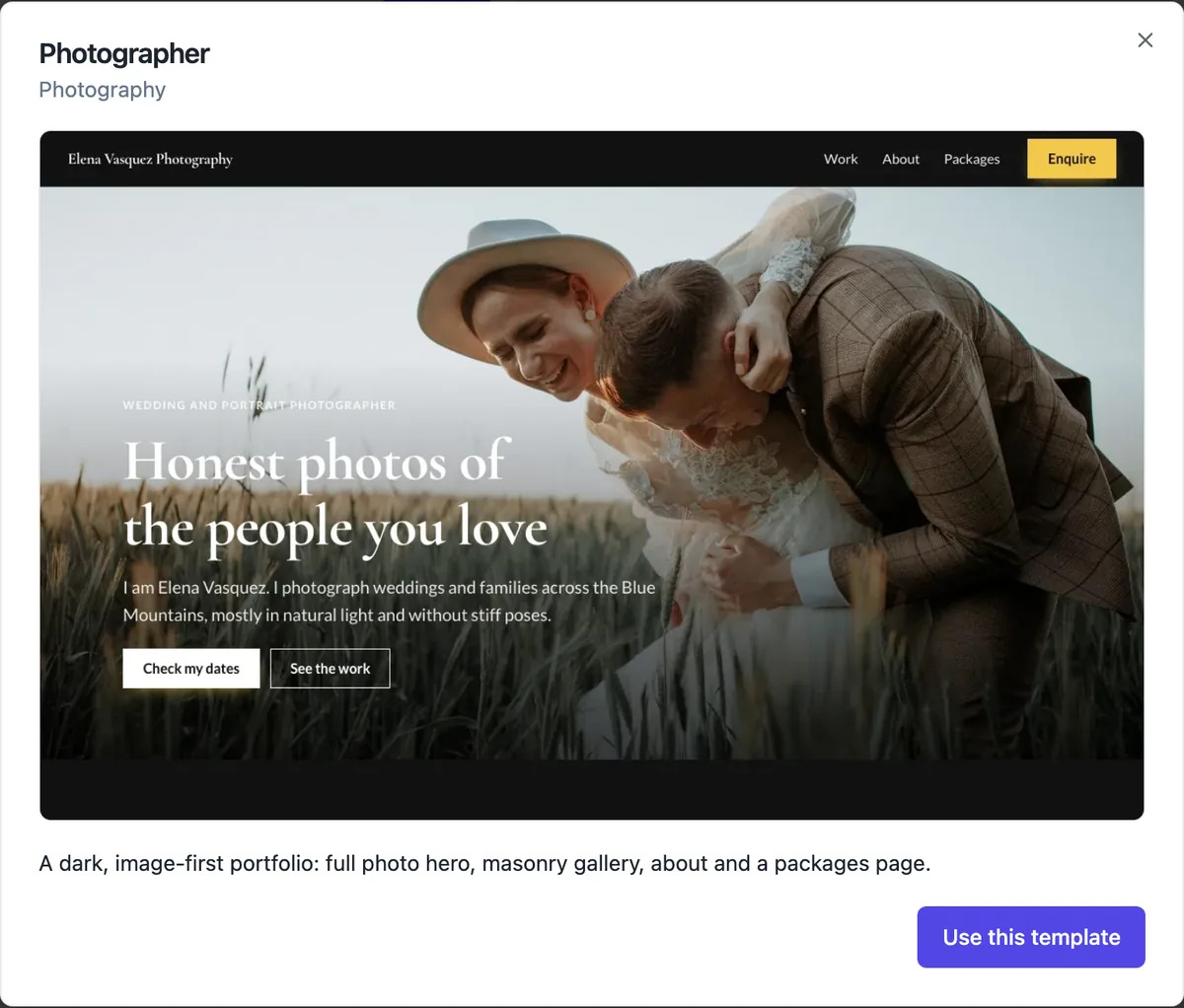
A dark, image first photographer site with a full photo hero, a masonry gallery, about, reviews and a packages page; a calm architecture studio with a stat hero, featured projects, studio facts, process steps and a map; and a one page product designer portfolio with client logos, case study panels and process. Each opens as it is for you to swap in your work.
Case studies, not just pictures
Designers and architects win work by explaining it. The services layout with a photo per item gives each project a few paragraphs beside its image: the brief, the constraint, what changed. Pair it with a steps section for your process and a logo strip for clients you can name. Keep each case study short enough to read on a phone.
Enquiries that arrive complete
Contact sections post to the messages inbox and email you each enquiry, with the visitor email as the reply to address. A quote request field set adds phone and a job address, and you can embed a longer OneCraft form when you need the date, venue and budget before replying. Bots are filtered by a hidden field, so the inbox stays readable.
Your photos, your rights
Uploads are raster images up to 15 MB each and are published at the site media address. Set alt text under each image in the picker, which also gives screen reader users a description of the work. For moving work, the video section embeds YouTube or Vimeo and loads the player only when the visitor presses play.
How it works, in three steps
Step 1
Pick Portfolio
Choose Portfolio as the kind and describe your work, or open one of the three portfolio templates.
Step 2
Replace the work
Upload your images into the gallery, set focal points and alt text, and write a line per project.
Step 3
Publish
Publish and put the address on your socials, email signature and business cards.
Limits worth knowing
- Image uploads are raster formats up to 15 MB each; SVG uploads are not accepted.
- Video plays from YouTube or Vimeo; video files are not hosted.
- There is no client proofing or password protected gallery.
- Uploads count toward your account storage.
Questions people ask
Will my photos be compressed?
Uploads are stored as you send them and served from the site media folder with long caching, so pick a sensible size before uploading: around 2,000 to 2,500 pixels on the long edge keeps detail on large screens without slow pages. Very large originals waste your storage and your visitors data.
Can I protect a client gallery with a password?
No. Pages are either public or hidden from search engines, and a hidden page is still reachable by anyone with the link. For private client proofing use a dedicated proofing service and link to it. The portfolio itself should show only work you are happy for anyone to see.
How many images should a portfolio show?
Fewer than you think. Fifteen to thirty of your strongest images, grouped by the kind of work you want more of, beat two hundred. Clients judge the weakest image they see. Put series or older work on a second page rather than lengthening the home gallery.
Can I sell prints from my portfolio?
On a paid plan you can switch the store on, add prints as shipped products with sizes as options, and link to them from the gallery or a shop page. Payment goes through Stripe Checkout into your own Stripe account, and orders arrive in the store screens.
Can I set where each photo is cropped?
Yes. In the image picker, clicking the thumbnail sets the focal point, so layouts that crop, such as heroes and equal tiles, keep the face or subject in frame at every width. The mixed shapes gallery shows images uncropped, so focal points matter less there.
Should my portfolio show prices?
Show starting prices when they filter out enquiries you cannot take, which is common for wedding and family photographers. Leave them off for commissioned design or architecture, where every job is quoted. The photographer template puts packages on their own page so the gallery stays about the work.
Can the portfolio have a page per series or project?
Yes. Add a page for each series with its own gallery and a few lines about it, and link them from the home page with cards or the menu. Each page gets its own address and search title, which helps people find a specific project by name.
Make your own website
The button opens the generator with this use case already described. Change the wording to match yours, generate, then edit anything you like.
Create a website with OneCraftRelated pages
Free website address: yourname.onecraft.live, and when to move on
A free website address is a subdomain on someone else's domain: your name in front, their name behind. It costs nothing and works straight away, and it is a sensible start as long as you know you can rename it and later add your own domain without breaking links.
Edit your website with AI chat: describe the change, review it, keep or undo
Editing a website with AI chat means typing what you want, add a pricing section after services, and having the AI make the change on your draft. The useful part is not the typing, it is that every change is listed, previewed and reversible before you publish.
Nonprofit website maker: show the mission, prove the impact, ask for help
A nonprofit website has to earn trust from people who will never visit in person: donors, volunteers, partners and the people it serves. It does that with a plain statement of the mission, numbers that show the work, one real story and a clear way to help.
More finished work of this kind is on the website examples hub.
Sources
Written and checked by the OneCraft team. Last checked .