Documents
Two column document layout
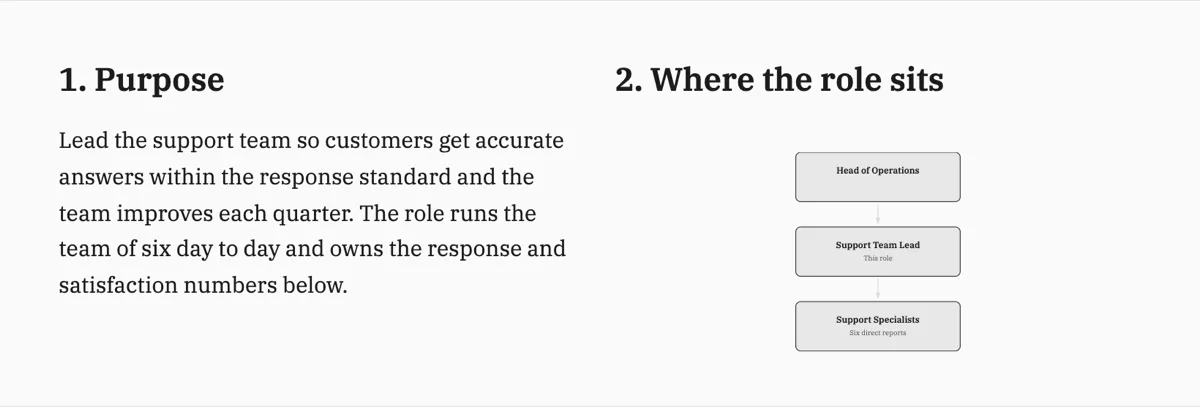
There is no columns switch for the page. Two things sit side by side when they are cells of one row, and that row is what the pagination engine moves as a unit.
The page is a twelve column grid
Every page's content area is twelve columns wide. A row holds one or more cells placed left to right, and each cell declares a span between one and twelve. Full width is a single cell of twelve. Side by side is six and six. A label beside a value is four and eight. The spans in a row should add up to twelve or less, and rows stack top to bottom in reading order, which is the order you wrote them in.
What goes in a cell
A cell holds ordinary blocks: a heading, paragraphs, a list, a table, a callout, a chart. It can also hold another container, so a six column cell can itself be split. The nesting is what makes a price panel beside a scope section possible without any absolute positioning, and it is also the thing to use sparingly, because two levels of nesting on an A4 page leaves each cell narrow enough to hurt the prose.
At a page break, a row moves whole
The engine flows rows onto physical pages and it will not split a pair of side by side cells down the middle. A row that does not fit in the space left moves to the next page entirely. That is the behaviour you want, and it is also the reason paired panels suit short parallel content: two long columns will push the whole row over and leave a hole above it. If the two halves each run to paragraphs, they read better one after the other at full width.
The AI chat can edit inside a cell
The chat has an operation for exactly this: rewriting one cell of a container. That matters more than it sounds, because clicking into the right half of a dense row is fiddly and naming it in a sentence is not. What the chat cannot do is change the structure: it will not add a cell, change a span or turn one column into two. Those are builder decisions.
When a table is the better choice
If the two columns are really rows of paired values, use a table. A two column layout is for two pieces of content that happen to sit beside each other; a table is for a set of records with the same shape. The giveaway is repetition: one label and value pair is a row of cells, ten of them is a table, and building ten side by side rows by hand is a page you will not want to edit later.
How it works, in three steps
Step 1
Add a row
Place a container where the side by side content should sit, in the reading order you want it.
Step 2
Set the spans
Six and six for equal halves, four and eight for a label beside a body. They should total twelve or less.
Step 3
Fill each cell with normal blocks
A heading and a paragraph on one side, a callout or a small table on the other. Keep both halves short.
Step 4
Read it at the page break
If the row jumps to the next page and leaves a hole, the halves are too long and want to be full width sections instead.
The full walkthrough with screenshots is in the guide Style text and add callouts, stats and lists.
Limits worth knowing
- Spans run 1 to 12 and should total 12 or less in a row.
- A row is never split across a page break; it moves whole.
- Containers can nest, but each level narrows the usable width sharply.
- The AI chat can rewrite a cell's text but cannot add, remove or resize cells.
- There is no page level column setting; columns exist only inside a row.
Questions people ask
Why is there no two column page setting?
Because pagination is derived from the blocks rather than poured into columns. A page level column setting would mean text flowing down one column and up the next, which fights with everything else the engine does: keeping a heading with its content, moving a table whole, pulling content up into a half empty page. Columns inside a row give you the layout without the reflow.
What happens if my two columns are different lengths?
They sit top aligned and the row takes the height of the taller one, leaving white space under the shorter. That is usually fine for a panel beside a paragraph. If the imbalance is large, the space reads as a mistake, and the fix is to move some content out of the tall side or drop to full width.
Can I put a chart in one column and text in the other?
Yes, and it is one of the better uses of a row. Keep the chart in the wider cell, since a chart squeezed into four columns loses its axis labels, and keep the text beside it to a short paragraph rather than a full section.
How deep can containers nest?
A cell can hold another container, so nesting is allowed, but each level divides the width again. Two levels on an A4 page leaves cells too narrow for comfortable prose. If you find yourself nesting twice, the content probably wants to be a table or a set of full width sections.
Can the AI chat turn a section into two columns?
No. The chat rewrites text in a component or in one cell, and sets the document title. Structure is builder work, which is deliberate: a chat instruction that silently re-laid out your page would be much harder to review than one that only changed words.
Do the columns survive the PDF export?
Yes. One layout engine produces both the on screen document and the exported file, so a row of cells lands in the PDF exactly as you see it, including which page it moved to. There is no separate print stylesheet to disagree with the builder.
Make your own document
The button opens the generator with this use case already described. Change the wording to match yours, generate, then edit anything you like.
Create a document with OneCraftRelated pages
One page documents
The failure mode of a one page document is a page that is two thirds full. It is treated as a composed page rather than a short document, which means the blocks are sized to use the height they have.
Tidy a document layout
Hand editing drifts. Each block is placed relative to the one above it, small errors are inherited, and after twenty edits the top of the document is on a rhythm and the bottom is not.
AI document generator
Most tools that write a document hand you a wall of text. This one decides what kind of document it is first, then writes it and lays it out on A4 pages with the tables, headings, clauses and page breaks a document of that kind actually needs.
More finished work of this kind is on the document examples hub.
Written and checked by the OneCraft team. Last checked .