Videos
Logo watermark on video
A watermark here is not a corner bug stamped over the whole video. It appears after the opening scene, holds through the middle at partial opacity, and fades out before the closer, because those two scenes are already carrying the brand and a mark on top of a wordmark reads as a mistake.
Where it sits, exactly
Bottom left, at 72 percent opacity, with a soft drop shadow so it survives a light background. In landscape it is inset 56 pixels from the left and 44 from the bottom, at 26 pixel type. In vertical, 44 from the left and 120 from the bottom, at 30 pixel type. A logo image is drawn at about 1.3 times that type size in height, with its width left to the image's own proportions.
Wordmark or logo, and how each is supplied
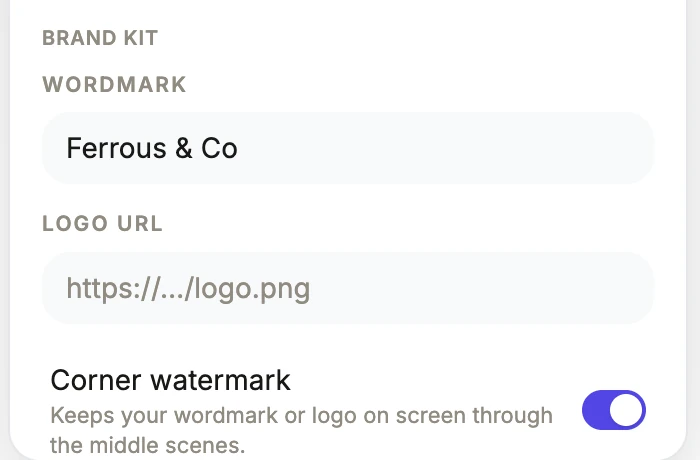
Two fields in the brand kit. Wordmark is plain text and is drawn in the video's display typeface at heavy weight in white. Logo is a URL to an image, and when one is present it is used instead of the wordmark. Both live in the theme panel with the watermark toggle beneath them. Note there is no file upload for the logo here: it is a URL field, so the image needs to be hosted somewhere reachable.
It fades in and out on purpose
The mark ramps up over twelve frames after the opening scene and ramps back down over twelve frames before the closing one. That is why it never appears on the intro or the call to action. Those scenes carry the brand in full, often as an oversized wordmark on a brand colour band, and a small mark in the corner underneath it would just be a second logo.
When to turn it on and when not to
On for anything that will be reposted, embedded or screen recorded by somebody else, and for anything running in a feed where the account name is not obviously yours. Off for a tutorial, where a persistent mark competes with the screenshots the viewer is trying to read, and off for a video that will only ever play on your own site with your logo above the player.
How it works, in three steps
Step 1
Set the wordmark or the logo URL
Both sit in the brand kit section of the theme panel. A logo URL takes precedence over the wordmark when both are filled.
Step 2
Turn on the corner watermark
The toggle beneath the two fields. Its own description says it keeps your wordmark or logo on screen through the middle scenes.
Step 3
Check it in the vertical cut
In vertical it sits 120 pixels up from the bottom, which is inside the area a phone interface covers. Look at it in that format before exporting.
The full walkthrough with screenshots is in the guide Make a promo video with AI voiceover.
Limits worth knowing
- The logo is entered as a URL. There is no upload button for it in the theme panel.
- Position, size and opacity are fixed per format. You cannot move it to another corner or scale it.
- It is drawn on the middle scenes only. It never appears on the opener or the closer.
- With no wordmark and no logo URL, the overlay draws nothing even when the toggle is on.
Questions people ask
Can I put it in the top right instead?
No. The inset is fixed at bottom left per format. If you need a mark elsewhere, add an image slot to a scene and position it, which gives you full control but only on that scene.
Will it protect the video from being reused?
Not really. At 72 percent opacity in a corner it is attribution rather than protection, and it can be cropped out. Its job is making the source obvious when the video is reshared, not preventing that.
Does it show on the shared link too?
Yes. A share link plays the same saved document through the player, so whatever the watermark setting is, the viewer sees it.
Is it on by default?
For an AI generated promotional video, yes, because a promo benefits from continuous brand presence. It is a toggle, so turning it off is one click in the theme panel.
Make your own video
The button opens the generator with this use case already described. Change the wording to match yours, generate, then edit anything you like.
Create a video with OneCraftRelated pages
Add your logo to a flyer
A logo slot is a different kind of box from a photo slot. It shows an uploaded image if there is one, and a monogram built from your name if there is not, and there is no generate button on it at all.
Add a logo to slides
One control puts your brand mark on the deck. It lives in the same panel as the transition and footer settings, applies at deck level, and offers exactly the decisions worth making: what to show, how big, and on how many slides.
Add your logo to a form
A form on a link, sent by email, arrives with no context. A logo answers the question the respondent is actually asking, which is whether this is really from you, before they type anything.
More finished work of this kind is on the video examples hub.
Written and checked by the OneCraft team. Last checked .