Proposals · Alternative
A Bonsai alternative for proposals and getting paid
Bonsai is a business suite for service firms, covering a CRM, scheduling, projects, time tracking, invoicing and bookkeeping. OneCraft Proposals covers one stretch of that work, from the proposal to the paid invoice, and writes the first draft of the proposal from a brief.
Updated , competitor details checked . Bonsai is a trademark of its owner. OneCraft is an unrelated product and claims no affiliation with or endorsement by it.
Nuwan Madhusanka · Co-founder
3 min read · Published
The short verdict
Bonsai earns its place when one login should hold leads, contracts, projects, timesheets, invoices and the books, and when billable hours become invoices. OneCraft is the narrower choice for a freelancer or small studio whose pain is the proposal itself: writing it, pricing it with options and a deposit, and turning the yes into an invoice that a client can pay by card.
| Feature | Bonsai | OneCraft |
|---|---|---|
| Price | Plans and prices are published on Bonsai's pricing page and are not restated here checked 2026-10-13 | Per account, not per user: Free $0, Starter $8, Pro $25 and Pro+ $125 a month, with 150, 500, 1,500 and 7,500 credits; each new proposal uses 1 credit |
| Scope of the product | Consolidate your projects, clients, and billing into one integrated, easy-to-use platform, listing CRM, pipeline, scheduling, estimates, proposals, agreements, forms, projects, time tracking, invoicing, payments, expenses and bookkeeping checked 2026-10-13 | Proposals and quotes on a page canvas, a clients list, invoices, pay links and reminders; no projects, time tracking or bookkeeping |
| CRM | Store every lead, client and vendor, with a sales pipeline that visualizes your sales process from lead to close with customizable pipeline stages checked 2026-10-13 | No CRM and no pipeline; clients are a list inside Proposals |
| Writing the proposal | Create high-quality proposals in seconds with your project details and payment options, starting from proposal, quote and scope of work templates checked 2026-10-13 | The AI writes the proposal from a brief of up to 8,000 characters plus client, deliverables and price hints; every price you give becomes an item at exactly that price |
| Choices for the client | Add single or multiple package options to your proposals checked 2026-10-13 | Optional items the client ticks and quantities the client changes between a minimum and maximum, with totals following on screen |
| Deposit | Deposit capture: Require a deposit when your client approves a proposal checked 2026-10-13 | Deposit as a percentage or a fixed amount; acceptance issues a deposit invoice due that day and a draft invoice for the balance |
| Knowing it was read | Seen receipts: Know when your proposal has been opened and read checked 2026-10-13 | Each recipient's tracked link records opens and time viewed on the activity page |
| Acceptance | Client e-approval: Let your clients approve your proposals in just one click checked 2026-10-13 | Click acceptance with name, email, a drawn signature and a consent box, recorded on a certificate page |
| Recurring billing | Set up automatic billing for retainer clients and subscription services for consistent cash flow checked 2026-10-13 | No recurring invoices; a monthly fee is one line item with month as its unit |
| Invoices from tracked work | Transform billable hours and project expenses tracked in Bonsai into accurate invoices checked 2026-10-13 | Invoices come from the proposal's items, either at acceptance or through Create invoice in the Pricing panel |
| Accounting software | Sync invoice data two-ways with QuickBooks Online and Xero to keep your accounting records accurate checked 2026-10-13 | No accounting connector; invoices are PDFs with INV-0001 style numbers and a paid, overdue or void status |
Where Bonsai is better
Time becomes invoices
Bonsai turns tracked hours and expenses into invoice lines. A consultancy that bills by the hour saves real effort there, because nothing is retyped. OneCraft has no timer and no timesheet, so hourly work has to be totalled elsewhere and entered as a quantity.
Retainers bill themselves
Recurring billing and saved cards let a monthly retainer charge without anyone touching it. OneCraft has no recurrence at all: a care plan at $180 a month is one line on the proposal, and each month's invoice would be raised by hand.
It keeps the books
Bonsai lists bookkeeping, expenses and a two way sync with QuickBooks Online and Xero. OneCraft stops at the invoice and its payment status, so a business that wants its ledger updated automatically will need its accounting software alongside.
Leads arrive in a pipeline
A CRM with pipeline stages, automations and a client portal holds a relationship from first enquiry to finished project. OneCraft keeps a list of clients for addressing proposals and nothing more.
Where OneCraft is different
The draft is written for you
Type what the job is, who it is for and what you charge, and the proposal arrives with its sections, one pricing table and numbered terms. A research step reads the client's website first, so the opening talks about their business rather than a template's.
Accepting creates the invoices
When the client accepts, the deposit invoice is issued and emailed straight away and the balance waits as a draft. Without a deposit, one invoice is issued due in 14 days. There is no separate step of building an invoice from the proposal.
Proof of what was agreed
A click acceptance appends a certificate page to the PDF with the signer's name and email, the time, IP address, browser, a hash of the content and the items they selected. That record answers the later question of what exactly the client said yes to.
A finished example
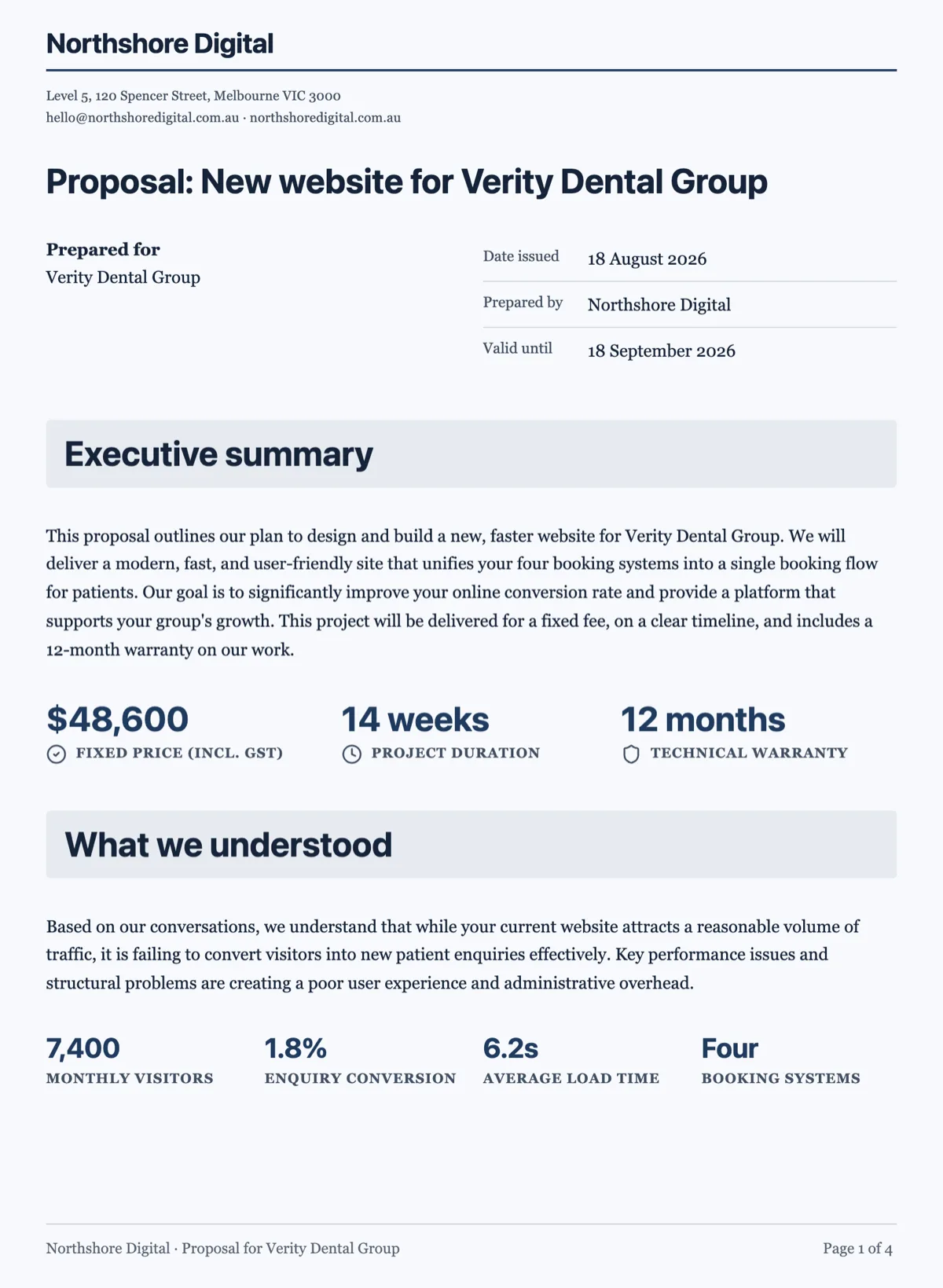 Business proposal template with the fixed fee on page oneMade with OneCraft, exactly as the generator and editor left it. Open the page for the full breakdown.
A suite against a single job
Bonsai's home page lists twenty product areas across client management, project management and finance. That breadth is the reason to buy it: one record follows a client from lead to project to invoice to the ledger. OneCraft Proposals does one job inside that chain. It is worth choosing when the proposal is where the hours go, when every quote is written from scratch in a word processor, or when the gap between yes and payment is the problem. A freelancer who already lives happily in a suite rarely needs a second tool for proposals.
Where the money moves
In OneCraft a card payment always goes through Stripe Checkout on the owner's connected Stripe account, and the money lands in that account rather than with OneCraft. Connecting Stripe needs a paid plan. The platform takes 2% of each payment on Starter, 1% on Pro and 0.5% on Pro+, and Stripe's own fees come on top. Bank details can be printed on the invoice instead, and a payment received that way is marked paid by hand. Bonsai lists cards, bank transfers and saved payment methods for repeat clients.
Packages against optional items
Bonsai frames choice as service packages, single or several. OneCraft frames it as items: each line can be optional, pre ticked or not, and can let the client change its quantity inside limits you set. A landscaping quote can carry turf by the square metre with an editable quantity and irrigation as an unticked extra, and the client sees the total change as they choose. The acceptance stores that selection, and the invoices are built from it.
How the columns were checked
Bonsai's column quotes its home page, proposals page, invoicing page, payments page and CRM page as read on 13 October 2026. Prices are deliberately left out and the pricing page is linked instead, so this page does not go stale when a plan changes. Every OneCraft cell names the row of an internal ledger that was read out of the product's source code: the plan caps, the acceptance flow, the invoice rules and the list of things the product does not do.
Who should stay with Bonsai
Stay with Bonsai if hours and expenses drive your invoices, if retainers bill on a schedule from saved cards, if the books sync to Xero or QuickBooks, or if a pipeline and client portal run the relationship. OneCraft replaces the proposal and the invoice that follows it, not the operating system of the business.
Questions people ask
Can OneCraft replace Bonsai's time tracking and timesheets?
No. OneCraft Proposals has no timer, no timesheet and no project board, so it cannot turn logged hours into invoice lines. If hourly billing is the core of your work, keep a time tracker and enter the total hours as a quantity on an item. The proposal, the acceptance and the invoices that follow are the parts OneCraft is built to handle.
Does OneCraft send recurring invoices for retainers?
No. There is no recurrence field and no subscription billing. A monthly retainer is written as one line item with month as its unit, so the proposal shows the monthly price clearly, but each later month's invoice is created by hand. Bonsai's recurring billing and saved cards are the better fit when retainers make up most of your income.
How does a client pay the deposit?
Set the deposit on the proposal as a percentage or a fixed amount. When the client accepts, an invoice for the deposit is issued due that day and emailed to them, and the accepted screen shows a Pay deposit now button. That opens Stripe Checkout on your connected Stripe account. The balance sits as a draft invoice until you issue it.
Can I bring my Bonsai clients across?
There is no importer. Clients in OneCraft are added in the Clients tab or from the client picker inside the generator and the Pricing panel, one at a time, with a name, email and company. For a handful of active clients that takes minutes. For hundreds of contacts it is a reason to keep a CRM alongside.
What does the client see when they open the proposal?
A private link opens the proposal as pages, the same pages as its PDF. Optional items show a tick box and editable quantities show a quantity control, and the totals update as they choose. They can download the PDF, accept or decline. They cannot edit the text, which keeps what was offered fixed.
Is there a free plan?
Yes. The free plan includes 150 credits a month and up to 3 proposals and 10 invoices. Each new proposal uses 1 credit, and AI drafting and chat bill their model use on top. A free account cannot connect Stripe, so card payments need Starter or above, which allows 25 proposals and 100 invoices.
Try the proposal side of OneCraft
The button opens the generator with a starting prompt already filled in. Change the wording to match your own work before you run it.
Create a proposal with OneCraftMore comparisons
- A HoneyBook alternative for proposals and quotesA HoneyBook alternative for quotes and proposals: drafted by AI from a brief, optional extras, online acceptance, invoices and Stripe pay links.
- A Dubsado alternative for proposals drafted from a briefA Dubsado alternative where the proposal is written from a brief, the client ticks optional extras and accepts online, and invoices follow with a pay link.
- A Proposify alternative for proposals and quotesA Proposify alternative with AI drafting, optional items, tracked links, online acceptance and Stripe pay links, set against Proposify's per user pricing.
What the module actually does, feature by feature: the proposals maker page.
Step by step in the builder: Send a proposal and get paid.
Written and checked by the OneCraft team. Last checked .