Proposals · Alternative
A HoneyBook alternative for proposals and quotes
HoneyBook is client management software for service businesses: proposals that combine booking, signing, invoicing and scheduling in one link, a CRM, automations and AI help. OneCraft Proposals drafts the proposal itself from a brief, records the acceptance and turns it into invoices with a card pay link, without the booking calendar or the pipeline.
Updated , competitor details checked . HoneyBook is a trademark of its owner. OneCraft is an unrelated product and claims no affiliation with or endorsement by it.
Nuwan Madhusanka · Co-founder
3 min read · Published
The short verdict
HoneyBook suits a photographer, planner or coach who wants a client to pick services, sign, pay and book the first call from a single link, with a CRM and automations keeping the next steps moving. OneCraft suits someone who mainly needs the proposal written well and priced with options, then wants the deposit invoice issued the moment the client accepts.
| Feature | HoneyBook | OneCraft |
|---|---|---|
| Price | Plans and prices are published on HoneyBook's pricing page and are not restated here checked 2026-10-13 | Per account: Free $0, Starter $8, Pro $25 and Pro+ $125 a month, with 150, 500, 1,500 and 7,500 credits |
| Where it is offered | HoneyBook is currently available for business owners in the U.S., Canada, UK and Australia checked 2026-10-13 | Proposals default to AUD with a GST label for AUD and NZD and VAT for GBP and EUR; a connected Stripe account fixes the currency |
| What the client opens | Press send and clients can select services, eSign contracts, pay invoices, and schedule meetings checked 2026-10-13 | A private tracked link to the proposal's pages, where the client ticks optional items, changes editable quantities, downloads the PDF, accepts or declines |
| Booking a call | Let clients book their first kick-off call or meeting right from inside the proposal checked 2026-10-13 | No scheduling; the proposal carries no calendar |
| Pipeline | Every proposal connects to your leads and pipeline, so you always know where projects stand checked 2026-10-13 | No CRM or pipeline; proposals have a status (draft, sent, viewed, accepted, declined, expired or void) and clients are a list |
| AI | AI takes meeting notes and summarizes to-dos, and turns everything on your plate into a daily action plan checked 2026-10-13 | The AI writes the whole proposal from the brief with one pricing table, then edits text and pricing through chat with every change shown as a preview first |
| Selected services and the invoice | Invoices and contracts update instantly with whatever services your clients select checked 2026-10-13 | The acceptance stores the client's selection, and the invoices at acceptance are built from it |
| Tracking | Track if clients have viewed, signed, or paid so nothing slips through the cracks checked 2026-10-13 | Per link opens and time viewed, plus accept, decline, PDF download and payment events on the activity page |
| Instalments | Accept deposits, bill for one-time services, or invoice as you go with flexible installments checked 2026-10-13 | A deposit invoice and a balance invoice; no instalment plans |
| Reminders | Give clients a gentle nudge to ensure invoices are paid on time, every time checked 2026-10-13 | Four presets per invoice (off, gentle, standard, firm), at most 6 reminders at least 20 hours apart |
| How clients pay | Accept credit cards, bank transfers, or autopay from any device checked 2026-10-13 | Cards through Stripe Checkout on your connected Stripe account, on a paid plan; bank details printed on the invoice and marked paid by hand |
Where HoneyBook is better
One link does four jobs
A HoneyBook proposal lets the client choose services, sign the contract, pay the invoice and book a meeting without leaving it. OneCraft's link covers choosing, accepting and paying, but the first call still has to be arranged by email or another scheduler.
The pipeline is built in
Leads, projects and proposals sit in one pipeline with automations moving them along. OneCraft shows each proposal's status and a clients list, which is enough for a few deals a month and thin for a busy studio.
Payment plans and autopay
HoneyBook lets a client pay in instalments or by autopay. OneCraft splits a job into a deposit invoice and a balance invoice and stops there, so a six payment plan for a wedding would need invoices raised by hand.
Where OneCraft is different
The proposal is written, not assembled
Instead of filling a template, you describe the job and its prices. The AI writes the proposal in sections around one pricing table, with numbered terms, after a research step on the client's website or company name. A price you type is kept exactly.
A record of the yes
Click acceptance captures a name, email, drawn signature and a consent sentence, and the PDF gains a certificate page with the time, IP address, browser, a content hash and the selected items.
No list of supported countries
Nothing in OneCraft Proposals checks where the business is based. It defaults to Australian dollars with a GST label, switches the label to VAT for pounds and euros, and takes card payments through the owner's own Stripe account.
A finished example
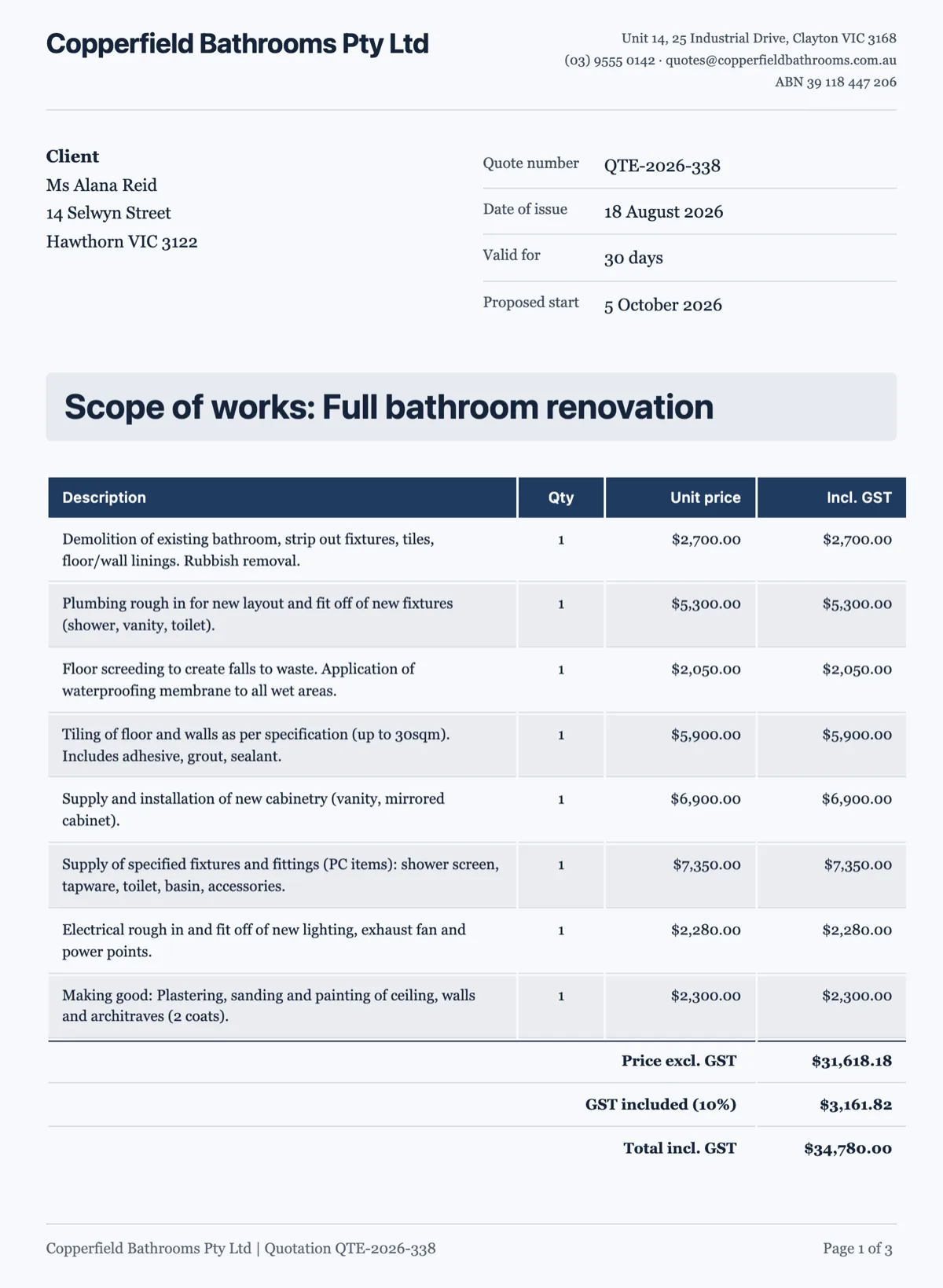 Quotation template priced trade by tradeMade with OneCraft, exactly as the generator and editor left it. Open the page for the full breakdown.
One file against one proposal
HoneyBook's idea is the interactive file: one link that holds services, contract, invoice and calendar. That removes steps for a client booking a portrait session. OneCraft's idea is narrower. The proposal is a paginated document that reads the same on screen and in the PDF, and the decisions inside it are the optional items and the quantities. The contract terms live in the proposal as numbered clauses rather than as a separate contract file, and acceptance applies to the whole document.
Countries and currencies
HoneyBook's pricing page says it is available to business owners in the United States, Canada, the United Kingdom and Australia. OneCraft Proposals has no such list in its code. A proposal can be priced in any currency the owner sets, the tax line is labelled GST for Australian and New Zealand dollars and VAT for pounds and euros, and once Stripe is connected the account's currency is used everywhere.
What happens after the client says yes
With a deposit set, OneCraft issues the deposit invoice due the same day and emails it to whoever accepted, then keeps the balance as a draft for you to issue when the work is done. Without a deposit, one invoice is issued due in 14 days. Each issued invoice has a pay page with the amount due, the items, the PDF and your bank details, and a Pay now button when Stripe is connected. Reminders follow the preset you choose.
How the columns were checked
HoneyBook claims are quoted from its proposal software page, its invoices page, its AI page and its pricing page, read on 13 October 2026. Prices are not restated; follow the pricing link. The OneCraft cells each point to a ledger row compiled from the product's source code, including the list of features the product does not have, so the gaps are stated as plainly as the strengths.
Who should stay with HoneyBook
Stay with HoneyBook if clients should book their kick-off call from the proposal, if instalment plans and autopay carry your cash flow, or if the pipeline and automations run your week. OneCraft fits the business that wants a better written proposal and an invoice issued at the moment of acceptance.
Questions people ask
Is OneCraft a HoneyBook alternative for Australian businesses?
It can be, for the proposal and invoice part. Proposals default to Australian dollars, the tax line reads GST, and an invoice that includes GST says so. HoneyBook now lists Australia among its countries too, so the choice is less about availability and more about whether you want scheduling and a CRM in the same tool.
Can a client book a call from a OneCraft proposal?
No. There is no scheduler in OneCraft Proposals. You can put a booking link in the proposal text, but nothing is booked or tracked inside the product. If clients booking their first meeting from the proposal is a key step for you, HoneyBook's built in meeting scheduler does that and OneCraft does not.
Can I split a job into several payments?
Into two. A deposit, set as a percentage or a fixed amount, becomes an invoice due on the day of acceptance, and the rest becomes a balance invoice you issue later. There are no instalment plans and no autopay, so a job paid in four parts would need the extra invoices created by hand.
Can clients pay by bank transfer?
Yes, outside the product. Add your bank details to the invoice and they appear on the pay page and the PDF. When the money arrives you mark the invoice paid yourself. Card payments go through Stripe Checkout once a paid plan has a Stripe account connected; there is no PayPal or direct debit.
What does the activity page show?
For each recipient's link it shows when it was opened, the total time it was viewed and events such as accepted, declined, PDF downloaded, payment started and paid, in plain words. An open counts once per link per 30 minutes, and viewing time comes from a heartbeat every 15 seconds while the page is in view.
How many proposals can I send on the free plan?
Three proposals and ten invoices, with 150 credits a month. Each new proposal uses one credit whether it is generated, opened from one of the 18 templates or duplicated. Invoices created automatically at acceptance do not count toward the cap. Starter allows 25 proposals and 100 invoices, and Pro removes both caps.
Try the proposal side of OneCraft
The button opens the generator with a starting prompt already filled in. Change the wording to match your own work before you run it.
Create a proposal with OneCraftMore comparisons
- A Dubsado alternative for proposals drafted from a briefA Dubsado alternative where the proposal is written from a brief, the client ticks optional extras and accepts online, and invoices follow with a pay link.
- A Bonsai alternative for proposals and getting paidA Bonsai alternative for the proposal to payment step: an AI drafted proposal, optional items, online acceptance, invoices and a Stripe pay link.
- A Qwilr alternative for proposals clients accept and payA Qwilr alternative for proposals clients accept online and pay through Stripe: AI drafting, optional items, tracked links, and the web features Qwilr keeps.
What the module actually does, feature by feature: the proposals maker page.
Step by step in the builder: Send a proposal and get paid.
Written and checked by the OneCraft team. Last checked .