Proposals · Alternative
A Dubsado alternative for proposals drafted from a brief
Dubsado joins a proposal, a contract and an invoice into one form and wraps workflows, scheduling, a client portal and recurring invoices around it. OneCraft Proposals puts its effort into writing and pricing the proposal and into the invoices after the client accepts, with far less to set up.
Updated , competitor details checked . Dubsado is a trademark of its owner. OneCraft is an unrelated product and claims no affiliation with or endorsement by it.
Nuwan Madhusanka · Co-founder
3 min read · Published
The short verdict
Dubsado rewards the business owner who will spend an afternoon building forms and workflows so that every enquiry, booking, contract and payment plan then runs on rails. OneCraft rewards the owner who would rather describe the job and get a priced, readable proposal back, and who needs the deposit invoice issued without designing a workflow first.
| Feature | Dubsado | OneCraft |
|---|---|---|
| Price | Plans and prices are published on Dubsado's pricing page and are not restated here checked 2026-10-13 | Free $0, Starter $8, Pro $25 and Pro+ $125 a month per account, with 150, 500, 1,500 and 7,500 credits |
| The proposal | Consolidate your proposal, contract, and invoice in a single flow; one link for clients to review, select, sign, and pay checked 2026-10-13 | One paginated proposal with its terms as numbered clauses and exactly one pricing table, read on screen or as a PDF |
| Choosing services | Display service packages, let clients select their desired services, add optional add-ons or upgrades, enable multiple package selections checked 2026-10-13 | Items marked optional (ticked by default or not) and quantities the client can change within a minimum and maximum |
| Starting point | Turn your website into a booking engine, with proposals embedded on your site to capture new leads automatically checked 2026-10-13 | A brief of up to 8,000 characters, one of 18 templates, or both; a research step reads the client's site before writing |
| Workflows | Proposals, contracts, invoices, scheduling and workflows that keep every client moving while you do the work you love checked 2026-10-13 | No workflow builder; the automatic steps are fixed: invoices at acceptance, expiry, and invoice reminders |
| Recurring invoices | Set up your billing schedule once and let Dubsado automatically generate and send invoices for your retainers, subscriptions, and ongoing services checked 2026-10-13 | No recurring invoices and no subscriptions |
| Payment plans | Create custom payment plans, schedule installment payments automatically, add autopay for auto deductions from clients checked 2026-10-13 | A deposit (percent or fixed) as one invoice and the balance as another; no autopay |
| Card processing | Built on Stripe's seamless payments infrastructure, with optional surcharging features available in eligible regions checked 2026-10-13 | Stripe Checkout on the owner's connected Stripe account; paid plans only, with a platform fee of 2%, 1% or 0.5% by plan plus Stripe's fees |
| Client portal | Client portal access to complete invoice history checked 2026-10-13 | No portal; each proposal and each invoice has its own private link |
| Reminders | Automated reminders that maintain professionalism checked 2026-10-13 | Off, gentle, standard or firm per invoice; standard sends 3 days before, on the due date, then 3, 7 and 14 days after |
Where Dubsado is better
Workflows you design
Dubsado's workflows send the next form, email or reminder on triggers you choose, so a planner can automate a whole season of bookings. OneCraft's automation is a fixed set of steps around acceptance and invoices, with nothing to configure and nothing to extend.
Retainers and payment plans
Recurring invoices, scheduled instalments and autopay are all listed. A designer on monthly retainers or a planner taking five payments before a wedding gets that handled. OneCraft offers a deposit and a balance, and anything beyond that is raised by hand.
A portal and a scheduler
Clients get a branded portal with their invoice history, and discovery calls can book themselves. OneCraft has neither; each document lives at its own link and calls are arranged outside the product.
Where OneCraft is different
Nothing to build before the first send
A new account can send a proposal within minutes: pick a template or write a brief, let the AI draft it, adjust the items in the Pricing panel and press Send. The steps after acceptance are already wired, so there is no form designer or workflow to learn first.
Edits by conversation
The chat editor rewrites text and changes pricing in plain language: add an item, change a quantity, apply a discount, set the deposit, change the tax rate or the validity. Pricing changes wait for you to press Apply, because they change what the client pays.
A certificate with every click acceptance
The accepted PDF carries a certificate page listing who accepted, when, from which IP address and browser, a hash of the content, the selected items with totals and the consent wording. It is evidence of the agreement without a separate contract file.
A finished example
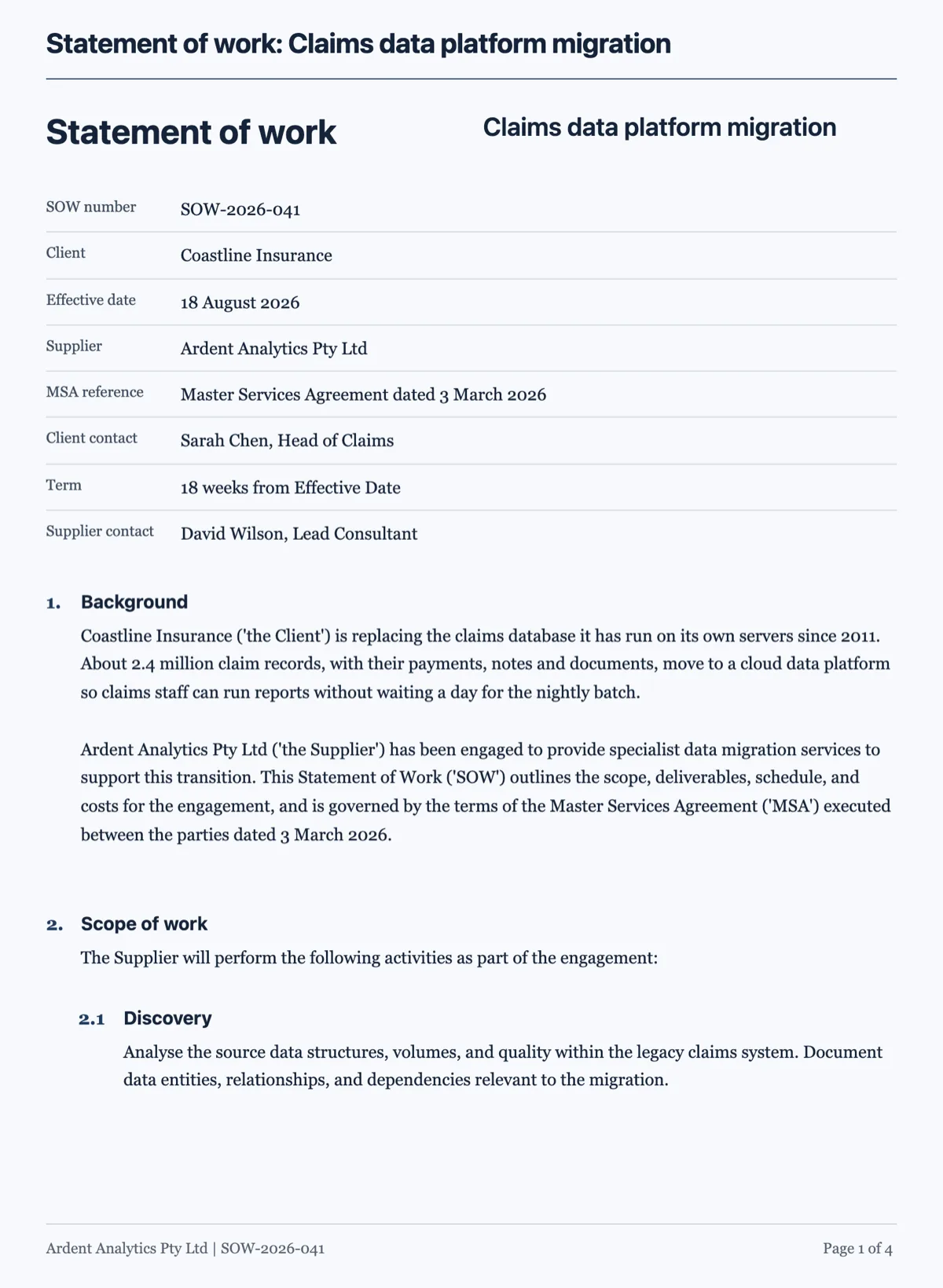 Statement of work template under a master agreementMade with OneCraft, exactly as the generator and editor left it. Open the page for the full breakdown.
Three forms in one against one document
Dubsado describes its proposal as three forms in one: the proposal, the contract and the invoice reached through a single link. OneCraft treats the proposal as one document whose terms are written into it as numbered clauses, so accepting the proposal is accepting the terms.
Workflows against fixed steps
In OneCraft the steps after sending are not configurable, and for many small businesses that is the point. A sent proposal moves to viewed when opened and to expired at the daily check after its valid until date has passed, if nobody accepted. Acceptance issues the invoices and emails them; reminders follow the preset on each invoice once you send it. What it will not do is send a questionnaire after signing, book a call or trigger a welcome email, which Dubsado's workflows can.
Deposits and balances
A 50% deposit on an $11,000 job, plus GST, produces a deposit invoice for half the accepted total due on the day, paid through a Stripe Checkout page if you have connected Stripe on a paid plan, and a draft balance invoice. The numbers on both follow the client's selection of optional items. Dubsado's payment plans go further, with any number of scheduled instalments and autopay.
How the columns were checked
Dubsado claims come from its home page, its proposals page, its invoicing page and its payments page as read on 13 October 2026, quoted in its own words. Prices are not repeated here; the pricing page is linked so the figures are always current. OneCraft cells cite ledger rows taken from the product's source code, and the cells that say no point at the ledger's list of features the product does not have.
Who should stay with Dubsado
Stay with Dubsado if your workflows already run themselves, if retainers and multi part payment plans make up your billing, or if clients rely on a portal and self booked calls. OneCraft is for the business that wants the proposal drafted and the money requested at acceptance, and little else to maintain.
Questions people ask
Is OneCraft easier to set up than Dubsado?
It has less to set up because it does less. There are no forms, workflows or portals to configure. You connect Stripe if you want card payments, optionally save a brand kit, then write a brief or pick a template. The trade off is that the automatic steps are fixed and cannot be extended the way a Dubsado workflow can.
Can I send a separate contract with the proposal?
The terms are part of the proposal itself, written as numbered clauses, so there is no separate contract file. The client accepts them with a name, a drawn signature and a consent box, and the accepted PDF with its certificate page is emailed to both of you.
How do optional add-ons work for the client?
Each item in the Pricing panel can be marked optional and set as ticked or unticked by default. In the client's view it shows a tick box and the totals change as they choose. Items can also allow the client to change the quantity between a minimum and maximum you set, such as extra shoot days or extra pages.
Will OneCraft chase unpaid invoices for me?
Yes, on a preset per invoice. Gentle reminds on the due date and seven days after. Standard reminds three days before, on the due date and three, seven and fourteen days after. Firm adds more steps up to fourteen days late. No invoice gets more than six reminders, and two are never sent within twenty hours.
Does OneCraft support surcharging card fees?
No surcharge setting exists. Card payments go through Stripe Checkout on your own Stripe account, Stripe charges its fees and OneCraft takes a platform fee of 2% on Starter, 1% on Pro or 0.5% on Pro+. If you want to recover those costs, build them into your prices rather than adding a fee at checkout.
Can I export a proposal to Word?
No. Proposals and invoices export to PDF only, rendered on the server so the file matches the pages the client sees. The client can download the same PDF from their link. If a client asks for an editable copy, the honest answer is that edits happen in OneCraft and a new version is sent.
Try the proposal side of OneCraft
The button opens the generator with a starting prompt already filled in. Change the wording to match your own work before you run it.
Create a proposal with OneCraftMore comparisons
- A HoneyBook alternative for proposals and quotesA HoneyBook alternative for quotes and proposals: drafted by AI from a brief, optional extras, online acceptance, invoices and Stripe pay links.
- A Bonsai alternative for proposals and getting paidA Bonsai alternative for the proposal to payment step: an AI drafted proposal, optional items, online acceptance, invoices and a Stripe pay link.
- A Nusii alternative that carries on to invoicesA Nusii alternative that drafts the proposal from a brief, records acceptance on a certificate page, then issues invoices with a pay link and reminders.
What the module actually does, feature by feature: the proposals maker page.
Step by step in the builder: Send a proposal and get paid.
Written and checked by the OneCraft team. Last checked .